
A writer emails me a version of the same question every few months: should I move my newsletter off Substack and onto Mailchimp, or the other way around. Usually they've outgrown one of the two and don't know which limitation matters more.
Substack vs Mailchimp comes down to what the newsletter actually is. If the writing is the product, Substack wins almost every time. If the newsletter is a marketing channel bolted onto a bigger business, Mailchimp usually fits better. The rest of this comes down to the specifics: pricing, monetization, community, growth, and what each platform quietly leaves out.
Table of Contents
- The Short Answer
- What Substack Is Built For
- What Mailchimp Is Built For
- Pricing and Monetization Compared
- Substack's Cut vs Mailchimp's Subscription
- Community and Engagement: What Mailchimp Doesn't Have
- Growth and Discovery
- Ease of Use and Editorial Workflow
- Analytics and Automation
- Migrating Between the Two
- Common Reasons Writers Switch
- Which One Should You Actually Use
The Short Answer
Substack is a publishing platform with a built-in audience and a built-in payment system. Mailchimp is an email marketing tool with no publishing identity of its own. A Substack post is a page on the internet with a URL, comments, and a chance of being recommended to someone who's never heard of you. A Mailchimp campaign is an email that lands in an inbox and, once sent, mostly disappears.
That difference decides almost everything else in this comparison. Writers building an audience from nothing lean toward Substack because discovery and community are part of the platform, not an add-on. Businesses that already have an audience and use email as one channel among several (a Shopify store, a SaaS product, an events company) lean toward Mailchimp because it plugs into the rest of their stack.
Practical rule: if you'd be embarrassed to say "check out my newsletter" without a link, you want Substack. If your newsletter's job is to sell something else, you want Mailchimp.
If Substack is the answer, the next problem is staying visible on it without burning hours every day. Try WriteStack free for 7 days and queue a week of Notes before you finish reading this.
What Substack Is Built For
Substack started as a place for independent writers to publish and get paid directly by readers, without a publisher or an ad network in between. Every post is both an email and a public page. Readers can comment, "restack" a post to their own followers, and react with a like, the same way they would on a social feed.
The editor is deliberately simple. There's no drag-and-drop template builder, no A/B testing on subject lines, no marketing automation canvas. You write, you can add images, embeds, and paywalled sections, and you hit publish. That simplicity is a feature for someone whose job is writing regularly, and a limitation for someone who wants granular control over layout.
Substack also runs Notes, a short-form feed similar to a Twitter timeline, and a Discover page that surfaces publications to readers who aren't subscribed yet. Neither exists on Mailchimp, because Mailchimp has no public reading surface at all. Everything it sends lives in someone's inbox and nowhere else.
What Mailchimp Is Built For
Mailchimp is a marketing platform. Newsletters are one thing it does, alongside automated email sequences, landing pages, forms, audience segmentation, and integrations with e-commerce and CRM tools. A company running abandoned-cart emails, a welcome sequence, and a monthly newsletter through the same dashboard is Mailchimp's actual use case.
The editor gives you real design control: drag-and-drop blocks, custom templates, brand kits, and detailed send-time and A/B testing options. None of that is on Substack, on purpose. Substack's entire pitch is that writers shouldn't need design skills to publish something that looks finished.
What Mailchimp lacks is any concept of a public audience. There's no discovery surface, no comments, no way for a stranger to stumble onto your list and subscribe because they liked one post. Every subscriber has to be added by you, through a form, an import, or an integration. Growth is entirely your job.
Pricing and Monetization Compared
Substack's Cut vs Mailchimp's Subscription
Substack is free to start and free to publish on indefinitely. If you turn on paid subscriptions, Substack takes 10% of subscription revenue, on top of standard payment processing fees from Stripe. There's no monthly fee regardless of list size, which matters once a free list grows into the tens of thousands.
Mailchimp charges by list size and feature tier, starting around $13/month and climbing well past $300/month for larger contact counts, according to Mailchimp's own pricing page. It has no built-in way to charge readers directly for content. If a business wants paid newsletter subscriptions through Mailchimp, that has to be built separately with a third-party payment tool.
| Substack | Mailchimp | |
|---|---|---|
| Cost to start | Free | Free tier capped at 500 contacts, then $13+/mo |
| Native paid subscriptions | Yes, 10% revenue share | No, requires a third-party integration |
| Pricing scales with | Subscription revenue | Contact list size |
| Free plan ceiling | No subscriber cap | 500 contacts, 1,000 sends/month |
| Built-in community (comments, Notes, restacks) | Yes | No |
| Public discovery surface | Yes (Discover page, recommendations) | No |
| Design/template control | Minimal, by design | Extensive, drag-and-drop |
| Marketing automation | No | Yes, full automation builder |
For a writer with 2,000 free subscribers and 100 paying at $8/month, Substack's cut is roughly $80 a month. The same list on Mailchimp costs a flat monthly fee regardless of whether anyone pays for anything, because Mailchimp isn't built to collect subscription revenue at all. Below a certain income, Substack is cheaper. Above it, the 10% starts to sting, which is the tradeoff worth doing the math on before committing either way.
Community and Engagement: What Mailchimp Doesn't Have
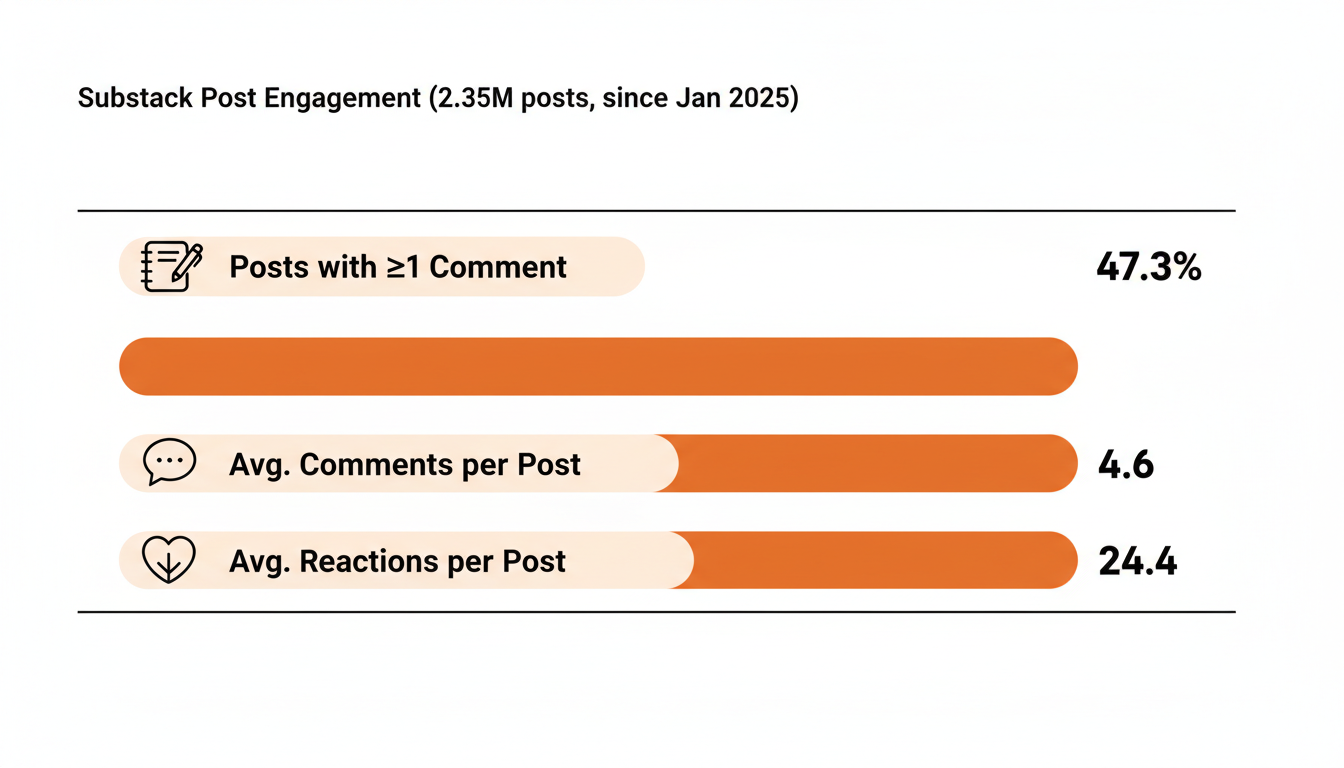
This is the part comparison articles usually skip, and it's the biggest structural difference between the two platforms. We pulled a sample of 2.35 million Substack posts published since January 2025: 47.3% had at least one reader comment, averaging 4.6 comments and 24.4 reactions per post. That's not a marketing stat from Substack's own press page, it's what shows up in the raw post data.
None of that is possible on Mailchimp. An email campaign has no comment section. A recipient can reply to the sender, but there's no public thread, no reactions, no way for other subscribers to see or build on each other's responses. Substack's comment section functions like a live, ongoing conversation attached to every post; Mailchimp's inbox is a dead end.
Practical rule: if part of what you want from a newsletter is a relationship with readers who talk back and to each other, Mailchimp structurally can't give you that. Substack was built around it from day one.
Restacks add a second layer on top of comments: a reader can share your post to their own followers with one click, the way a retweet works. That's how posts spread past a writer's existing list. Mailchimp campaigns can be forwarded manually, but there's no built-in mechanism for a reader's network to see and act on a share.
For writers who post consistently, keeping that engagement layer active is its own discipline. WriteStack's Notes scheduler handles the short-form side of that (queuing Notes so a publication stays visible in the Discover feed even on days there's no full post), which is a workflow that has no Mailchimp equivalent because Mailchimp has no feed to be visible in. Load the queue once and it keeps posting whether or not you open the app that day.
Struggling to stay consistent on Substack?
Batch and queue your Substack Notes in minutes, track which Notes convert subscribers, and grow without burning out.
Growth and Discovery
Substack's Discover page and recommendation network are its biggest structural advantage for writers starting from zero. A new publication can appear next to established ones in a reader's inbox through the recommendation system, and other writers can recommend your publication to their own subscribers directly inside Substack. Both mechanisms bring in subscribers who never saw a link anywhere else.
Mailchimp has none of this. Every subscriber arrives through a form, a landing page, an import, or a paid ad funnel you built and ran yourself. That's not necessarily worse, a business with existing traffic and a marketing budget doesn't need built-in discovery, but for someone starting a newsletter with zero audience, it's the difference between a platform that helps you find readers and one that assumes you already have them.
Substack Notes plays into this too. It's a public, short-form feed that works like a mix of Twitter and a comments section, and posts there can reach readers who don't subscribe to you yet. WriteStack's heatmap tool shows exactly when your specific audience is most active on Notes, which matters because posting into the feed at the wrong hour is close to posting nothing.
Ease of Use and Editorial Workflow
Substack's editor is closer to a plain text document than a page builder. There are headers, bold and italic, embeds, and a paywall toggle, and that's close to the full feature list. For a writer who wants to sit down and write, that's the entire point. Nothing stands between a draft and a published post except hitting the button.
Mailchimp's editor is a genuine design tool: drag-and-drop content blocks, saved templates, brand color and font settings, and the ability to build a campaign that looks like a designed piece of marketing collateral rather than a plain email. That's the right tradeoff for a company sending a monthly product update with photography and multiple calls to action.
The tradeoff shows up in speed. A Substack post can go from draft to published in the time it takes to write it. A well-designed Mailchimp campaign usually takes longer to build because the design work is part of the job, not just the writing.
Practical rule: if design flexibility is what's missing from your current setup, that's a Mailchimp problem. If speed and a writing-first workflow are what's missing, that's a Substack answer.
Analytics and Automation
Mailchimp wins outright here. It has open rates, click maps, audience segmentation by behavior, A/B testing, and a full marketing automation builder for welcome sequences, abandoned-cart flows, and drip campaigns. Substack's built-in analytics are comparatively basic: subscriber counts, open rates, and per-post performance, without the segmentation or automation depth.
Where Substack writers make up the gap is with tools built specifically for the platform. WriteStack's Notes generator drafts Notes directly from a writer's own published posts rather than a blank prompt, and pairs that with link-click tracking across a publication's full Notes history and benchmarking against comparable publications, the kind of "is this good, not just is this better than last week" context Substack's native dashboard doesn't provide on its own.
The part people don't expect: WriteStack schedules Chat threads as well as Notes and full posts. It also tracks which of the two links inside a given Note got the click, going back to a writer's very first Note, not just the last thirty days.
Migrating Between the Two
Moving a list from Mailchimp to Substack is mechanically simple: export subscribers as a CSV and import them into Substack's subscriber list. What doesn't come with them is engagement history, comment threads, and any Discover-page momentum, all of which start from zero on the new platform.
Moving from Substack to Mailchimp works the same way in reverse, exporting subscribers as a CSV, but a writer loses the public archive, the comment sections, and the recommendation network entirely. Posts that lived at a public URL on Substack don't have an equivalent home on Mailchimp, since Mailchimp has no public page for a sent campaign.
Neither migration is a decision to make lightly, since neither platform preserves what made the other one work. Most writers who've built real community on Substack (active comment sections, regular restacks, a Notes presence) find that the community itself doesn't transfer, only the email addresses do.
Custom domains complicate the move further. A publication that's been running on Substack for a couple of years usually has backlinks and search rankings tied to its substack.com URL or connected custom domain. Rebuilding that on a new domain under Mailchimp (which doesn't host public pages at all) means starting search visibility from zero, not just re-adding subscribers.
Practical rule: before migrating either direction, count what you'd actually lose. A CSV of email addresses moves in minutes. A comment history, a Discover ranking, and two years of search-indexed posts do not move at all.
Common Reasons Writers Switch
The writers who move from Mailchimp to Substack are almost always chasing the same thing: they've been running a newsletter as a side project attached to a business, and they want to turn the writing itself into an income source. Substack's native paywall and subscription billing make that possible without stitching together a separate payment processor, a members-only page, and an email list that all have to stay in sync manually.
The writers who move the other way, from Substack to Mailchimp, are usually running into one specific wall: they've outgrown what a writing platform can do for a business. A course creator who needs automated email sequences after someone buys, or a company that needs to segment a list by what a person clicked last month, runs into Substack's basic analytics fast. Substack was never built to replace a marketing automation platform, and trying to force it to do that job usually means switching before too much has been built on top of it.
A smaller group keep both. A writer with a paid Substack newsletter and a separate product (a course, a coaching offer, a physical good) sometimes runs Substack for the writing and public audience, and Mailchimp for the transactional and sales-focused email that a paying customer needs after checkout. That's not a contradiction. It's using each platform for what it does best instead of asking one tool to do a second job it wasn't designed for.
Which One Should You Actually Use
For a writer, journalist, or creator whose newsletter is the actual product, Substack is the right platform. The free-to-start pricing, the built-in payment system, the comment sections, and the Discover-driven growth all solve problems specific to someone building an audience from nothing. Substack's own background as a platform built specifically to let writers monetize directly, without an ad network or a publisher, is still the core of what makes it different from a general email tool.
For a business where the newsletter supports something else (a product, a store, an event calendar), Mailchimp's automation and segmentation depth is worth the monthly cost. The tradeoff is real: no built-in audience, no discovery, no comment section, and no way to charge for content without adding another tool on top.
Most Substack writers who reach here have already made the call and are looking for the next problem: how to actually stay consistent and grow once the platform decision is made. That's a scheduling and workflow problem more than a platform problem, and it's the one WriteStack exists to solve. Load a week of Notes in twenty minutes, watch them go out on schedule, and check the following morning which one actually moved the needle.