
I opened my Stripe dashboard the week my Substack crossed 200 paid subscribers and stared at the payout number for a solid minute. It was smaller than the math I'd done in my head. Not by a little.
That gap between "what people pay" and "what actually lands in your bank account" is the part almost nobody explains clearly before you turn on paid subscriptions. How much does it actually cost to start a Substack? The short answer is that publishing itself is free. The longer, more useful answer is everything that happens once money starts moving, and that's what this breaks down.
One number worth having before you start: WriteStack has close to 100 verified reviews from Substack writers across multiple platforms. The scheduling tools built specifically for Substack that we could find have none.
Table of Contents
- Is Substack Actually Free?
- The 10% Platform Fee: What It Actually Costs You
- Payment Processing Fees on Top of That
- Real Math: What a $10/Month Subscriber Actually Nets You
- The $50 Custom Domain and Other One-Time Costs
- Free vs. Paid: When It Actually Makes Sense to Turn On Subscriptions
- How Substack's Costs Compare to Beehiiv and Ghost
- The Hidden Cost Nobody Budgets For
- So, How Much Should You Actually Budget?
Is Substack Actually Free?
Yes, and this part isn't a marketing simplification. Substack's own support documentation states plainly that "publishing is free on Substack, no matter how many subscribers you have". You can write, publish, send emails, post Notes, and grow a free list of 50,000 people without paying Substack a cent.
There's no storage cap and no sending limit tied to a plan tier. Unlike Ghost or Kit, there's no monthly software fee sitting underneath the free version either. If your plan is to write for free and grow an audience before ever charging for anything, your cost to start really is close to zero. A laptop and an internet connection.
The costs in this article all start at the same trigger point: the moment you flip on paid subscriptions.
Practical rule: if you haven't decided what a paid subscriber gets that a free one doesn't, don't turn on payments yet. There's no cost to staying free while you figure that out, and turning payments on early just adds fee math to a decision you haven't made.
The 10% Platform Fee: What It Actually Costs You
Once you enable paid subscriptions, Substack takes 10% of each transaction. That's confirmed directly on Substack's own support page for setting up a paid publication, which also states the minimum subscription price: $5 a month or $30 a year on US-dollar Stripe accounts.
How the Fee Applies
The 10% only touches subscription revenue. It doesn't apply to your free list, your Notes activity, or anything else you do on the platform. A newsletter with 8,000 free subscribers and zero paid ones pays Substack nothing. The fee shows up the day someone pays you, and it recalculates every billing cycle after that, for as long as that subscriber stays paid.
Beehiiv's breakdown of Substack's fees walks through a concrete case: a creator with 650 paying subscribers at $5 a month generates $3,250 monthly, or $15,000-plus over a year, and pays Substack "around $2,000" of that annually just in platform fees. That's before payment processing is even factored in.
Start here: the 10% is fixed and there's no negotiating it. The only lever a writer actually controls is how big and warm the free list is before that cut ever applies to a single dollar. WriteStack exists for that exact stretch, keeping Notes and posts going out on schedule while the free list grows toward the size worth charging.
Payment Processing Fees on Top of That
Substack's 10% isn't the whole story. Every paid subscription also runs through Stripe, and Stripe's cut comes out before you see a payout. According to the fee math laid out in Ruzuku's Substack pricing guide, that's 2.9% plus $0.30 per transaction for standard card processing, plus a separate 0.7% recurring billing fee.
Stack all three together (Substack's 10%, Stripe's 2.9% + $0.30, and the 0.7% recurring fee) and you land somewhere between roughly 14% and 17% of gross revenue gone before it reaches your account, depending on your subscription price. Ruzuku's own math shows an $8/month plan losing about 17.35% of gross to combined fees, while a $50/year plan loses closer to 14.2%, since the flat $0.30 per-transaction charge matters less on a larger, less frequent payment.
The Recurring Billing Fee, Explained
The 0.7% line item confuses people because it looks redundant next to the 2.9%. It isn't. Card networks charge extra for subscriptions that bill automatically on a recurring schedule, separate from the base swipe fee, and Stripe passes that through. It's small on its own, but it compounds with everything else, and it's one more reason your actual take-home is lower than "price minus 10%."
Practical rule: whatever subscription price you're considering, subtract 15% before you do any revenue planning. That's a safer working number than the advertised 10%, and it'll be closer to what you actually collect.
Real Math: What a $10/Month Subscriber Actually Nets You
Here's what the fees above look like on an actual subscription price, assuming a standard recurring monthly card payment.
| Subscription price | Substack's 10% | Stripe (2.9% + $0.30 + 0.7%) | You actually keep |
|---|---|---|---|
| $5/month | $0.50 | $0.48 | ~$4.02 |
| $8/month | $0.80 | $0.67 | ~$6.53 |
| $10/month | $1.00 | $0.79 | ~$8.21 |
| $20/month | $2.00 | $1.18 | ~$16.82 |
| $30/year | $3.00 | $1.51 | ~$25.49 |
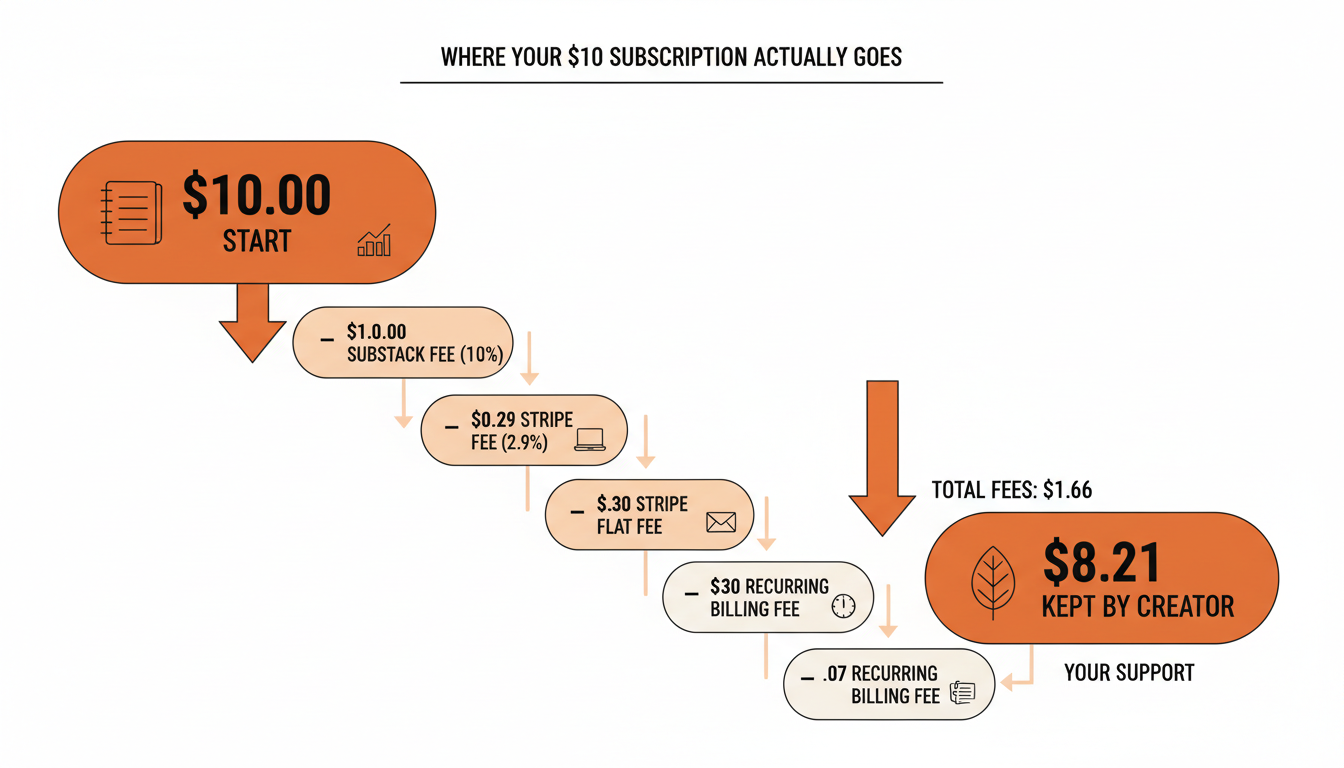
None of this means paid subscriptions are a bad idea. A newsletter with 500 subscribers paying $8/month nets a bit over $3,265 a month even after every fee, which is a real number worth building toward. It just means the number to plan around is "price minus roughly 15%," not "price minus 10%."
Practical rule: a subscriber at $5/month isn't the same subscriber at $10/month once fees come out. Model revenue off the last column in that table, not the sticker price.
The $50 Custom Domain and Other One-Time Costs
Beyond the recurring transaction fees, there's one optional cost worth knowing about upfront: a custom domain. Substack charges $50 as a one-time fee to connect a domain you already own, or to register a new one through them, so your newsletter lives at yourname.com instead of yourname.substack.com. It's optional, and it's not recurring. Plenty of well-read Substacks never bother with it.
Outside of that, there's genuinely not much else. No storage fees, no fee for adding co-authors, no charge for uploading images or embedding audio. The cost structure is narrow: recurring fees on transactions (Substack's cut plus Stripe's), and one optional one-time cost if you want a custom domain.
📅 Struggling to stay consistent on Substack?
WriteStack's Smart Scheduling lets you batch and queue Notes in minutes. Grow on Substack without burning out.
Explore Smart SchedulingPractical rule: skip the custom domain until a plain .substack.com URL is the actual thing slowing growth down. For almost everyone starting out, it isn't.
App Store Fees You Might Not See Coming
There's one more cost that only applies to a slice of subscribers: anyone who subscribes through Substack's iOS app instead of on the web. Apple's in-app purchase rules mean Apple charges 15% to 30% on top of whatever Substack and Stripe already take, depending on the app's revenue tier. It's Apple's platform tax, not Substack's, but it eats into the same payout, and it's worth knowing about if a meaningful share of your list reads on iPhone.
Free vs. Paid: When It Actually Makes Sense to Turn On Subscriptions
The honest answer is: later than most new writers think. Turning on paid subscriptions before you have an engaged free audience just means doing fee math on a small number. The fees don't change based on how ready you are, so the only variable you control is how big and warm your free list is before you flip the switch.
How to Tell You're Ready
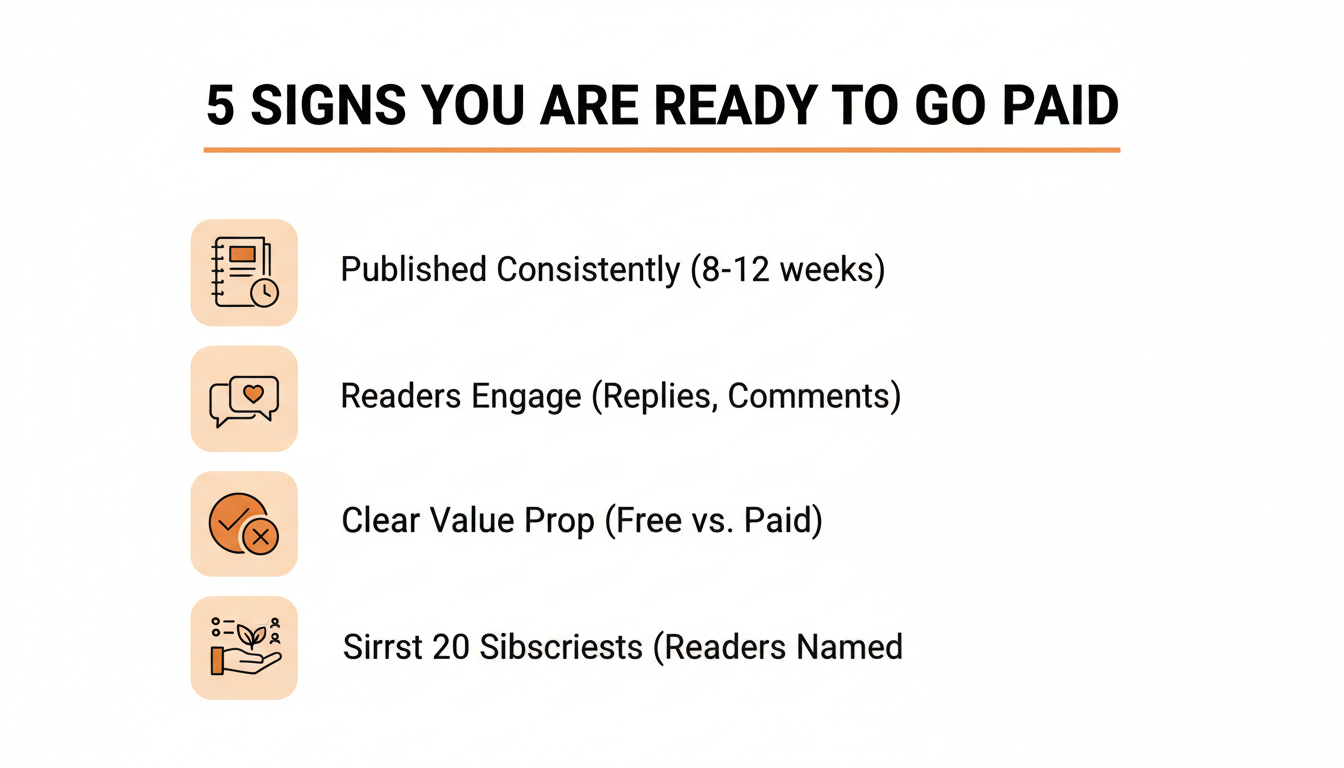
A few signals that actually matter more than raw subscriber count: readers reply and restack without prompting, you can describe the paid-only benefit in one sentence, a handful of people have already asked how to pay you, and you could already name who your first twenty paying subscribers would probably be. That third one is the strongest signal there is. It means the fee math is about to work in your favor instead of against a mostly-free, mostly-quiet list.
This is also where knowing who your most engaged readers actually are pays off, since they're the ones worth reaching out to first. WriteStack's fan tracking surfaces exactly that: which free subscribers open everything and restack often, so the first paid pitch goes to people who were already halfway there instead of a cold blast to the whole list.
The part people don't expect: WriteStack doesn't just tell you your restack count went up. It benchmarks that number against other publications your size and tracks whether it's trending up or down month over month. It also reads back through your entire Notes history to find which exact two links inside a given Note got clicked. Most tools show a snapshot. This shows a trend and a history.
Try this first: load two weeks of Notes into WriteStack before flipping on payments. Watch replies and restacks climb on their own. That's the signal worth acting on, not a subscriber count target.
How Substack's Costs Compare to Beehiiv and Ghost
Substack's revenue-share model isn't the only way newsletter platforms charge. Beehiiv and Ghost both flip it: no cut of subscription revenue, but a flat monthly software fee regardless of what you earn.
| Platform | Free tier | Paid cost structure | Revenue share |
|---|---|---|---|
| Substack | Yes, unlimited subscribers | Free until you charge; then fees on transactions only | 10% + ~3-4% processing |
| Beehiiv | Yes, up to 2,500 subscribers | Scale plan from $43/month billed annually | 0% |
| Ghost(Pro) | No | Starter from $15/month billed annually | 0% |
The tradeoff is straightforward once you see the numbers side by side. Substack costs nothing until you're making money, then takes a percentage of what comes in. Beehiiv and Ghost cost a fixed amount every month whether you have zero paying subscribers or five hundred, but you keep the full subscription price once you clear that fixed cost.
Do the crossover math on your own numbers before assuming either side is obviously better. A creator with 300 subscribers at $8/month is grossing $2,400 monthly. On Substack, fees run roughly $360-$408 of that. On Beehiiv's Scale plan at that list size, the flat fee is a few dollars a month higher or lower depending on the exact tier, but it stops growing as a percentage once revenue climbs past a certain point, while Substack's cut always scales with what you earn.
For most writers just getting started, Substack's zero-cost-until-you-earn model is the lower-risk starting point, which is a large part of why it remains the default for new paid newsletters. The tradeoff shows up later, once a newsletter is earning enough that a flat-fee platform would cost less than the percentage cut. That's a good problem to have, and it's a math exercise worth redoing once a year, not something to decide before publishing a single post.
Practical rule: divide a flat-fee platform's monthly price by roughly 15% of your subscription price. That's about how many paying subscribers it takes before the percentage cut costs more than the flat fee would. Below that number, Substack is cheaper. Above it, worth a second look.
The Hidden Cost Nobody Budgets For
Every dollar figure in this article is the visible cost. The invisible one is time, and it's the one that actually determines whether a Substack survives its first six months.
Writing takes the time everyone budgets for. What catches people off guard is everything around the writing: turning a published post into two or three Notes without just copy-pasting the headline, figuring out when your specific audience is actually online, replying to comments before they go cold, and doing all of that on a schedule you can actually keep during a normal week.
This is where a Substack's real ongoing cost quietly shows up as hours instead of dollars. WriteStack exists specifically for that gap. It's the only scheduling tool built for Substack that handles chat post scheduling, not just Notes and posts, so a full week of content (posts and Notes, plus chat threads) can go out on a schedule set once instead of managed daily. Its AI drafting reads what you've already published and drafts new Notes in that voice, instead of generating from a blank prompt and asking you to fix it into sounding like you afterward.
And once subscriptions are actually on, the heatmap view answers the question this whole article keeps circling: is this Note, this post, this week, actually working, benchmarked against publications your size, not just against your own history. That's the difference between guessing whether growth is normal and knowing it.
The cost that's easiest to fix: most abandoned Substacks didn't fail on fees. They failed on missed weeks. Load a week of Notes and posts into WriteStack once, and the schedule holds on the weeks writing doesn't happen.
For a writer deciding between an $8/month and $10/month price, the software cost that actually moves the needle usually isn't Substack's fee. It's the two or three hours a week spent on manual scheduling and Note-writing, spent once on a plan instead of every single day from scratch.
So, How Much Should You Actually Budget?
If the plan is to write for free and build an audience first, budget zero dollars. That's a completely legitimate way to spend the first three to six months, and Substack puts no pressure on that timeline with fees, storage limits, or subscriber caps.
If the plan includes paid subscriptions from the start, budget for roughly 15% off the top of whatever price you set, not the advertised 10%, and decide up front whether a $50 custom domain matters enough to pay for before you've published a single paid-only post. It usually doesn't, not on day one.
The number that actually determines whether any of this works isn't Substack's fee. It's whether the writing keeps showing up on a schedule readers can rely on. That's the part worth spending on early, and it's exactly what WriteStack is built to protect. Load a week of Notes in twenty minutes. Watch them go out without you.