
TL;DR: Yes. Substack added scheduled Chats in 2026: start a new thread, select Schedule, and pick a date and time. It works on the web and in the iOS and Android apps. WriteStack can schedule Chat threads too, through its Chrome extension, so they sit in the same queue as your Notes and posts.
Substack added Chat as a way to run an ongoing conversation with subscribers, separate from Notes and separate from the emailed post. It works well for exactly that: real-time back and forth with the people already paying attention. Our Substack Chat guide covers setup and every chat setting.
For a long time, Chat was harder to plan than Notes. Posts could be scheduled and Chat threads could not, so whatever you wanted to say to your Chat, you said live, at whatever hour you happened to be at your laptop. That changed in 2026, when Substack added scheduled Chats.
Can you actually schedule Substack Chat posts? Yes, inside Substack itself or from a tool like WriteStack. Scheduling matters more than it looks like it should for anyone trying to keep a Chat active without being online every single day.
One number worth having before you start: WriteStack has close to 100 verified reviews from Substack writers across multiple platforms. Narrareach and StackSweller have none that we could find anywhere.
Table of Contents
What Substack Chat Actually Is
Chat lives in a different part of Substack than posts or Notes. It isn't emailed to subscribers by default and it doesn't show up on the publication homepage the way a post does. Starting a Chat thread sends subscribers a push notification, and for the very first thread, an automatic email. After that, it's up to the writer whether new threads also trigger an email, according to Substack's own support documentation.
The distinction matters because Chat, Notes, and Threads solve different problems. Mixing them up is the fastest way to either over-notify subscribers or under-use a feature built for something specific.
Writers usually turn Chat on for one of a couple of reasons: to give paying subscribers a space that feels closer than a comment section, or to run an informal book club or course cohort alongside the main publication. Both depend on the same thing: someone showing up regularly enough that subscribers stop wondering if the space is still active.
Chat vs. Notes vs. Threads
Substack's help center lays out the difference directly: Notes are public, short-form posts that travel through Substack's wider feed and can reach readers who don't subscribe to you yet. Chat is private, visible only to your own subscribers (or only paid subscribers, depending on how a thread is set up), and built around conversation rather than reach. Threads are closer to a normal post with comments switched on by default.
Practical rule: use Notes when the goal is to be seen by people who don't subscribe yet. Use Chat when the goal is to talk with the people who already do.
How Substack's Native Chat Scheduling Works
Substack built native scheduling for posts years ago, and in 2026 it added the same option for Chat. In the Chat tab, start a new thread, write your message, choose the audience, then select Schedule and pick a date and time (Substack Help). It works on the web and in the iOS and Android apps.
That covers a single thread. Planning gets harder once Chat sits alongside everything else: a week of Notes, a post going out on Thursday, and a Chat prompt that shouldn't land an hour after the email. Substack keeps scheduled Chats in the Chat tab, apart from your Notes plan, so it's easy to stack three things on the same morning without noticing.
Scheduling also leaves Chat what it was built to be: a live space for conversation. A thread that goes out while the writer is away can't answer the first reply, so plan to check back soon after it goes live.
Why Scheduling Chat Posts Actually Matters
None of this would matter if Chat performed the same regardless of when or how often it ran. It doesn't. Two problems show up over and over for writers trying to keep a Chat active alongside everything else they're already doing.
The Consistency Problem
A Chat thread that starts sporadically, active three days in a row and then quiet for two weeks, trains subscribers not to check it. The people who opted into notifications stop opening them, and the ones who didn't never build the habit of looking. Chat, more than Notes or posts, depends on a rhythm the audience can predict.
The Timezone Problem
A publication with subscribers spread across timezones runs into a second issue: whatever time a writer happens to be at their desk is rarely the best time for the whole audience. A Chat prompt posted at 9pm local time might land at 3am for a meaningful share of subscribers, right when nobody's around to answer it.
Practical rule: treat Chat scheduling as a distribution problem first and a content problem second. The best prompt still underperforms if it goes out when nobody's awake to reply.
WriteStack helps with the planning side. You can draft a Chat thread now, schedule it for the time subscribers are around to answer it, and see it in the same queue as your Notes.
How to Schedule Substack Chat Posts With WriteStack
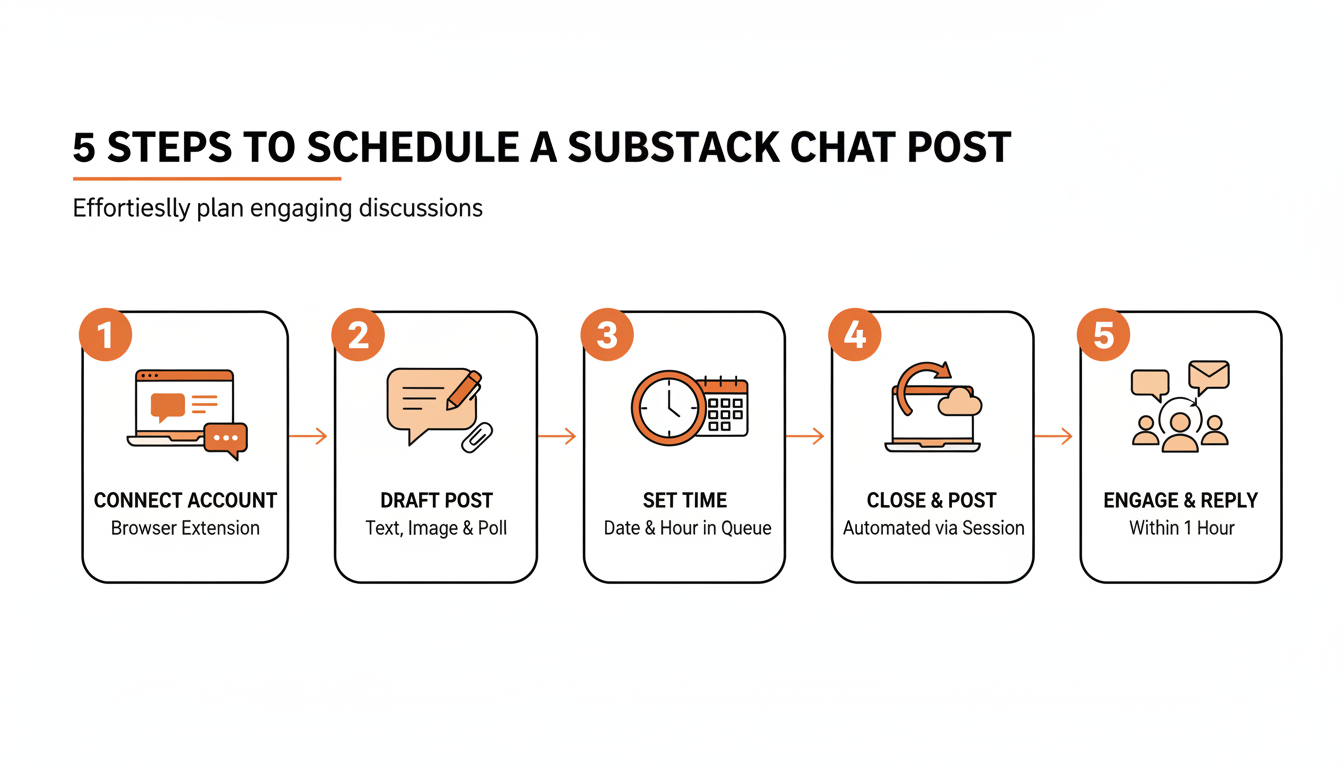
You can schedule a thread inside Substack as described above. If you already plan your Notes in WriteStack, you can schedule Chat threads from the same place. Here's what that looks like in practice:
- Install the WriteStack Chrome extension and connect your Substack account. The extension works inside your own browser with your own Substack login, so WriteStack never needs your Substack password.
- Write the Chat thread the same way you'd write it live, the opening prompt plus any image or poll you want attached.
- Pick the date and time. WriteStack's queue shows what else is scheduled that day, so a Chat prompt doesn't collide with a Notes batch or a post going out an hour later.
- Schedule it. The Chrome extension adds the thread to your Substack account as a scheduled Chat for the time you picked, and it shows in your WriteStack queue next to your Notes.
- Check back for replies. Scheduling gets the thread started. The conversation still needs a person answering it.
None of this replaces judgment about what to say. The writing happens whenever it's convenient for you, and the thread is timed for when it works for subscribers.
Practical rule: schedule the opening prompt, never the whole conversation. A scheduled Chat still needs you back within an hour or two to reply, or it reads like nobody's home.
Struggling to stay consistent on Substack?
Batch and queue your Substack Notes in minutes, track which Notes convert subscribers, and grow without burning out.
What to Actually Schedule
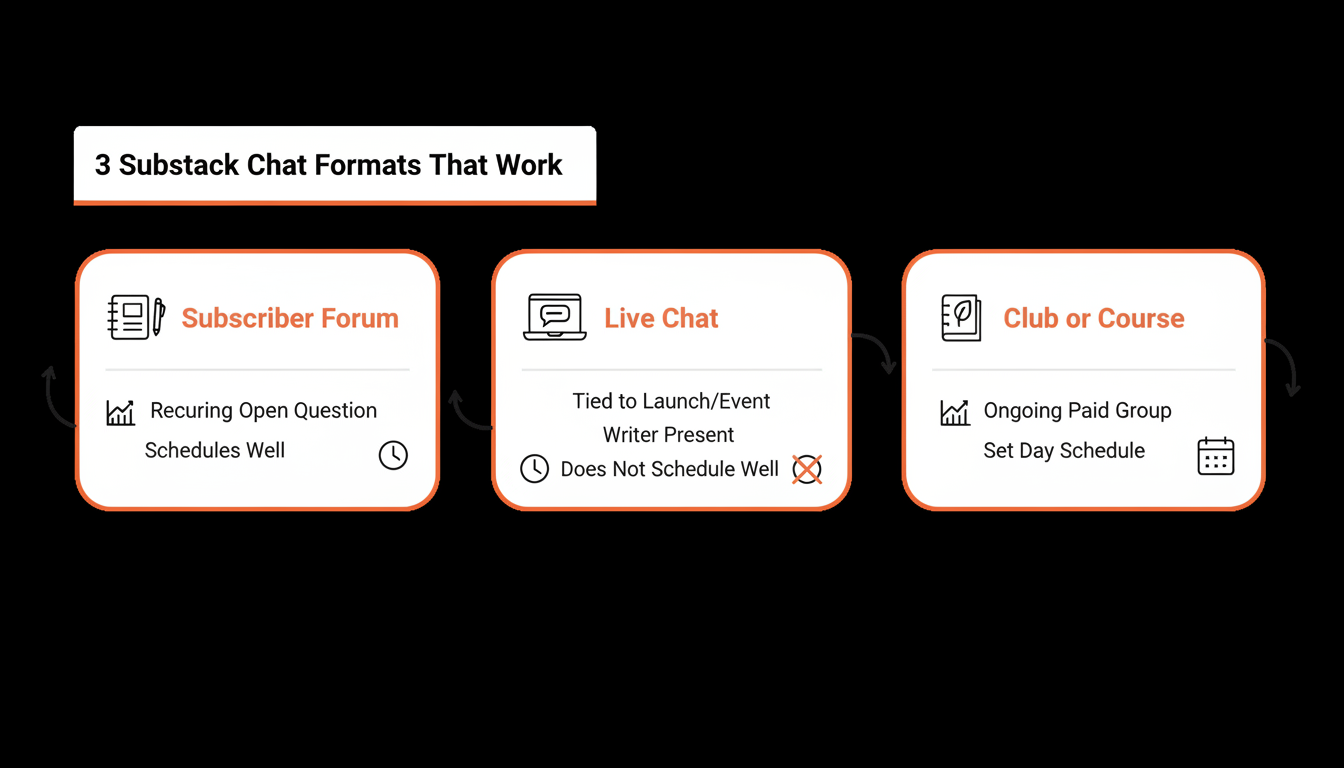
Getting the timing right doesn't matter much if the content doesn't fit the format. Substack's own guide to Chat describes three archetypes that tend to work: a subscriber forum where the writer poses a standing question and lets replies accumulate over time, a live chat built around a real event or release, and a club or course format where Chat is the ongoing home for a paid group.
Three Chat Formats That Work
- Subscriber forum. A recurring open question. Schedules well, since it doesn't depend on a specific real-time moment.
- Live chat. Tied to a launch or event. The one format that resists scheduling. It only works if the writer is actually present when it goes out.
- Club or course. Chat as the ongoing home base for a paid group. Fits scheduling because members already expect a standing prompt on a set day.
Practical rule: schedule the formats built around a standing question. Don't schedule the ones that only work live.
The part people don't expect: WriteStack also tracks link clicks inside your Notes going back to your very first one, benchmarks your restack rate on the heatmap against other publications your size instead of just last week's number, and can draft a Chat prompt directly from a Note you already published, so the opening line starts in your own voice instead of a blank box you have to fill from scratch.
Substack Chat Scheduling Tools, Compared
Several tools compete on scheduling Notes or a full post. Scheduling a Chat thread specifically is a much shorter list.
| Capability | WriteStack | Narrareach | StackSweller |
|---|---|---|---|
| Schedules Chat posts | Yes | No | No |
| Schedules Notes | Yes | Yes | Yes |
| Link-click history across all Notes | Full history, from your first Note | No | No |
| Cross-publication benchmarks | Yes | No | No |
| Verified reviews found | ~100 | None found | None found |
Narrareach and StackSweller both schedule Notes and articles well. Neither has built a way to schedule Chat specifically, based on their own feature pages and FAQ, which describe Notes and article scheduling but never mention Chat. That gap makes sense given how each product is built: both are general Notes-and-cross-posting tools first, and Chat is a narrower, Substack-only feature that doesn't map cleanly onto a workflow built around distributing the same content to five or six other platforms at once.
WriteStack took the opposite bet: build specifically for Substack, including the parts of Substack, like Chat, that don't have an obvious equivalent anywhere else to cross-post to.
How the Posting Actually Happens
Both Narrareach and StackSweller run from a cloud dashboard, and their own FAQs describe posting on a writer's behalf after that writer has closed their laptop. Substack's own Terms of Use bar using Substack in a manner that "Jeopardizes the security of your Substack account or anyone else's (such as allowing someone else to log into Substack as you, or sharing your account or password with someone)" (substack.com/tos).
We are not going to tell you that this is a confirmed violation, because we can't verify that and neither should you take our word for it. We're telling you what each company says about its own mechanism, with links, so you can read the exact wording yourself. WriteStack runs through a browser extension and Substack's own native scheduler where possible, using the Substack session already open in your own browser.
Of the three tools in this table, WriteStack is the one that schedules Chat threads. Queue one this week and check the Fans view a few days later to see who actually replied on the day there was no time to sit down and start a thread live.
Common Chat-Scheduling Mistakes to Avoid
Scheduling the prompt and disappearing for the rest of the day. Chat's entire value is the back and forth. A scheduled message followed by silence undoes what made it worth writing in the first place.
Posting too often, or copying the Notes cadence. Chat runs on notifications. A cadence that works for Notes, several a day, reads as noise in Chat, since every new thread can push a notification to every subscriber who has them turned on, per Substack's own notification settings documentation.
Practical rule: treat one Chat thread a day as the most you post. Subscribers who mute a Chat after notification fatigue rarely turn it back on.
Writing a prompt nobody can respond to. Looking at a sample of 20,000 recent Notes across WriteStack's own users, multi-line entries averaged about 11% more reactions and about 28% more restacks than single-line ones. Those numbers are from Notes specifically, but the underlying pattern likely carries over to Chat: a thread that gives people something concrete to react to, a real question or a specific claim worth agreeing or disagreeing with, gets replies. One that reads like an announcement doesn't.
Forgetting which audience the thread is set to. A Chat thread can be opened to every subscriber or restricted to paid subscribers only. Scheduling a prompt meant as a small, paid-only conversation but leaving it open to everyone (or the reverse) undoes the reason the format was chosen in the first place. Check the audience setting every time a thread gets queued.
Frequently Asked Questions About Scheduling Substack Chat
Can subscribers start their own Chat threads, or only the writer? In your main subscriber chat, only contributors can start threads by default. You can change that in the chat's Settings under Who can start threads. Extra chats you add let all subscribers start threads by default.
Does every Chat message send subscribers an email? No. The first Chat thread a publication ever starts triggers an automatic email to all subscribers. After that, the writer chooses whether new threads also send an email, separate from the push notification that goes out by default.
Is Substack Chat visible to people who don't subscribe? No. Chat is private to the publication's own subscribers, and a thread can be further restricted to paid subscribers only. That's the opposite of Notes, which is designed to be seen by people who haven't subscribed yet.
Can you schedule a Chat post from the Substack mobile app? Yes. Scheduled Chats work on the web and in the iOS and Android apps. Start a new thread, select Schedule, and pick a date and time.
Can you schedule regular posts on Substack? Yes. Posts, Notes, and Chat threads can all be scheduled natively in Substack. For a post, choose a future date and time when you publish instead of sending it right away.
Chat is the one place on Substack built for actual back-and-forth with the people already paying attention. Scheduling the opening prompt lets you pick the hour your subscribers are around. WriteStack puts those threads in the same queue as your Notes, so you can see the whole week at once. Then show up for the replies. Start with one scheduled Chat this week. By the third one, the difference is obvious.