
Most Substack writers know Notes and they know Posts. Chat is the feature that gets ignored, and it is quietly one of the most underused tools on the platform. If you have never opened the Chat tab on your own publication, you are sitting on a distribution channel your subscribers already expect and almost nobody is using well.
Substack added group chats in 2026 on top of the original Chat feature, which means there are now two distinct tools living under one tab, and most writers cannot tell you the difference between them or when to use which. This guide covers what Chat actually is, how the new group chats work, how Chat compares to Notes and Posts, and a practical system for using all three together without adding hours to your week.
Table of Contents
- What Substack Chat Actually Is
- Group Chats: Substack's Newest Feature
- Chat vs. Notes vs. Posts: When to Use Each
- Why Chat Drives Retention and Revenue
- 7 Ways to Use Chat to Build Real Community
- Common Chat Mistakes to Avoid
- Chat Settings and Moderation Controls
- Building a Unified System: Notes, Chat, and Posts Together
- The Bottom Line
What Substack Chat Actually Is
Chat vs. Comments: Not the Same Thing
Comments live under a specific post and disappear into that post's history within a day or two. Chat is a standing space, always open, not tied to any single piece of writing. A publication with an active comment section can still have a dead Chat, and the reverse is just as common.
Chat is a subscriber-only community space where the writer sets the rules: who can post, who can reply, and whether it is open to free subscribers or gated to paid ones. According to Substack's own guide to the feature, Chat threads can include text, links, video up to five minutes long, and as many as six images per thread, and the space is built specifically for writers rather than repurposed from a generic messaging app (Substack, "Chat: An online community platform").
Practical rule: if you are trying to decide whether something belongs in a Note or a Chat thread, ask who it is for. If the answer is "anyone on Substack," post a Note. If the answer is "my subscribers specifically," start a Chat thread.
How to Start and Join a Chat Thread
Starting a thread takes three steps on web: open the Chat tab, click the pencil icon, and select "Start a new thread." On the app it is the same flow behind a compose button. Threads support text, a poll, images, and short video, and once posted, subscribers can reply with text, image, or video of their own and react to individual replies.
Joining someone else's Chat is even simpler. Every publication you subscribe to that has Chat enabled shows up in your Chat tab automatically, with the most recent threads surfaced first. There is no separate opt-in required beyond being a subscriber, which is part of why Chat participation tends to be higher than comment participation on the same publication.
Group Chats: Substack's Newest Feature
Group Chats vs. Publication Chat
Substack rolled out group chats in 2026, and they solve a different problem than publication-wide Chat. A group chat is a private space capped at up to 50 people, created the same way you would start a direct message, and every member inside can invite others rather than that control sitting only with an admin (Substack, official product announcement).
Publication Chat is one-to-many: you, the writer, broadcasting to a subscriber base that can talk back. A group chat is many-to-many: a smaller, self-selecting circle with no single owner. Writers have started using group chats for beta reader circles, ARC (advance reader copy) teams for book launches, mastermind-style peer groups, and standing spaces for a publication's most active commenters, separate from the main Chat feed.
Practical rule: publication Chat is for reach across your whole subscriber base. Group chat is for depth with a specific, smaller set of people you already know by name.
Chat vs. Notes vs. Posts: When to Use Each
The three formats solve three different jobs, and treating them interchangeably is the most common reason a Substack strategy feels like busywork instead of a system. Substack's own support documentation draws the line clearly: Notes are for public, platform-wide reach; Chat is for private, subscriber-only conversation (Substack Support, "What is the difference between Notes and Chat?").
| Format | Audience | Visible to | Best for | Effort per use |
|---|---|---|---|---|
| Posts | Subscribers (or public, if unpaywalled) | Inbox + publication archive | Depth, the thing people actually subscribed for | High |
| Notes | Anyone on Substack | Public feed, cross-publication | Discovery, reaching non-subscribers | Low |
| Chat | Your subscribers only | Chat tab, subscriber-only | Retention, community, two-way conversation | Medium |
| Group chat | An invited circle (up to 50) | Members only | Small-group depth: beta readers, masterminds, ARC teams | Medium |
One phrase sums it up well: Chat is for the subscribers you already have, Notes are for the publication you are trying to grow (Substack, "A guide to Substack Chat").
A Worked Example: The Same Idea, Three Formats
Say you just finished writing a post about a mistake you made early in your career. Here is how the same underlying idea moves through all three formats without repeating itself:
The Post is the full story: what happened, what it cost you, what you would do differently. That is the depth format, and it is what someone actually subscribed to read.
The Note is a single sharp line pulled from that story, posted publicly the day the post goes out, with no context beyond the hook itself. Its job is to make a stranger scrolling the Notes feed stop and click through, not to summarize the whole piece.
The Chat thread, posted a day or two later once subscribers have had time to read the post, asks a question tied to the same story: "Has something similar happened to you? What did you do?" That thread is not trying to reach anyone new. It is trying to get the people who already read the post talking to each other, which is the entire point of Chat existing as a separate format from Notes.
Treat one idea as raw material for three different jobs instead of writing three unrelated pieces of content, and a week of Substack work gets noticeably lighter.
Why Chat Drives Retention and Revenue
Growth advice on Substack is dominated by Notes, and for good reason since Notes is the only format that reaches people who have never heard of you. But the data on Chat specifically is worth taking seriously if churn, not discovery, is your actual problem.
Substack has reported that publications with an active Chat grow revenue at roughly twice the rate of publications without one, and that publications launching with a Chat strategy from day one see meaningfully higher total subscriber counts than those that add it later (Substack, "A guide to Substack Chat"). That is a retention and monetization effect, not a discovery effect. Chat does not put you in front of new readers the way a Note can. It gives the readers you already have a reason to stay subscribed instead of letting your publication quietly become one more unread newsletter in their inbox.
Practical rule: if your subscriber count is fine but your renewal rate is not, the fix is more likely to be a healthier Chat than a better Note.
📅 Struggling to stay consistent on Substack?
WriteStack's Smart Scheduling lets you batch and queue Notes in minutes. Grow on Substack without burning out.
Explore Smart Scheduling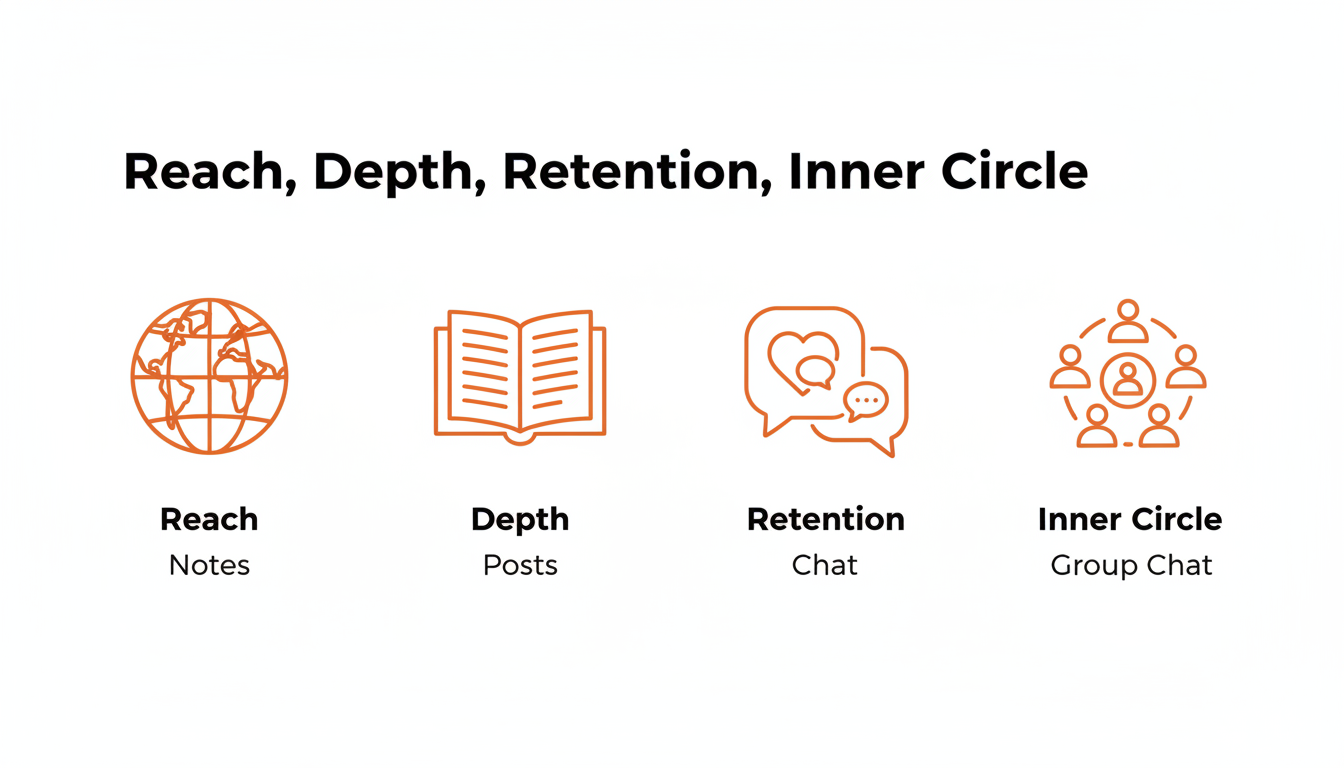
7 Ways to Use Chat to Build Real Community
Most writers open Chat once, post "hey everyone, welcome to chat," get three replies, and never come back. Chat rewards a standing habit more than a single good thread. Here is what actually gets used, in rough order of effort required:
- Weekly open thread. A recurring, predictable slot ("Friday check-in: what are you working on?") that subscribers learn to expect and return to on their own.
- Behind-the-scenes previews. Share a paragraph or image from a post before it publishes and ask what resonates. It turns subscribers into early readers instead of passive recipients.
- Reader questions and AMAs. Post a prompt inviting questions, then answer a batch of them in a follow-up thread or in your next post.
- Polls before you write. A quick poll on which of two topics to cover next both informs the post and makes the eventual subscriber feel like they had a hand in it.
- Paywalled Chat for paid subscribers only. Gating a specific thread to paying subscribers gives them a tangible, ongoing benefit beyond "extra posts," which paywalled posts alone do not provide.
- Group chats for your most engaged readers. Pull your most active commenters or a book's ARC team into a dedicated group chat instead of leaving them to compete for attention in the main feed.
- Cross-promote sparingly through Notes. Post a Note pointing to an especially good Chat thread once in a while. It is one of the few ways to funnel public, Notes-driven attention into your private, subscriber-only space.
Practical rule: pick one of these to run weekly before adding a second. A Chat that runs on one reliable habit outperforms one that tries five things and does none of them consistently.
Common Chat Mistakes to Avoid
Going Silent After the First Thread
The single biggest reason a publication's Chat looks dead is that the writer started it, got a modest response, and stopped posting. Subscribers take their cues from the writer. A Chat with no recent activity from the account that owns it will stay quiet no matter how many subscribers are technically eligible to post in it.
Treating Chat Like a Second Notes Feed
Chat content should feel private in tone even when it technically is not public in the same way a comment thread is not public. Cross-posting the exact same content to both Notes and Chat, word for word, wastes the one advantage Chat has: subscribers get something that feels made for them specifically.
Adding People to Group Chats Without Asking
Group chats are opt-in by nature, and getting pulled into one without warning is the fastest way to get muted or have a member leave immediately. Ask first, even with subscribers who seem enthusiastic, before adding them to a standing group.
Chat Settings and Moderation Controls
Writers control three main levers on publication Chat: who can start threads (writer only, or open to subscribers), who can see it (free and paid, or paid only), and moderation (muting or removing a specific participant from a thread). These settings live under the publication's Chat settings and can be changed per-thread as well as publication-wide, so a single account can run an open general Chat alongside a paywalled, subscriber-only thread for a specific topic.
For group chats, moderation is more distributed. As the creator, you can rename the group and remove members, but because everyone inside can invite others, you do not have the same gatekeeping control you have over publication Chat. That tradeoff is worth knowing before you use a group chat for anything sensitive.
How Paywalled Chat Works for Paid Subscribers
Gating a Chat thread to paid subscribers only is one of the more underrated ways to make a paywall feel worth it. Unlike a paywalled post, which a free subscriber simply cannot open, a paywalled Chat thread is a standing, ongoing space that keeps giving paying subscribers a reason to check back between posts. It costs nothing extra to set up beyond flipping a setting on the thread, and it does more to make the upgrade feel justified than most one-off perks writers try to bundle into a paid tier.
A simple version that works for most publications: keep the general Chat open to everyone, free and paid, and reserve one recurring thread type (monthly Q&A, first look at drafts, whatever fits the publication) as paid-only. That gives free subscribers a reason to see Chat as active and worth engaging with, while giving paid subscribers something the free tier genuinely does not have.
See how WriteStack's Notes scheduler helps you plan and queue the public side of this system.
Building a Unified System: Notes, Chat, and Posts Together
Treating Notes, Chat, and Posts as separate, unrelated habits is what makes a Substack strategy feel exhausting. The writers who make this sustainable run all three as one loop instead of three disconnected chores.
The sequence looks like this in practice: a Post goes out with real depth, a Note references a specific line or idea from that Post to pull in new readers who have not subscribed yet, and a Chat thread opens the same topic up to existing subscribers for discussion, feedback, or a follow-up question that can seed the next Post. Notes handles reach. Posts handles depth. Chat handles the part in between, where a reader decides whether staying subscribed is worth their inbox space.
Use WriteStack's Fans feature to see which subscribers are most engaged, and start there when you build your first group chat.
This is also where scheduling consistency matters more than any single tactic on this list. A Chat thread posted once a month will not build a habit in your subscribers the way a weekly one will, and the same is true of Notes. WriteStack's heatmap and scheduling tools exist specifically so that showing up consistently on Notes doesn't depend on remembering to do it manually every day.
Practical rule: if you can only commit to one recurring Chat habit and one recurring Notes habit, pick both over neither. A publication running a weekly Chat thread and three Notes a week will out-retain one running daily Notes and zero Chat.
The Bottom Line
Chat is not a replacement for Notes or Posts, and it is not optional polish either. It is the retention layer of a Substack growth system that most writers skip because it is quieter and slower to show results than a viral Note. If your Notes strategy is working but subscribers keep drifting away after a few months, Chat, run consistently and gated thoughtfully between free and paid, is very often the missing piece.
Start with one weekly thread. Give it four weeks before judging whether it is working. Most writers quit Chat in week one, which is exactly why the ones who stick with it end up with a real advantage.
Ready to build the public half of this system without it eating your week? WriteStack schedules and queues your Substack Notes in bulk, so the discovery side of your growth loop runs on autopilot while you focus on the conversations happening in Chat.