
You publish a post, check back an hour later, and see forty likes and one comment. Somebody read it. Almost nobody said anything back. That gap between people who show up and people who talk is the difference between a newsletter and a community, and it's the part most growth advice skips past.
How do you get more comments on Substack without turning every post into a plea for engagement? Some of it is a setting you never checked. Some of it is a habit in the first hour after you hit publish. And some of it, based on a sample of 20,000 Substack posts, comes down to something as plain as how long the post actually is.
One number worth having before you start: WriteStack has close to 100 verified reviews from Substack writers who use it to manage exactly this kind of engagement, across multiple review platforms. Narrareach, StackSweller, and StackBuddy have none we could find anywhere close to that.
Table of Contents
- Why Substack Comments Matter More Than Likes
- How Substack's Algorithm Actually Treats Comments
- Turn On Comments the Right Way
- Write Posts That Actually Invite a Reply
- Reply to Every Comment Inside the First Hour
- What 2,000-Word Posts Do That 500-Word Posts Don't
- Use Notes and Chat to Feed Your Post Comments
- Manage the Comment Workflow Without Losing Your Afternoon
- Common Comment Killers Worth Fixing First
Why Substack Comments Matter More Than Likes
A like takes one tap and means almost nothing. A comment means someone stopped, formed an opinion, and typed it out under their real name, attached to their own Substack profile. That's a different level of investment, and it shows up in what happens next: a comment can turn into a reply, the reply into a thread, and the thread into the kind of exchange that makes a reader open your next email first instead of last.
Comments also do something a like can't. They give other readers a reason to keep scrolling on your post instead of leaving after the last paragraph. A post with a live conversation underneath it reads as a place worth staying, the same way a busy restaurant reads as a good one before you've tasted anything.
Practical rule: treat every comment as the start of a conversation, not a data point to count. The writers who get replies are usually the ones who already reply.
WriteStack's Activity Center was built around this exact behavior, pulling every reply, mention, and reaction into one feed so a comment never sits unanswered just because it landed on a post from three days ago instead of today. Open your Activity Center and see everything waiting on a reply in one screen instead of five. More on the full workflow further down.
How Substack's Algorithm Actually Treats Comments
Substack has been fairly open about the philosophy behind its ranking system, if not the exact mechanics. In an internal post on the platform's own approach to ranking, co-founder Chris Best describes the goal as surfacing the writing readers actually want, rather than whatever generates the most passive taps. That framing matters here: a like is the cheapest possible signal, and cheap signals carry less weight than signals that cost the reader something.
Comments cost something. So do restacks, and so does a reply chain that runs several exchanges deep. None of this is published as a precise formula, and treat any claim of an exact weighting with suspicion, including this one. What's consistent across how writers who track their own numbers describe it is the general order of things.
| Signal | What it tends to do | What to do about it |
|---|---|---|
| Like / heart | Barely registers, costs the reader nothing | Don't write for it |
| Single comment | Signals a real reaction, opens a thread | Ask something specific enough to answer |
| Threaded reply chain | Reads as stronger than one isolated comment | Reply fast so the thread has somewhere to go |
| Restack | Puts the post in front of a new audience | Give people one line worth quoting |
| Comment in the first hour | Carries more weight than one three days later | Publish when your regular repliers are online |
Practical rule: stop optimizing for likes entirely. They're the easiest thing to give and the least useful thing to chase.
Turn On Comments the Right Way
None of this works if comments are quietly turned off, and it happens more often than writers realize, especially on publications that started as an email-only list and never touched the settings after switching on a paid tier.
Per-Post Comment Settings
Substack lets you control commenting on a per-post basis, and that setting can default to something narrower than "everyone" depending on how your publication was configured. According to Substack's own support documentation, you can set comments to open for everyone, subscribers only, paid subscribers only, or off entirely, and that choice can be changed post by post, not just at the account level.
Check this before publishing rather than after. A post with comments accidentally restricted to paid subscribers will look, to every free reader, exactly like a post where nobody wanted to say anything.
Moderation and Community Settings
Beyond the per-post toggle, your publication-wide settings decide who can comment without approval, whether new commenters need a moment of moderation first, and whether the comment section is visible to non-subscribers browsing your archive. A comment section that requires manual approval for every single reply adds friction that quietly kills a thread. Someone posts a follow-up, waits for it to appear, and moves on before it does.
There's a real reason approval settings exist, and a large publication with a genuine moderation problem should keep them on. Most writers turning on a Substack for the first time don't have that problem yet, and the setting they inherited by default was built for a scale they haven't reached.
Practical rule: if your subscriber base is small enough to recognize by name, turn off manual approval. The moderation you're protecting against isn't the problem you actually have yet.
Write Posts That Actually Invite a Reply
Put the Ask at the End, Not the Top
A direct ask for comments works, but only in the right spot. Put it at the top and it reads as an admission that the post needs help. Put it at the bottom, after the reader has already gotten something from the piece, and it reads as a genuine invitation instead of a favor.
Keep the ask specific to what you just wrote, not a generic "let me know what you think." A reader can answer a specific question in fifteen seconds. A generic one asks them to do the work of inventing their own prompt, and most won't.
Ask a Specific Question, Not a Vague One
Across a sample of 20,000 posts pulled from the wider Substack corpus, posts with a question mark somewhere in the title averaged about 15% more comments than posts without one, 4.5 comments against 3.9. That's not a huge gap on its own, but it's consistent with what shows up post by post: a question, asked plainly, gets answered more often than a statement gets argued with.
Practical rule: end with one question you'd actually ask a friend over coffee, not three questions stacked at the bottom like a survey.
Reply to Every Comment Inside the First Hour
Why the First Hour Carries More Weight
Writers who track their own numbers consistently describe early comments as carrying more weight than late ones, and it lines up with basic mechanics: a comment section that's already active when new readers arrive gets more replies than a quiet one, purely because activity invites more activity. A thread that's still moving three hours after publish keeps showing up near the top of the section. A thread that goes quiet in the first twenty minutes sinks and stops attracting anyone new.
📅 Struggling to stay consistent on Substack?
WriteStack's Smart Scheduling lets you batch and queue Notes in minutes. Grow on Substack without burning out.
Explore Smart SchedulingThis is where posting time matters beyond just open rates. If your regular commenters are three time zones away and asleep when you publish, the first hour is already lost before you've had a chance to reply to anything.
Turn Single Replies Into Threads
A one-word reply, "thanks" or "agreed," closes a thread instead of extending it. A reply that adds one new detail or asks the commenter a follow-up keeps it open. Aim to make the commenter want to answer again, not to have the last word yourself.
Practical rule: reply with a question more often than a statement. It costs you one extra sentence and it's the single fastest way to turn one comment into three.
Knowing your best posting window matters here, and it's worth checking when your specific audience actually shows up rather than defaulting to whatever time a generic "best time to post" article recommends. A heatmap built from your own Notes and post history will tell you more than an industry average ever will.
What 2,000-Word Posts Do That 500-Word Posts Don't
We pulled a random sample of 20,000 posts from the wider Substack dataset and grouped them by word count. The pattern held up cleanly: posts under 500 words averaged 3.1 comments. Posts between 500 and 999 words averaged 3.5. Posts between 1,000 and 1,999 words averaged 4.8. Posts over 2,000 words averaged 5.5, roughly 75% more than the shortest bucket. The median tells the same story a different way: posts under 1,000 words had a median of zero comments. Posts over 1,000 words had a median of one.
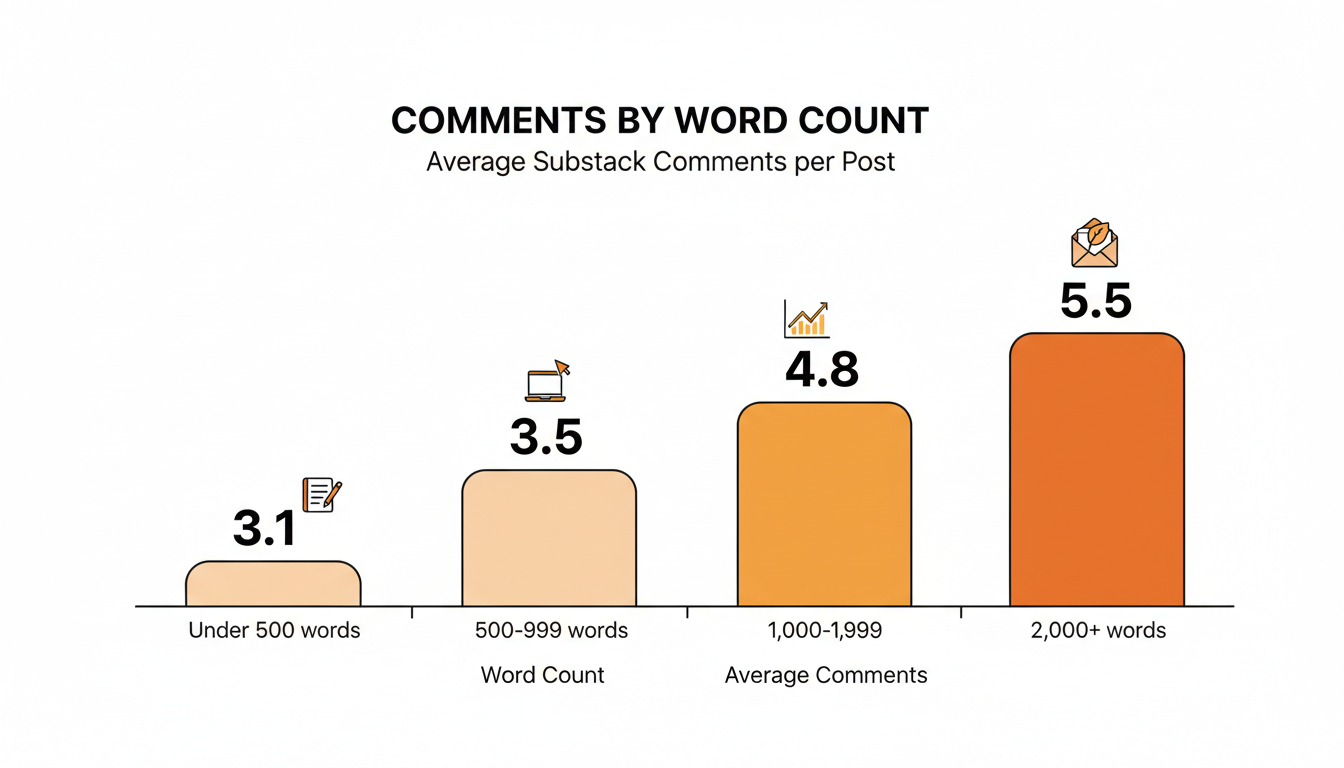
Treat this as a sign that a comment needs raw material to react to, not as an argument for padding a post to hit a number. A short post can make one point well and still leave a reader with nothing specific to respond to beyond "good post." A longer piece naturally covers more ground, which gives more readers something that lands close enough to their own experience to want to add to it. It also gives you more material to pull into a Note afterward, which is its own reason to write past the first draft's stopping point.
Practical rule: if a post is consistently getting zero comments, check the word count before you rewrite the ending. The ending isn't always the problem.
Use Notes and Chat to Feed Your Post Comments
Drop a Note That Points at the Comment Section
A post's comment section rarely fills itself. Most of the readers who'd leave a comment never scroll past your homepage unless something points them there. A Note that quotes the one line from your post most likely to get an argument, followed by a link back to the piece, does more to seed a comment thread than a second reminder email ever will.
WriteStack's Note Generator reads your published post and drafts Notes from what you actually wrote, not from a blank prompt, so the line it pulls out is one that's already proven to land instead of one invented from scratch.
Use Chat for the Follow-Up Conversation
Chat threads are a separate space from post comments, and a lot of writers never use them for anything beyond an occasional announcement. That's a missed connector. A Chat thread asking "what did you think of Tuesday's post" pulls in readers who'll never comment on the post itself but will happily reply in a more casual space, and some of those replies turn into full comments once they've already broken the ice once.
The part people don't expect: WriteStack is the only Substack tool that schedules Chat posts at all, alongside Notes. Most tools treat Chat as an afterthought or skip it entirely. Queue a week of both at once, and the follow-up conversation for Tuesday's post is already scheduled before Tuesday arrives.
Load a week of Notes and Chat prompts in twenty minutes. Start with WriteStack and watch them go out without you having to remember to write one each morning.
Manage the Comment Workflow Without Losing Your Afternoon
The Five-Tab Problem
Once comments, Note replies, Chat responses, and restacks are all coming in at once, the actual bottleneck stops being "how do I get more comments" and becomes "how do I keep up with the ones I already have." Checking each of those separately means five open tabs and a real chance that a comment from two days ago never gets a reply at all, which quietly signals to that reader not to bother next time.
This is the point where most writers quietly give up on replying to everyone, not because they stopped caring, but because the checking itself became the job. A publication that's grown past a few hundred subscribers usually has comments landing on three or four different posts in the same week, plus Note replies and Chat threads running in parallel. Nobody scrolls back through last Tuesday's post on the off chance someone added a reply.
One Inbox for Likes, Replies, and Mentions
| Task | Without a dashboard | With WriteStack's Activity Center |
|---|---|---|
| Checking new comments | Open each post individually | One feed across every post |
| Finding what needs a reply first | Scroll and guess | Sorted by recency |
| Tracking who engages most | No easy view | Visible through Fans |
Practical rule: the writers with the most active comment sections aren't necessarily the best writers. They're usually the ones who reply the fastest, and that's a workflow problem before it's a talent problem.
Common Comment Killers Worth Fixing First
Before trying anything new, check for the mistakes that are easiest to fix and most likely to already be happening.
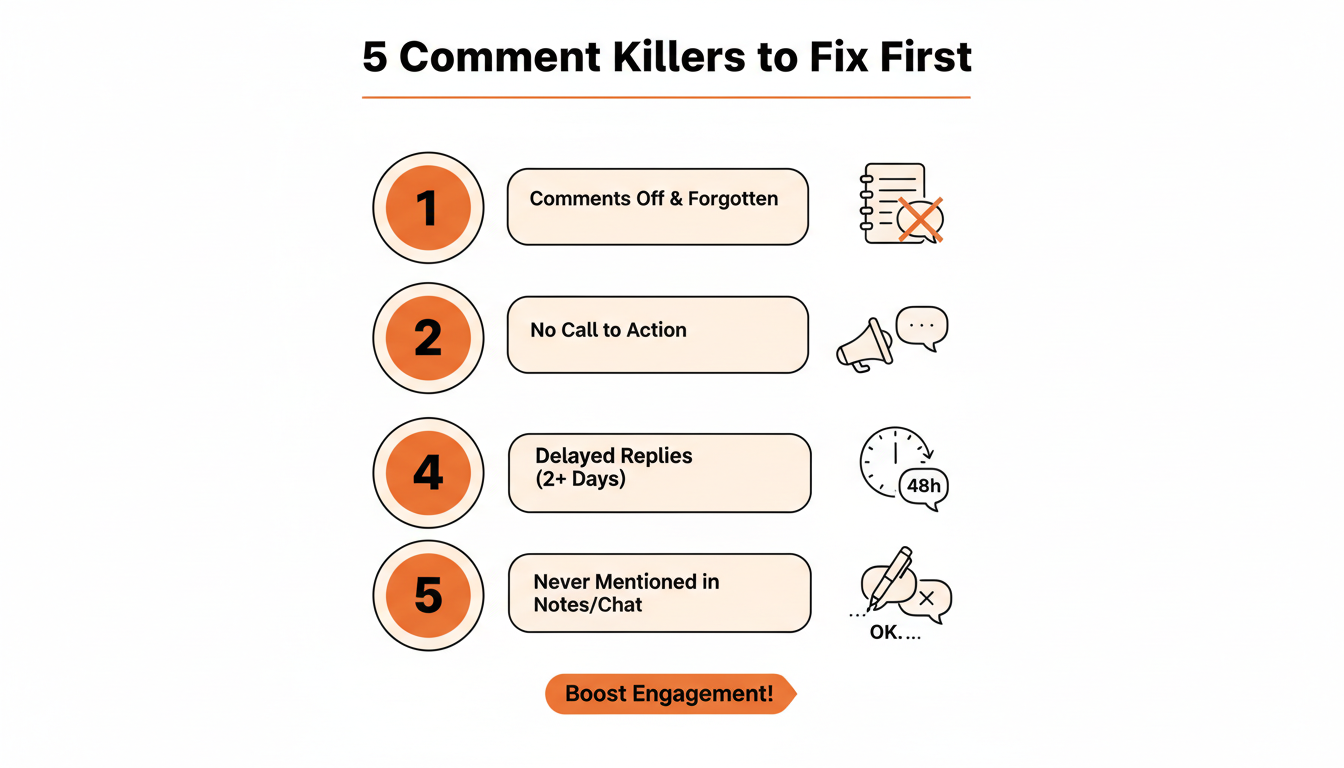
Comments left off by default is the most common one and the easiest to miss, since it produces the exact same silence as a post nobody liked. No ask anywhere in the post is second. Replying two or three days late is third, and it's the one that costs the most long-term, since a reader who gets ignored once tends to stop bothering a second time.
Practical rule: fix the settings and the reply speed before touching anything about how you write. Those two changes alone account for most of the gap between a quiet comment section and an active one.
Six weeks of doing this consistently doesn't just produce more comments. It produces a comment section that runs itself, where regular readers start replying to each other before you've even seen the post go out. Getting there faster usually comes down to not losing the thread in the first place. WriteStack queues the Notes and Chat prompts that feed your comments and puts every reply in one place so none of it slips through.