
You're four newsletters into your Substack and someone in a Slack group tells you to "just build it on WordPress instead, you'll own everything." You open a new tab, look at hosting plans, themes, and plugin lists, and close it again twenty minutes later without doing anything.
That hesitation is the right instinct, but it deserves a real answer instead of a vibe. Substack vs WordPress isn't really about which platform is better. It's about which tradeoffs you're actually willing to manage on a weekly basis. One platform optimizes for speed to publish and a built-in audience. The other optimizes for ownership and unlimited flexibility, at the cost of doing work Substack currently does for you automatically.
This article breaks down what each platform actually gives you, where the real gaps are, and, using data pulled from tens of thousands of active Substack publications, why the biggest reason people cite for leaving is smaller than it looks.
One number worth having before you start: WriteStack has close to 100 verified reviews from Substack writers across multiple platforms, a level of independently checkable trust that most Substack tooling, and most "should I switch platforms" advice online, doesn't come with.
Table of Contents
- The Real Question Behind Substack vs WordPress
- What Substack Gives You Out of the Box
- What WordPress Gives You That Substack Doesn't
- The Ownership Argument, and Why It's Smaller Than You Think
- Money: Substack's 10% vs WordPress's Flat Fees
- Design and Branding: How Far Minimalism Actually Stretches
- Growth and Discovery: Network Effect vs Search Traffic
- When WordPress Actually Is the Right Call
- Closing the Real Gap Without Leaving Substack
The Real Question Behind Substack vs WordPress
Most comparisons of these two platforms start with a feature list and end with "it depends," which is technically true and also not useful to someone trying to make a decision this week. Here's a more useful frame instead: Substack is a publishing and payments product built for people who write regularly and want an audience relationship, not a website project. WordPress is a content management system that happens to be able to run a newsletter, among a hundred other things it can also do.
If your actual job most weeks is writing and hitting publish, you're comparing a tool built specifically for that job against a much broader tool that can technically also do it, with more assembly required on your end.
Practical rule: if you're unsure which camp you're in, count how much of your last month went into writing versus how much time a WordPress setup would demand from hosting, plugins, and design decisions. That ratio is your real answer, not a feature comparison chart.
Start scheduling Notes on WriteStack while you read the rest of this. The platform decision below doesn't have to block the growth work in the meantime.
What Substack Gives You Out of the Box
Sign up, name your publication, write your first post, hit publish. That's the entire onboarding process. No hosting account to configure, no theme to pick, no plugin research, no security patching to keep up with. Substack also gives you, without any setup on your end:
- A built-in payments system for paid subscriptions, with Substack handling the billing infrastructure end to end
- Substack Notes, a discovery feed that can put your writing in front of readers who have never heard of your publication
- Substack's Recommendations network, where other publications can send you subscribers directly through a mutual endorsement
- Email delivery infrastructure tuned specifically for newsletter deliverability, which is a much harder technical problem than it sounds
That last point matters more than most comparisons give it credit for. Getting consistently into inboxes instead of spam folders at scale is an ongoing technical and reputational problem, involving domain authentication, sender reputation, and spam-filter behavior that changes constantly. It's one Substack has already solved so you never have to think about it.
The tradeoff is real too. Your design options are minimal, you can't add arbitrary functionality beyond what Substack ships, and 10% of your subscription revenue goes to the platform.
What WordPress Gives You That Substack Doesn't
WordPress is a full content management system. You control the hosting, the domain, the theme, the plugins, and the underlying database yourself. Practically, that means:
- Complete design freedom: any layout, any color scheme, any custom feature a plugin or developer can build for you
- No revenue share on anything you sell, beyond whatever standard payment processor fees you'd pay on any platform
- The ability to build things that go well beyond a newsletter, like a course platform, a membership site, a full store, or a portfolio, all alongside your writing
- Full data export and full control over exactly where your subscriber list lives and how it's stored
As WordPress.com's own comparison of the two platforms frames it, the tradeoff comes down to flexibility against convenience. WordPress hands you the tools to build almost anything, but you're the one who has to assemble them, maintain them, and keep them working.
Practical rule: every plugin you install is a piece of software you are now personally responsible for updating, securing, and troubleshooting when it eventually breaks. Budget real ongoing time for platform maintenance, not just for the initial design work.
The Ownership Argument, and Why It's Smaller Than You Think
The strongest legitimate argument for WordPress is ownership: your own domain, your own hosting, your own data, with no platform standing between you and your readers. It's a real concern, not a paranoid one. Every writer has heard a story about a platform changing its terms, shutting down, or taking a bigger cut of revenue, and Substack is a venture-backed company that could, in theory, do any of those things eventually.
But "ownership" tends to get collapsed into "I need a custom domain," and that specific piece of the argument turns out to be weaker than it sounds once you look at what most active Substack writers have already done.
Custom domains already close most of the gap
We pulled domain configuration data across roughly 42,000 active Substack publications, defined as ones that had published in the last 180 days, from a dataset of Substack posts and publications. About 90% of them already had a custom domain configured, meaning the publication runs on the writer's own URL rather than a generic substack.com subdomain.
That's the single biggest piece of the "you don't own your address" argument, and the large majority of active Substack writers have already solved it inside Substack, with zero migration required.
📅 Struggling to stay consistent on Substack?
WriteStack's Smart Scheduling lets you batch and queue Notes in minutes. Grow on Substack without burning out.
Explore Smart Scheduling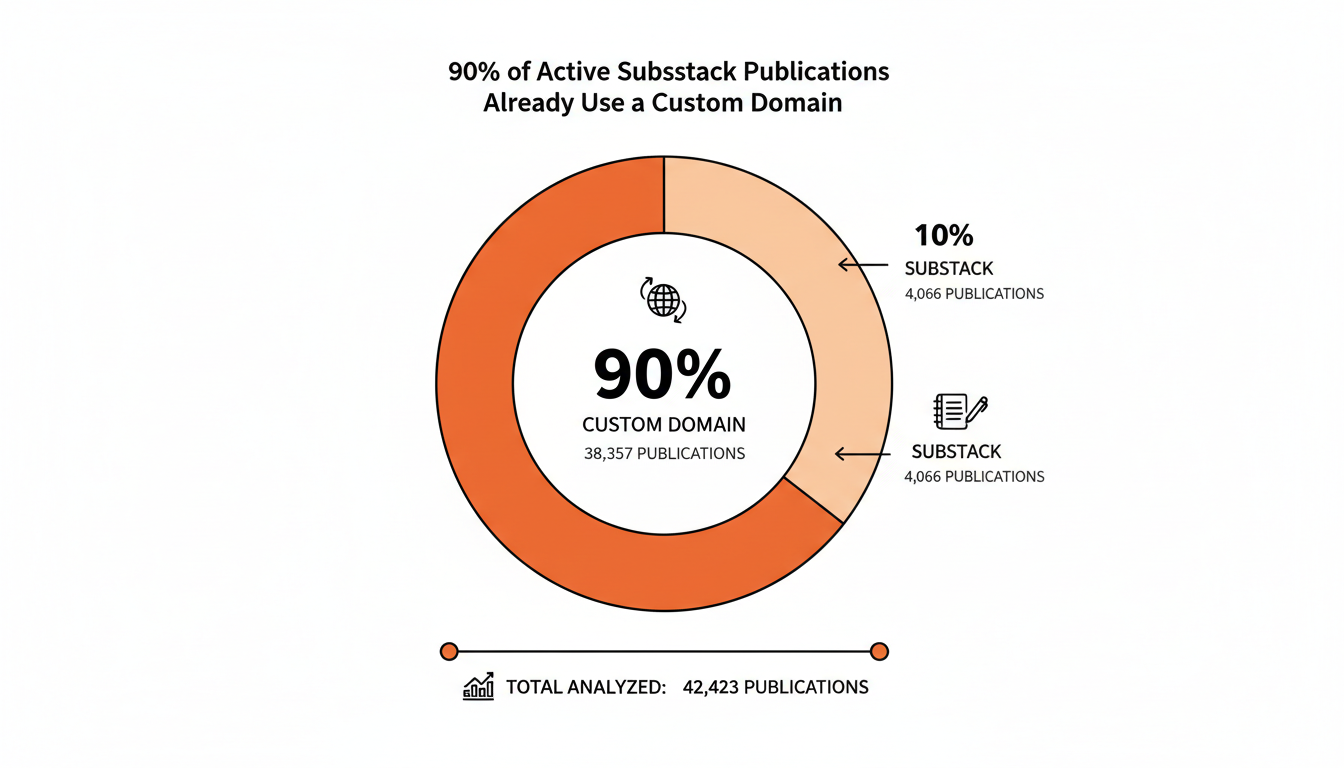
| What "ownership" usually means | Available on Substack? |
|---|---|
| Your own domain (yourname.com) | Yes, built in |
| Exporting your subscriber list | Yes, at any time |
| Exporting your published posts | Yes, at any time |
| Full control over site code and design | No |
| Zero platform revenue share on payments | No, 10% fee applies |
What's actually left after the domain question is settled is design control and the revenue share, and both of those are real limitations. Neither one, though, is "you don't own your own audience." Substack lets you leave with your full list and your full archive intact whenever you want. That's most of what "ownership" is actually meant to protect against.
Practical rule: if the only thing pulling you toward WordPress is wanting your own domain, set that up on Substack this afternoon instead of planning a migration.
Money: Substack's 10% vs WordPress's Flat Fees
This is where the math is actually fairly simple, once you plug in your own numbers instead of a generic example.
Substack takes 10% of paid subscription revenue, on top of standard payment processing fees. WordPress.com's Creator plan and above lets you run subscriptions with a 0% platform fee, but you're paying a flat monthly hosting cost regardless of whether you have five paying subscribers or five thousand, according to WordPress.com's own pricing comparison.
| Substack | WordPress | |
|---|---|---|
| Platform fee on paid subscriptions | 10% | 0% on paid plans |
| Monthly hosting cost | $0 | Roughly $4 to $45/mo depending on plan |
| Payment processing | Handled for you through Stripe | You set up processing yourself |
| Break-even behavior | Fee scales up with revenue | Fixed cost regardless of revenue |
| Setup cost | $0, a few minutes | Hosting, theme, and plugin setup, hours to days |
Below a few thousand dollars a month in subscription revenue, Substack's 10% is often cheaper in absolute dollars than a paid WordPress plan plus a payment processing setup, even before counting your own time. Past a certain revenue point, that math flips and the flat fee wins clearly. There's no single universal answer here. It's arithmetic specific to your subscriber count and price point, and it's worth actually running the numbers before deciding either way.
A detail that trips people up: the WordPress side of that comparison assumes you've already picked a plan, connected a payment processor, and configured subscription tiers correctly, none of which is instant even for a technically comfortable writer. Substack's number is what you get on day one with zero configuration. Factor in a realistic setup timeline, not just the sticker price, before comparing the two side by side.
Design and Branding: How Far Minimalism Actually Stretches
Substack's design system is deliberately narrow: a logo, a header image, an accent color, and a small handful of layout choices. Every Substack publication has a recognizable family resemblance, and that's frequently cited as the platform's biggest branding weakness. WPBeginner's comparison of the two platforms makes exactly this point, highlighting WordPress's much wider theme and customization library by comparison.
That's an accurate criticism, and it's also a smaller problem than it looks for most writers, because most readers experience your publication through their inbox, not through your web page. The email is where your brand actually lives day to day, and Substack gives you real control over that experience: your logo, your voice, and your formatting choices, delivered directly into someone's inbox every time you publish.
Where the branding gap genuinely does bite is if your growth strategy depends on a distinctive, memorable web presence, a visual identity doing real work convincing a stranger to subscribe on their first visit to your site. If that's your growth model, WordPress's flexibility is a genuine advantage worth the extra setup. If your growth comes mostly from Notes, recommendations, and word of mouth, the web page itself matters a lot less than people assume.
Growth and Discovery: Network Effect vs Search Traffic
This is the part of the comparison that gets skipped most often, and it might be the biggest practical difference between the two platforms.
Substack has an internal discovery network built in: Notes, Recommendations, and the app's own feed can all surface your writing to readers who have never heard your name before. A WordPress site has none of that built in on its own. Every visitor either found you through search, through social media, or through a link someone shared directly. WordPress's advantage is that a well-optimized post can rank in Google for years and bring in steady traffic without you doing anything new to it. Substack's advantage is an active internal network that can compound quickly if your writing performs well inside it.
Neither one is strictly better than the other. They're different growth engines entirely, and which one matters more to you depends on whether you're building an audience primarily through search or primarily through a writing community and its recommendation loops.
The part people don't expect: Substack writers who post consistently through Notes, not just weekly full-length essays, tend to see meaningfully different subscriber growth curves than writers who only publish long-form pieces, and almost nobody tracks this closely enough to actually know whether it's working for them. WriteStack's analytics dashboard benchmarks your Notes performance against other publications, not just against your own past weeks, so "is this working" gets a real answer instead of a guess. It also tracks link clicks across your full Notes history, not just the last week or two, which nothing else in this category currently does.
When WordPress Actually Is the Right Call
To be direct about it: WordPress is the right call in a specific, narrower set of situations than the general "own your platform" advice usually implies.
- You're building something meaningfully bigger than a newsletter: a course platform, a membership community with forums, or an online store alongside your writing
- Your growth strategy leans heavily on SEO and long-form search traffic rather than on a writing network or word of mouth
- You're already comfortable handling, or willing to pay someone else to handle, ongoing technical maintenance
- You've hit a subscriber revenue level where the flat-fee math clearly beats the 10% share, and you've actually run those numbers yourself
If none of those apply to your situation, the case for migrating usually comes down to the discomfort of not fully owning your platform. That's a real feeling worth taking seriously, but it's one a custom domain and a disciplined export habit already address for most writers, based on the data above.
Closing the Real Gap Without Leaving Substack
For most Substack writers, the honest recommendation here is straightforward: stay on Substack, set up your custom domain if you haven't already, and put your energy into growth and consistency instead of a platform migration project. The reasons people cite for switching are usually about control and design, and a domain swap plus a disciplined publishing habit solve most of what actually matters day to day.
The real gap in Substack has almost nothing to do with design, and almost everything to do with tooling. Substack doesn't tell you which Notes are actually driving subscriber growth, doesn't let you queue a full week of content in one sitting, and doesn't benchmark your account against anyone else's performance. Those are workflow problems, not platform problems, and they're solvable without touching your hosting or your domain at all. WriteStack exists specifically to close that gap without asking you to leave the platform or touch a single line of code. Schedule a full week of Notes, including chat posts, which nothing else in this category can queue, in about twenty minutes. See exactly which links inside old Notes are still driving clicks months later. Check whether your restack rate is climbing against writers in your niche instead of just against your own quiet week last month. If you want a head start drafting that week's batch, WriteStack's AI Notes generator writes from what you've already published, so the output starts sounding like you instead of arriving there after three rounds of editing.
Set up your domain this week if you haven't. Load your Notes for the next seven days into WriteStack in one sitting. Skip the migration project entirely, and put that time into the writing instead.