
You turn on Subscriber Referrals, announce it in one Note, and then never mention it again. Six weeks later the leaderboard has two names on it, and both of them are readers who would have shared you anyway. The feature worked fine. The promotion around it never happened.
The Substack referral program turns readers you already have into a distribution channel, by giving every one of them a trackable link and a reason to use it. This guide covers what the program actually does, how to set reward tiers people bother chasing, which rewards get shared and which get ignored, how to tell which of your Notes drove the clicks, and how to keep a referral push alive for the weeks it takes to work.
One number worth having before you start: WriteStack has close to 100 verified reviews from Substack writers across multiple platforms. The other tools that promise to help you grow a Substack publication have none that we could find anywhere. That is not a small gap in a category where most products launched in the last eighteen months.
Table of Contents
What Is the Substack Referral Program?
Substack's subscriber referral program, officially called Subscriber Referrals, gives every reader on your list a unique referral link. When someone signs up using that link, the referring subscriber gets credit toward reward tiers you set in advance, and the credit builds automatically as more people sign up through their link, according to Substack's own support documentation on subscriber referrals.
It is a separate system from Gift Subscriptions, which lets paid subscribers give trial access to specific friends by name. Referrals reward the act of sharing your publication widely. Gifting rewards the act of paying for someone else's access directly. A later section covers when to run each and why they solve different problems.
The mechanics are simple: a referral link, a public leaderboard, and rewards that arrive automatically once a subscriber crosses a threshold you set. The setup screen takes about two minutes. Deciding what a referral is worth to you, then getting that in front of readers often enough that they act on it, is the part that takes real work.
Practical rule: if you cannot explain your referral reward in one sentence inside a Note, the reward is too complicated and almost nobody will chase it.
Substack built the feature because subscriber growth on the platform has always run on word of mouth: readers forwarding a post, dropping a link in a group chat. A referral program gives that existing behavior a trackable link and a reason to keep doing it on purpose instead of by accident.
The part that decides whether the program works is not the toggle. It is the drumbeat of reminders that follows, week after week, without turning your publication into an advertisement for itself. That is a scheduling problem, and it is the work WriteStack does: draft a month of referral Notes from posts you already published, queue them, and watch them go out on the days you chose. Start a free 7-day trial and load the first month in one sitting.
How Subscriber Referrals Actually Work
Once enabled, every subscriber on your list, free or paid, gets a personal referral link and a spot on a leaderboard readers reach through a tab that appears in your publication's navigation.
Rewards stack rather than resetting at each tier. If your Tier 1 reward is a one-month paid comp at three referrals and Tier 2 is a three-month comp at ten, a subscriber who reaches ten receives four months in total, not three, because Tier 1 sits underneath Tier 2 instead of being replaced by it. Substack documents this stacking directly, and it matters when you set thresholds, because a generous Tier 1 compounds fast if Tier 2 and Tier 3 sit too close behind it.
For paid publications, Substack defaults the reward to complimentary paid months, which requires no manual fulfillment once configured. For free publications there is no built-in financial reward to fall back on, so the reward has to be something you create yourself: bonus content, community access, or public recognition. Paid publications get a reward built in. Free publications have to build one from scratch.
The program can be switched off at any time from the same Growth features panel, and Substack's support docs confirm that disabling it stops new referrals from counting. That off switch is useful mostly as reassurance while you experiment with tier numbers. The program costs nothing to run and asks nothing of readers beyond a click they were already willing to make, so turn it on, then spend your attention on the promotion around it.
How to Set Up Your Substack Referral Program
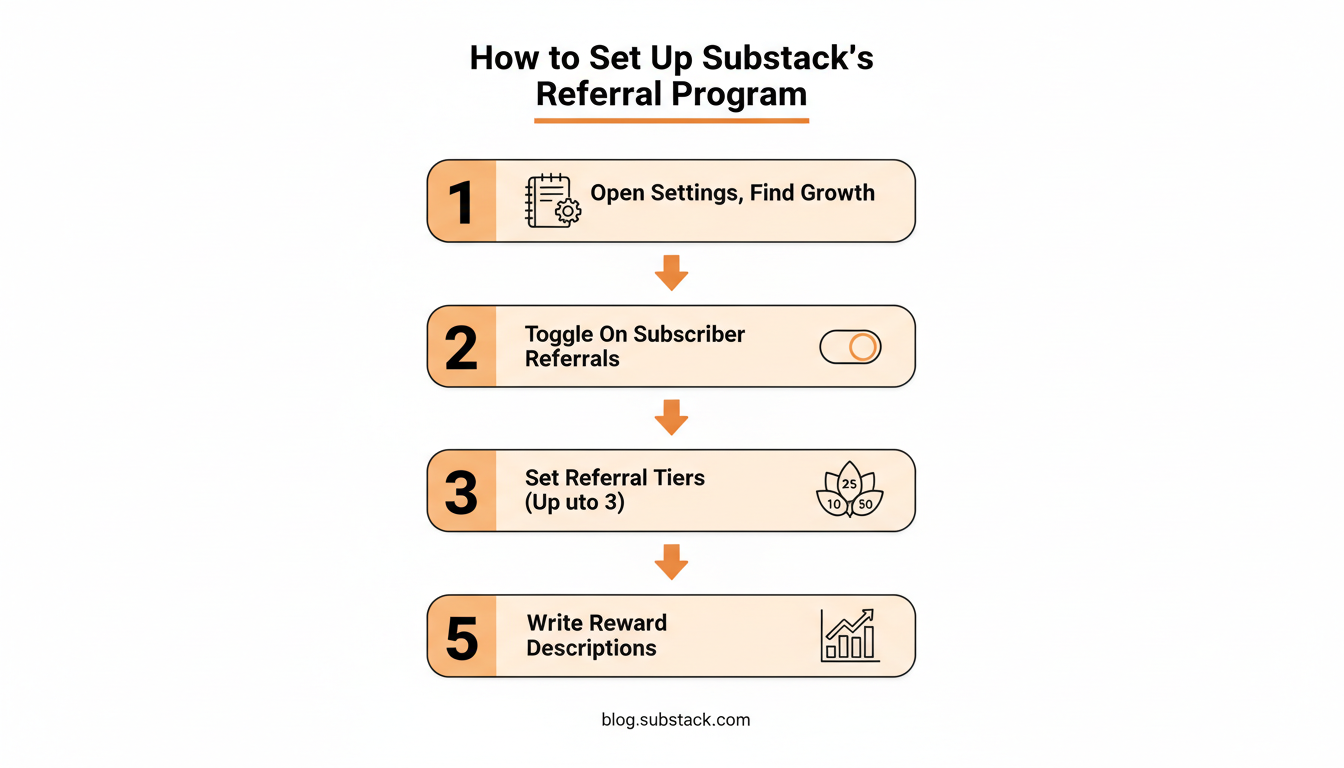
Turn On the Referral Toggle
Go to your publication's Settings, scroll to the Growth features section, and enable Subscriber Referrals. Turning this on by itself does not generate any rewards yet. It activates the referral link system for every subscriber and adds the leaderboard tab to your site's navigation.
Set Your Reward Tiers
Decide on up to three referral thresholds and a reward at each. Most publications settle on a low-effort Tier 1 around three to five referrals, a meaningful Tier 2 around ten to fifteen, and an aspirational Tier 3 around twenty-five to fifty that only a handful of readers reach but that gives your most engaged subscribers a reason to push past Tier 2.
Keep the gap between tiers proportional. Jumping from a five-referral Tier 1 straight to a hundred-referral Tier 2 leaves a dead zone where nobody has a reason to keep going once the first reward is claimed.
Write Reward Copy People Actually Read
The tier description is the only sales copy most readers will see before deciding whether the referral program is worth bothering with. Name the reward concretely: "3 free months of paid access" outperforms "a special reward" because the reader can immediately judge whether it is worth the effort. Say what it costs them to get there in the same sentence: "refer 5 friends."
Practical rule: turn the leaderboard on from day one. A referral program without a visible leaderboard removes the one piece of social proof that makes readers want to compete instead of quietly ignoring the feature.
Choosing Referral Rewards That Get Shared
Low-Maintenance Rewards That Work
Substack's own growth guidance is explicit that the best referral rewards require no ongoing management on your part, because the whole point of the feature is that it runs passively once configured, as laid out in Substack's guide to growth with subscriber referrals.
| Reward type | Setup effort | Ongoing effort | Best for |
|---|---|---|---|
| Complimentary paid months | Low, automatic | None | Paid publications |
| Bonus post or archive access | Low | None | Free or paid publications |
| Private Discord or chat access | Medium | Low, occasional moderation | Community-driven publications |
| 1:1 call or coffee chat | Low to set up | High, your time per redemption | Small, high-touch publications |
| Physical merch | Medium | High, fulfillment and shipping | Established publications with budget |
Practical rule: anything at Tier 1 needs to survive fifty redemptions without becoming a part-time job. Save the high-touch rewards for the tier almost nobody reaches.
Substack's growth guide points to reward patterns that show up repeatedly across creators who run this well: a PDF collection of a writer's best posts, a discount on merchandise, access to a private community thread, and public recognition such as a wall of fame page for whoever tops the leaderboard. None of these require per-person labor once they are built. The PDF gets assembled once. The wall of fame page gets updated in batches instead of per redemption. Build the reward once, then let the leaderboard track who earned it.
Rewards to Avoid
Anything that requires you to personally fulfill each redemption, custom PDFs assembled per person or thank-you calls offered at a low threshold, turns your referral program into a support queue instead of a growth channel. If a reward requires your direct time, reserve it for the top tier, where volume stays low by definition.
Subscriber Referrals vs. Gift Subscriptions
Substack runs a second, separate program: Gift Subscriptions, where paid subscribers can send a limited number of trial subscriptions to specific people they name. The two features solve different problems and are not substitutes for each other.
| Subscriber Referrals | Gift Subscriptions | |
|---|---|---|
| What it rewards | Sharing your publication broadly | Paying for one specific person's access |
| Who can participate | Any subscriber, free or paid | Paid subscribers only |
| Reward funded by | You, the writer | The subscriber doing the gifting |
| Runs best as | An ongoing background feature | A time-boxed push around a launch or holiday |
Referrals work best left running quietly in the background all year. Gift subscriptions work better as a burst tied to a specific moment: a birthday sale, a milestone post, an end-of-year promotion. Running both is not redundant, because they pull on different motivations and different subscriber segments.
Struggling to stay consistent on Substack?
Batch and queue your Substack Notes in minutes, track which Notes convert subscribers, and grow without burning out.
The Referral Link Nobody Is Tracking
A referral program lives or dies on one thing: whether people click the link. Everything upstream of that click, the tier design, the reward copy, the leaderboard, exists to produce clicks. Which makes it strange that the most common way writers promote a referral program, posting Notes about it, is the part where they have the least visibility into what happened.
Substack's dashboard tells you a Note got some likes and some restacks. It does not tell you that the Note you posted on Thursday morning sent eleven people to your referral page while Monday's sent none, and it does not tell you which of the two links inside that Thursday Note did the work. When a Note carries both a link to your latest post and a link to your referral page, "this Note performed well" is not an answer.
That gap is where WriteStack's link-click history lives. It tracks clicks per link inside each Note, going back to your very first one, so a referral push stops being a guess. Look at three months of Notes and see which framing of the ask moved people: the one that named the reward, the one that pointed at the leaderboard, or the one that thanked whoever was already sharing. Then write more of the version that worked.
| What you want to know after a referral push | Substack's dashboard | WriteStack |
|---|---|---|
| Which link inside a Note got clicked | No | Yes, per link |
| Click history across your full Notes archive | No | Yes, back to your first Note |
| Whether your referral conversion is normal for your size | No | Yes, benchmarked against other publications |
| Direction of engagement month over month | No | Yes, trend analysis |
| A month of referral Notes drafted in your own voice | No | Yes, from your published posts |
| A queue showing every scheduled referral reminder at once | Drafts list only | Yes, queue and calendar view |
| Scheduling chat posts about the program | Yes, in the Chat tab | Yes |
| Verified reviews from Substack writers | Not applicable | ~100 across multiple platforms |
The part people don't expect
Three things about a referral push become visible the moment you stop working blind. WriteStack tracks which of the two links inside a single Note got clicked, going back to your very first Note, so "that one landed" turns into "that one sent eleven people to the referral page." It benchmarks your numbers against other publications your size, which answers "is this good" rather than "is this better than last week," a question a per-account dashboard structurally cannot answer. And it schedules Chat threads as well as Notes, so the referral reminder can go somewhere other than the feed. Open the dashboard on a Tuesday and see that the Note you almost did not post drove 40 link clicks, and that your restack rate is running well above typical for a publication your size. Not better than last week. Better than the field.
Start your free trial and find out which Note is carrying your referral program.
What to Expect From Your Referral Numbers
Referral volume concentrates. A short list of highly engaged subscribers drives most of it, which means your job is to reach that short list often and give them something easy to hand over. Set thresholds that match your list size instead of copying tier numbers from a newsletter with ten times your subscriber count. A Tier 1 set at fifty referrals on a three-hundred-subscriber list will sit unclaimed indefinitely, while the same tier at five gives your most active readers something they can reach this month.
Practical rule: set your Tier 1 threshold low enough that at least a handful of your existing subscribers could hit it within a month. If nobody on your list can reach Tier 1, the whole program is decorative.
The harder question is what counts as a good result once numbers start coming in. Twelve referrals in a month is strong or weak depending entirely on the size of your list, and Substack gives you no way to answer that. Its dashboard compares you to yourself: this month against last month. WriteStack's cross-publication benchmarks compare you to the field, so a referral conversion rate arrives with context instead of arriving alone. A number sitting above typical for a publication your size tells you to keep pushing. One sitting below tells you the reward copy needs work before the promotion does.
Where Referrals Fit in Your Substack Growth Stack
Referrals sit alongside two other native Substack growth levers: recommendations and Notes. Recommendations route new subscribers between publications when another writer recommends you to their list. Referrals reward your existing readers for sharing you with people they already know, so the growth comes from relationships you have already built rather than another writer's goodwill.
The two channels are not substitutes. A recommendation brings in a stranger who trusts another writer's judgment. A referral brings in a friend who trusts a specific reader personally. Running both draws from two trust networks instead of one.
Notes plays the supporting role for referrals, and it is the one most writers underuse. A referral link mentioned once in a welcome email gets forgotten within a week. A referral link mentioned periodically in a Note, especially timed around a post that performed well, actually gets used, because it is back in front of readers at the moment they are most engaged. Keeping that rotation going for two months without writing a new promotional Note from scratch every week is the practical obstacle. WriteStack's Notes generator drafts from posts and Notes you have already published, so the referral reminders start in your voice instead of arriving at it after three rounds of editing, and if a draft misses you switch models rather than living with one fixed voice.
How to Promote Your Referral Program Without Annoying Readers
Mentioning the referral program in every single post trains readers to skip that paragraph. The programs that stay effective mention it sparingly, at moments when a reader's willingness to share is already high, right after a post that clearly landed.
The rhythm that works is one referral Note a week for six to eight weeks, each framed differently, none of them repeating the announcement. That is eight Notes to write, schedule, and space out so they never land next to each other. Writing them the morning you want to post them is how the effort dies in week two. Load all eight in one sitting inside WriteStack, spread them across two months on the calendar view, and the promotion runs whether or not you remember it that week.
Timing matters more than most writers assume. A reminder sent into a dead window gets buried under everything else that arrived that day. WriteStack's heatmap shows when your audience is actually opening and engaging, which is the window worth using for a referral push rather than guessing from when you feel like posting.
It also helps to know who your most engaged readers are before sending the ask to your entire list. That small segment is disproportionately likely to be the group that refers someone, and WriteStack's Fans feature surfaces it, so the reminder reaches the people most likely to act instead of getting lost in a broadcast to everyone.
Practical rule: mention the referral program at the end of your best-performing posts, not your average ones. A reader who just finished something worth sharing is your highest-conversion moment to ask them to share it.
Mistakes That Kill Referral Programs
Setting thresholds too high for a small list kills momentum before it starts. A fifty-referral Tier 1 on a three-hundred-subscriber publication never gets touched, and an untouched tier reads as proof the whole program is not worth a reader's time.
Never mentioning the program again after the launch announcement is the second most common failure. A one-time announcement Note gets seen by whoever happened to be online that day and forgotten within a week. The fix is mechanical rather than creative: a queue with eight reminders in it, going out on days you picked once.
Turning the leaderboard off removes the competitive visibility that makes referrals feel like a game instead of a chore. Readers who cannot see their own progress, or anyone else's, have no reason to check back in.
Building rewards that require per-person manual work at every tier, not just the top one, turns a passive growth feature into an active obligation that quietly gets deprioritized the first busy week.
Promoting the program without tracking the clicks is the mistake that costs the most and shows the least. You post eight Notes, referrals go up, and you have no idea which of the eight did it, so the next push repeats all eight instead of the two that worked. Link-click history across your full Notes archive is the piece that ends that cycle, and WriteStack is where it lives.
Copying someone else's tier structure without adjusting for list size causes most of the damage above in one move. A writer with 40,000 subscribers can set a Tier 3 reward at 200 referrals and still see people reach it. A writer with 800 subscribers copying that number is setting a threshold nobody on their list will ever cross.
What a Running Referral Program Changes
Two months into a referral program that is actually promoted, the change is not that a flood of new subscribers arrives. It is that a channel you owned the whole time finally runs on its own. The reminders go out on Tuesdays whether or not you thought about them. The leaderboard has names on it belonging to people you never personally asked. You know which framing of the ask works, because you can see which link inside which Note got clicked, and you know how your conversion rate compares to the field instead of only to last month.
Turning on the toggle takes two minutes. Keeping the promotion alive for the eight weeks it takes to matter, in your own voice, on a schedule you set once, and with the click data to tell you what worked, is the part WriteStack was built for. Close to 100 verified reviews from Substack writers back that up, and no other tool in this category has any we could find.
Start a free 7-day trial. Queue two months of referral Notes in twenty minutes. Watch the leaderboard fill while you write something else.