You opened this because you're trying to decide where to put a newsletter that doesn't exist yet, or where to move one that already does. Substack and Kit (the platform most people still call ConvertKit) get compared constantly, and most of that content either lists features without saying what to do with them or picks a side without saying why.
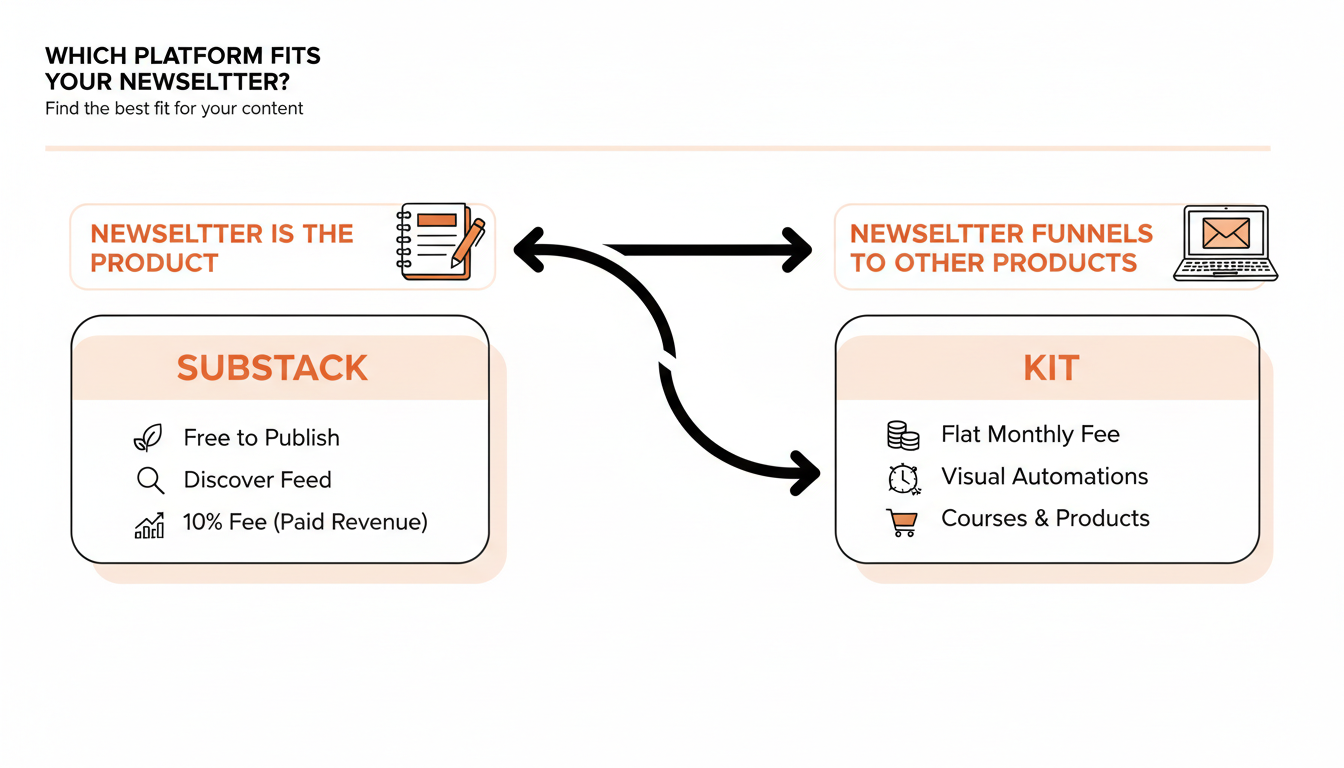
Substack vs Kit comes down to one question: is the newsletter the product, or is it the front door to something else you're selling? Get that answer right and the rest of the decision mostly makes itself.
One number worth having before you start: WriteStack has close to 100 verified reviews from Substack writers across multiple platforms. Neither Substack nor Kit publishes anything like a comparable third-party review count for their own newsletter tooling, and this take comes from a team that has actually run the workflow on both sides of this comparison, not just read the pricing pages.
Table of Contents
- Substack vs Kit: what you're actually choosing between
- What Substack gives you
- What Kit (ConvertKit) gives you
- Pricing side by side
- Monetization: where the money actually goes
- Growth and discovery: built-in audience vs. build-your-own
- The gap neither platform closes
- Which one to pick for your newsletter
Substack vs Kit: what you're actually choosing between
Substack is a publishing platform. You write, you hit send, readers who subscribe get it in their inbox and can find you through Substack's Discover and Notes feed. Kit is an email marketing platform built around forms, tags, automations, and selling things. As the site itself puts it, Kit is built for creators who need to segment an audience, automate onboarding, and sell what they make, not just publish to it.
That difference sounds small until you try to do the other platform's job on it. Building a five-email onboarding sequence with conditional logic in Substack is close to impossible, because Substack doesn't have visual automations at all. Getting genuinely discovered by new readers who weren't already looking for you is close to impossible in Kit, because Kit has no equivalent to Substack's Discover page or the Notes feed.
Most writers land on this comparison after outgrowing whatever they started with, not before starting. A common path looks like: start a free Substack because it costs nothing and see if anyone reads it, build an audience through Notes and Discover for a year or two, then hit a wall where the newsletter alone doesn't cover the business, and go looking for automation and product sales Substack was never built to do. Kit shows up in the search results at exactly that moment, and the comparison suddenly matters in a way it didn't when the newsletter was brand new.
Practical rule: if you can't picture the automation or the discovery mechanism you'd need to be a heavy user of, you're not the audience for that part of either platform, and you can stop weighing it in the decision.
There's a third option most "Substack vs Kit" comparisons skip entirely: pick Substack for the publishing and discovery, then bolt on the growth tooling Substack doesn't build for you natively. See what that setup looks like before assuming the only choice is between two platforms with nothing in between.
What Substack gives you
Free publishing and Discover
Substack costs nothing to start. Free plan, no subscriber cap, unlimited sends, and you only get charged anything once you turn on paid subscriptions. That's the whole model: publish for free indefinitely, and Substack only makes money when you do.
The other half of the pitch is Discover and Notes, Substack's built-in feed and recommendation system. New readers can find your publication without you doing any outbound marketing, purely through Substack surfacing it to people already reading things like it. No email platform, including Kit, has an equivalent. That's the trade a lot of writers are actually making when they pick Substack: give up some flexibility in exchange for a real chance at organic discovery.
Notes specifically works like a short-form feed sitting inside the same app your subscribers already read your posts in. A writer with zero paid subscribers can still get restacked into thousands of feeds by posting something sharp on a Tuesday morning. That's a genuinely different growth mechanism than anything in Kit's toolkit, and it's the reason writers with no existing audience tend to start on Substack rather than Kit even when they eventually plan to sell something.
The 10% fee, explained
Substack takes 10% of your subscription revenue if you turn on paid subscriptions, on top of standard Stripe processing fees. According to Substack's own support documentation, a reader paying $10 a month nets you roughly $8.40 to $8.60 after both Substack's cut and Stripe's processing fee, depending on exactly how the transaction is billed.
That fee only applies to money you actually collect. Publish for free forever and it costs nothing. It's a revenue share, not a subscription fee, which is the opposite of how Kit prices things.
What Kit (ConvertKit) gives you
Automations and funnels
Kit's core strength is visual automation: welcome sequences, tagging based on what someone clicked, moving a subscriber into a different sequence based on a purchase, all built with a drag-and-drop builder instead of code. If you've ever wanted a newsletter that behaves differently for a new subscriber than for someone who's been reading for two years, Kit does that natively. Substack, even with its newer basic automation features, isn't close to this level of branching logic.
A typical Kit setup: someone downloads a free guide, gets tagged, drops into a five-email welcome sequence over two weeks, and if they click a link to your paid course landing page, that click alone moves them into a sales sequence they'd never see otherwise. Building that same behavior on Substack would mean manually tracking who clicked what, because Substack doesn't expose that kind of subscriber-level automation trigger.
Selling products directly
Kit isn't limited to paid subscriptions the way Substack is. You can sell digital products, courses, and one-off items directly through Kit's commerce tools, tag buyers automatically, and route them into a different email sequence than someone who just subscribed. Substack's monetization is a single lever: paid subscription, on or off. Kit gives you several.
Practical rule: if "sell a course to 400 people once" describes your business better than "get 400 people to pay monthly forever," Kit's tooling matches that shape and Substack's doesn't.
📅 Struggling to stay consistent on Substack?
WriteStack's Smart Scheduling lets you batch and queue Notes in minutes. Grow on Substack without burning out.
Explore Smart SchedulingPricing side by side
| Substack | Kit (ConvertKit) | |
|---|---|---|
| Free tier | Unlimited subscribers, unlimited sends, free forever until you charge for subscriptions | Free Newsletter plan up to 10,000 subscribers, unlimited sends |
| Cost to publish for free | $0 | $0 |
| Cost once you monetize | 10% of subscription revenue + Stripe fees, no flat monthly charge | Flat monthly fee starting at $39/mo for 1,000 subscribers on the Creator plan, scaling with list size (per pricing trackers referencing Kit's published tiers) |
| Built-in audience discovery | Yes, Discover feed and Notes | No |
| Visual automations | Basic, recently added | Full builder, core feature |
| Sell digital products/courses | No native tooling | Yes, built in |
| Native chat post scheduling for growth content | No, third-party tools required | Not applicable, no chat feed |
Practical rule: don't compare these as if the top row and the bottom row are equally important to you. A free-to-publish writer who never monetizes pays Substack nothing and would pay Kit's Creator tier the moment their list crosses 1,000 people, even without selling anything.
Monetization: where the money actually goes
Substack's model rewards you for actually collecting revenue and costs nothing if you don't. Kit's model charges a flat fee based on list size regardless of whether that list is paying you a cent. Run the math on your own numbers before picking a side here, because the crossover point moves depending on how many subscribers you have and how many of them actually pay.
A writer with 2,000 free subscribers and no paid tier pays Substack $0 a month. The same writer on Kit's Creator plan, priced by total list size rather than paying subscribers, would already be paying a monthly fee for capacity they aren't monetizing. Flip it around: a writer with 500 paid subscribers at $8/month nets around $4,000/month after Substack's cut, while the same list on Kit costs a flat monthly fee regardless of how much of that $4,000 actually lands.
Neither structure is better in the abstract. Substack's model favors writers who are pre-revenue or modestly monetized. Kit's flat-fee model favors writers who've already built list size into real income and want predictable costs instead of a percentage that grows with success. See how a Substack-first workflow can compete with a more automated platform once the growth side is handled.
Growth and discovery: built-in audience vs. build-your-own
This is the part of the comparison that gets skipped most often, and it's the one that should carry the most weight for a writer who doesn't already have an audience.
Substack's Notes feed functions like a short-form content feed inside the platform itself, and writers who post there consistently get discovered by readers who never heard of them through search or referral. Kit has no equivalent mechanism. Every subscriber on Kit arrives because you drove them there yourself, through a landing page, a lead magnet, paid ads, or a referral from somewhere else entirely.
That means the true cost of Kit isn't just the monthly fee, it's that you're also responsible for the entire top of the funnel with no platform-native discovery to lean on. Some creators prefer that (total control, no algorithm risk), and some genuinely can't get traction without it.
The part people don't expect: the writers who do best on Substack aren't the best writers, they're the most consistent posters in the Notes feed. WriteStack schedules chat-style Notes posts in advance, the only Substack scheduling tool that does, plus link-click tracking across your entire Notes history and benchmarks against other publications your size, not just your own week-over-week trend. That's the layer neither Substack nor Kit gives you natively: proof of whether a specific Note actually worked, compared to writers like you, not just compared to last Tuesday.
The gap neither platform closes
Pick Substack for the discovery and the free-to-start model, or pick Kit for the automation and the multi-product commerce. Either way, you inherit the same unsolved problem: staying consistent enough, long enough, for either platform's growth mechanism to actually compound.
In WriteStack's dataset of more than 57,000 Substack publications, only 5.2% of them ever posted exactly once and stopped. That's not the failure mode most writers worry about. The bigger group, over 12% of every publication tracked, tapered off within their first ten posts, right around the point where posting stops feeling new and starts feeling like a chore with no feedback loop telling you it's working.
Substack's own dashboard tells you subscriber count and open rate. It does not tell you which Note actually drove those subscribers, whether your restack rate is normal or unusually low for a publication your size, or whether last month's dip was noise or a real trend. That's exactly the gap WriteStack fills for writers who've decided Substack is the right home for their newsletter: scheduling for the Notes feed, a heatmap of when your specific audience actually engages, and cross-publication benchmarks that answer "is this good?" instead of just "is this different from last week?"
Load a week of Notes into WriteStack on a Sunday. Watch them post themselves while you write the next piece instead of babysitting a publish button every morning.
Which one to pick for your newsletter
If the newsletter itself is what you're selling, subscriptions are the whole business model, and you'd rather have a shot at organic discovery than build an audience from zero, Substack is the right platform, and it costs nothing until it's actually making you money.
If you're building a business where the newsletter is a funnel into courses, digital products, coaching, or a multi-step onboarding sequence that needs to behave differently for different subscribers, Kit's automation and commerce tooling will save you from duct-taping three other tools together, and the flat monthly fee is a fair trade for that.
Most writers reading a "Substack vs Kit" comparison already have their answer the moment they're honest about which of those two businesses they're actually building. What they're usually missing isn't the platform decision, it's a way to see whether the writing itself is working once they've picked one.
If that platform is Substack, start a WriteStack trial and get the Notes scheduling, the benchmarking, and the chat post scheduling no other Substack tool has, before your next posting streak gets interrupted by a busy week.
Frequently asked questions
Can I use Substack and Kit at the same time? Yes, and some writers do, usually by publishing the newsletter on Substack for the discovery and paid subscriptions, then using Kit separately for a lead magnet funnel into a course that lives outside Substack entirely. It's more moving parts to maintain, so it only makes sense once the course or product side is generating enough to justify a second monthly bill.
Is ConvertKit still called ConvertKit? The company rebranded to Kit in 2023, though "ConvertKit" is still how most people search for it and how a lot of existing documentation and integrations refer to it. This article uses both names interchangeably for that reason.
Does Substack have any automation at all? Substack has added basic automation, mainly simple welcome sequences, but nothing close to Kit's visual, condition-based automation builder. If branching logic based on subscriber behavior is a requirement, Substack currently isn't built for it.
Which platform is easier to migrate away from later? Both let you export your subscriber list, but Substack's Discover-driven growth doesn't transfer. A publication that grew mostly through Substack's built-in discovery will lose that specific growth channel if it migrates to Kit or anywhere else, even though the email list itself moves fine.