
I once got a Substack Note restacked by a writer with 40,000 subscribers I had never spoken to. It sent close to 300 new readers to my archive in a day, and I hadn't paid for a single one of them. A friend running a similar-size newsletter on Kit sent me a screenshot of her Creator Network dashboard a week later, a similar bump in subscribers, from a completely different mechanism: a partner newsletter that had agreed to recommend her in exchange for the same favor back.
Substack vs Kit comes down to one question: where do your next 1,000 subscribers actually come from? A public feed that surfaces your writing to strangers, or a private network of creators trading recommendations with each other. Substack wins this comparison for anyone building a newsletter from zero, and the reason is checkable: Notes, restacks, and recommendations put a publication in front of readers who have never heard of it, while Kit's growth tools mostly move subscribers between lists that already exist.
We built WriteStack, a scheduling and analytics tool for Substack writers. We also linked every claim about both platforms to that platform's own live page, so anyone can check all of it directly. WriteStack has no stake in the Kit side of this comparison. It exists to make Substack's discovery layer work harder, which is exactly the argument this article is making.
One number worth having before you start: WriteStack has close to 100 verified reviews from Substack writers across multiple platforms. The tools built for the specific job of keeping a Substack publication posting and measuring what happened afterward have none that we could find anywhere.
Table of Contents
The Real Difference Between Substack and Kit
Substack was built as a publishing platform with a social network attached to it. Every post can surface in Notes, in restacks, and in other writers' recommendation panels the moment it goes out. That network is most of the pitch: write consistently, get restacked, and pick up subscribers without spending on ads.
Kit was built as an email marketing platform for creators who already have a business built around an audience. There's no public reading app or content feed. Instead there's a website builder, an automation engine designed to turn a subscriber into a customer, a full commerce layer for digital products, and a Creator Network where members recommend each other's newsletters inside sign-up flows. It's aimed at people who already have income streams to connect, not people trying to find their first 500 readers.
That split decides most of the rest of the comparison, because the two products solve problems of different sizes. Kit solves the problem of turning subscribers into revenue once they exist. Substack solves the problem of subscribers existing at all. A podcaster who already imported 20,000 emails from another platform has the first problem. Almost everyone starting a newsletter from zero has the second one, and the second one is what actually kills most publications before they get anywhere.
| Substack | Kit | |
|---|---|---|
| In-platform discovery feed | Yes, Notes | No equivalent |
| Restacks that push a post into another writer's feed | Yes | No |
| Cross-publication recommendations at signup | Yes, free | Yes, via Creator Network |
| Reader-facing native app | Yes | No |
| Chat threads and community posts | Yes | No |
| Visual automation builder | No | Yes, unlimited on paid plans |
| Digital product checkout and fulfillment | Basic | Full commerce suite |
| Website and landing page builder | Minimal | Yes, unlimited |
| Third-party tooling built specifically for the platform | Deep, including WriteStack | Broad app marketplace |
| Free tier | Free forever, any list size | Free up to 10,000 subscribers |
| Platform cut of paid subscription revenue | 10% | 3.5% + $0.30 per transaction |
| Monthly software cost at 1,000 subscribers, paid tier | $0 | $33-$39 |
| Custom domain | $50 one-time fee | Included on paid plans |
| Verified reviews for the tooling layer around it | ~100 for WriteStack | None found |
Read that table by row, not by column total. The rows Substack wins are the ones that decide how many people ever read the newsletter in the first place. The rows Kit wins are the ones that decide how a newsletter that already has readers gets run as a business.
If Substack is where a newsletter is staying, the next decision is how to actually work the discovery layer instead of hoping it works on its own. Start a free 7-day trial of WriteStack and load a week of Notes in one sitting.
Audience Discovery: Where the Comparison Is Decided
This is the part most fee-and-feature comparisons skip, and it's the one that actually settles the argument.
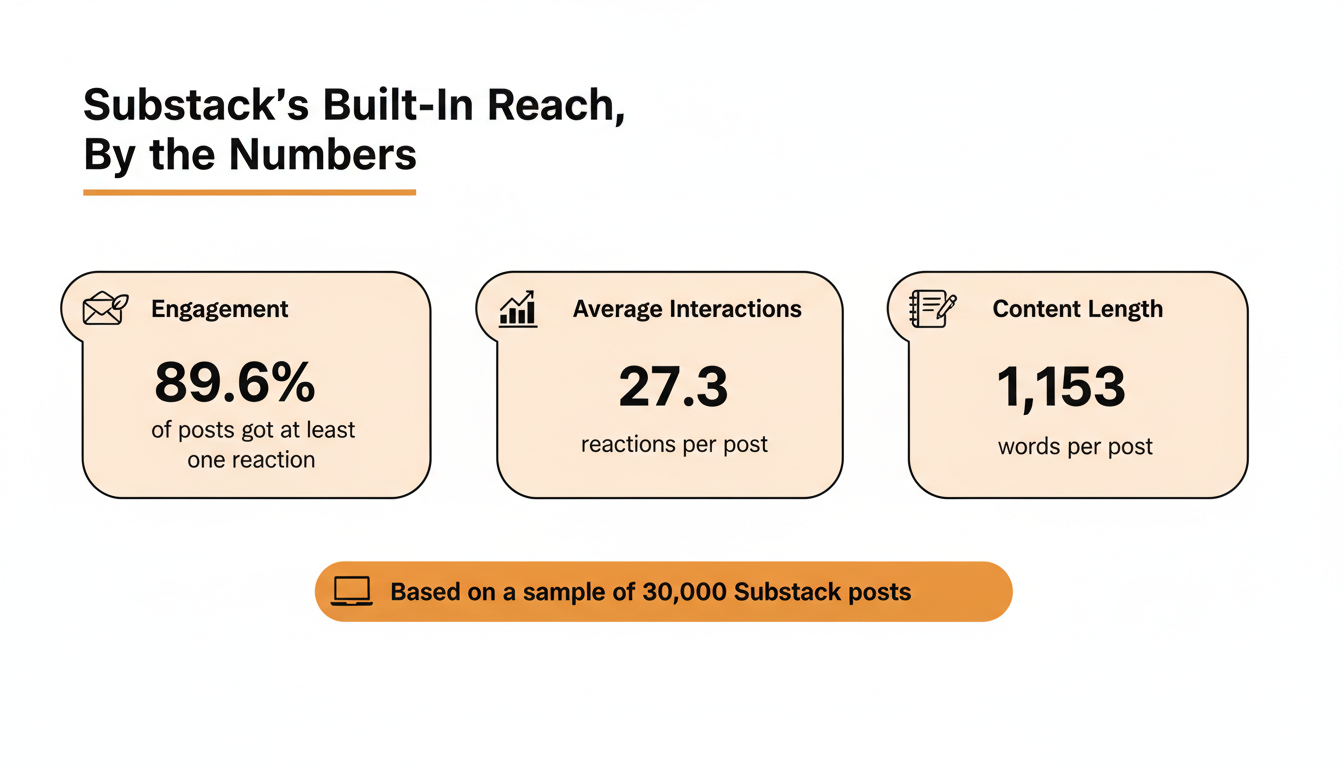
We pulled a sample of 30,000 recent posts from our own Substack dataset to measure how much of that reach is genuinely built in rather than earned through outside promotion. Just under 90% of the posts in that sample picked up at least one reaction, averaging about 27 reactions per post at a typical length of roughly 1,150 words. That's the baseline for a publication that shows up in the feed regularly, not a rare viral outlier. Kit has no equivalent internal feed generating that kind of ambient reach. Its growth tools work by connecting one list to another list, not by putting new writing in front of strangers browsing a feed.
Substack's Notes, Restacks, and Recommendations
Notes works like a short-form feed layered on top of the newsletter itself. Restacks push a post or a Note into another writer's own feed with one click. Recommendations run quietly in the background: a reader subscribes to one publication, and Substack surfaces a short list of others in the same space at the exact moment they've just decided a writer is worth reading. None of it costs anything, and all three keep working even for a writer who rarely posts, though frequency changes the numbers considerably.
The gap worth naming is that this layer rewards writers who show up several times a week and mostly ignores the ones who post in bursts every couple of weeks. This is the exact problem WriteStack was built to close: batch several Notes when the ideas show up, assign each one a time, and let the queue keep feeding the discovery layer through the weeks that get busy, or sick, or just slower than planned. Our own dataset of 20,000 recent Notes shows the shape of what gets queued matters too. Multi-line Notes averaged about 11% more reactions and 28% more restacks than single-line Notes, and Notes between 150 and 300 characters beat Notes under 50 characters by roughly a third on reactions.
Practical rule: if a Note has room for a second line, use it. The data says single-line Notes are consistently the ones leaving reach on the table.
Kit's Creator Network and Smart Recommendations
Kit's answer here is real and worth taking seriously, more so than most Substack-vs-X comparisons give it credit for. The Creator Network connects members who agree to recommend each other in email sign-up flows, and Kit reports that creators who recommend each other see roughly double the list growth of creators who don't, across a network Kit says now includes more than 74,000 creators. Smart Recommendations, bundled into the Pro plan, matches a newsletter to relevant partners automatically instead of requiring manual outreach.
The structural difference is where the recommendation actually shows up. A Substack recommendation reaches someone the moment they've just subscribed to a publication they didn't know existed a minute earlier, inside an app they're already browsing. A Kit recommendation reaches someone who is already on a different creator's email list, inside a sign-up flow that depends on that creator agreeing to feature the newsletter back. It's a genuine growth channel. It sits closer to a referral program than to a discovery feed: useful, but dependent on trades that have to be negotiated rather than a network a publication is automatically part of the day it launches.
Pricing and Fees: What You Actually Pay
Here's the actual math for a writer earning $10/month per paid subscriber on each platform.
Substack's 10% Cut, Explained
Substack charges nothing to publish, at zero subscribers or a hundred thousand. The moment paid subscriptions are turned on, Substack takes 10% of that revenue, on top of standard Stripe processing costs, as confirmed on Substack's own support page. For a $10/month subscriber, that works out to roughly $8.40 kept once Substack's cut and card processing are both taken out. A custom domain adds a one-time $50 fee, and that's close to the entire pricing page.
That cost only exists once money is actually coming in. There's no monthly software bill sitting underneath it, which matters most in the first year, when most newsletters have far more readers than paying subscribers.
Kit's Subscriber-Based Plans and Transaction Fees
Kit flips the model around. The Newsletter plan is free for up to 10,000 subscribers, with unlimited sends, unlimited landing pages, and one basic automation. Past that, or to get unlimited automations and remove Kit branding, the Creator plan starts at $33/month billed annually for 1,000 subscribers and climbs with list size, and Creator Pro starts at $66/month annually with Subscriber Signals, engagement analytics, and Smart Recommendations added on top. On the transaction side, Kit takes 3.5% plus $0.30 per sale on digital products and paid newsletters, which Kit's own comparison page argues is a meaningfully lower cut than Substack's 10%, before factoring in the monthly plan cost sitting underneath it.
Practical rule: run both numbers against an actual list, twice: once at the current size, and again at the size expected in twelve months. A flat monthly bill costs more at every stage before real paid revenue arrives. A revenue-percentage model costs more only once meaningful money is already coming in.
Monetization Options Compared
Paid subscriptions work the same way mechanically on both platforms: a reader picks monthly or annual, a payment processor handles billing, and a dashboard tracks who's active. What sits on top of that differs quite a bit.
Paid Newsletters on Substack
Substack keeps this narrow on purpose. Set a monthly or annual price, add a free trial, add a founding-member tier for readers who want to pay more than asked, gift subscriptions, or set up a group plan for teams. There's no built-in advertising marketplace and no course or product checkout layer. What a reader gets instead is a payment flow they likely already recognize, attached to an account they may already have, and that familiarity tends to convert better than a form on a site they've never visited before.
Kit's Products, Sponsorships, and Automation
Kit adds real revenue paths that Substack has no native answer for. Digital products get their own checkout page, newsletter sponsorships match a list to advertisers by niche and audience size, and Paid Recommendations let a newsletter earn money by recommending other paying creators. Automation ties all of it together: a new subscriber can land in a welcome sequence, get segmented by what they clicked, and see a relevant product offer days later without anyone manually sending a thing.
The honest limit is the same one that shows up everywhere in this comparison. None of it earns much until there's a list large enough to segment and automate against in the first place. A creator with 200 subscribers gets very little practical value out of a visual automation builder. A creator with 20,000 gets a lot.
Automation and Email Marketing
Substack has started shipping simple automations, mostly welcome sequences and a few basic rules, but most of the day-to-day workflow is still manual: write a post, publish it, send it. Kit's automation is the deeper product here by a wide margin. Its Visual Automations builder supports entry triggers from forms, tags, and purchases, event triggers tied to a date or a click, conditional split paths, and integrations with tools like Shopify and Calendly, all unlimited starting on the Creator plan.
For a writer whose business is the newsletter itself, this gap barely shows up day to day. For a writer selling a course, running a paid community, or coordinating sponsor campaigns across a list, it's the difference between doing that coordination by hand every week and setting it up once and letting it run.
Practical rule: weight this comparison toward discovery if the newsletter is the product. Weight it toward automation if the newsletter is the top of a funnel for something else being sold.
Struggling to stay consistent on Substack?
Batch and queue your Substack Notes in minutes, track which Notes convert subscribers, and grow without burning out.
Design, Branding, and the Newsletter Site
Substack's design options stay deliberately narrow: a header image, an accent color, a font pairing, and that's close to the ceiling. Every publication loads fast and looks clean without any setup work, and a brand-new writer can be publishing within minutes of signing up.
Kit gives a real website builder: unlimited landing pages, embeddable forms, a customizable newsletter site, and a custom domain included on paid plans. Removing Kit's own branding is available starting on the Creator plan. That flexibility takes real time to use well, and the actual cost isn't the learning curve, it's the substitution. Hours spent designing a header are hours not spent writing the next post or the next Note.
Consistency is the thing worth protecting with those hours instead. WriteStack's queue view shows a full week of scheduled Notes at a glance, and its engagement heatmap shows when readers are actually online, which changes what a scheduled Note is worth sending at all. Start a free trial and watch a week of Notes go out without any extra design work attached.
Analytics and Growth Tools
Substack's native dashboard covers open rates, subscriber growth over time, and top posts by views, with little detail on where a given subscriber actually came from. Kit's Subscriber Signals and engagement analytics, available on the Pro plan, go considerably further: demographics, social reach, purchase history, and a running score for who's engaged versus fading.
The part people don't expect
WriteStack schedules Chat threads as well as Notes. It tracks which of the two links inside a Note got clicked, going back to the very first Note ever posted, so "that one did well" turns into "that one sent 40 people into the archive." And it benchmarks restack rate against other publications of a similar size, then shows the direction it's moving month over month rather than just a snapshot next to last week.
Neither Substack's dashboard nor Kit's can answer whether a given number is actually good, because neither has other publications to compare against. That benchmark question is the one WriteStack's data was built to answer, and it only exists because Notes and restack activity are public on Substack in a way a private email list's open rate simply isn't.
Migration: Moving Between Substack and Kit
Moving a newsletter between the two platforms is more mechanical than most writers expect, and the mechanical part isn't the expensive part.
Exporting Your Subscriber List
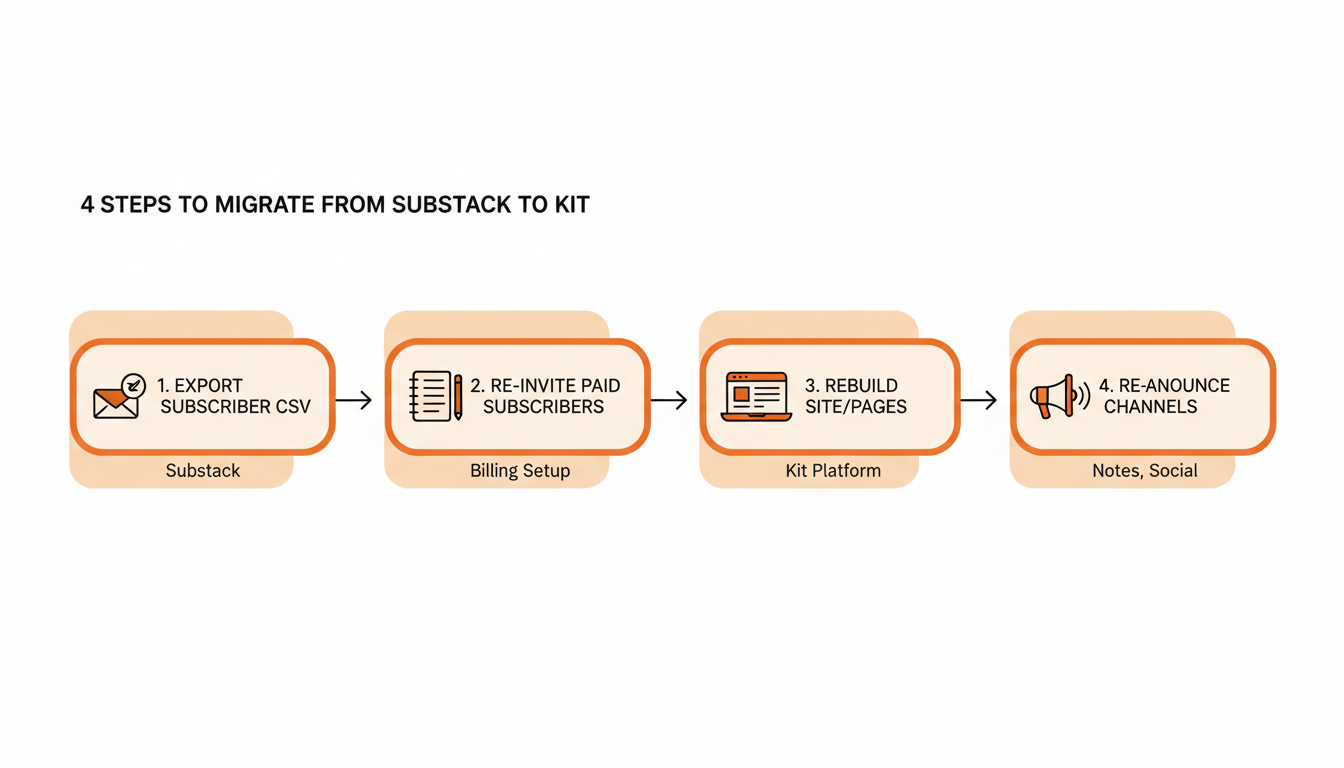
Both platforms let a writer export a CSV of subscriber emails from account settings, and Kit offers a free, hands-on migration that rebuilds forms, templates, and automations for anyone switching over on a paid plan. That covers an afternoon of work, not a week. What doesn't transfer automatically is active billing. Paid subscribers on Substack don't carry over as paid subscribers on Kit, so each one gets re-invited to set up payment again, and a percentage drops off in that gap no matter how carefully the announcement is worded.
What Changes When You Switch
The subscriber list moves. The discovery engine doesn't. Every reader who found the publication through Notes, restacks, or recommendations stops being reachable that way the moment the newsletter leaves Substack, and the recommendation panels it used to appear in go quiet. For a writer whose growth came mostly from that network, moving to Kit restarts audience acquisition from an owned list of one, with new growth depending on the Creator Network and paid channels until an automation and product stack can pick up the slack.
Practical rule: run a migration only once the reason for leaving outweighs the discovery layer being lost. "I need real automation for the business I've already built" is a good reason once a list is large enough to automate against. "I want a nicer-looking website" usually isn't.
The Verdict, and What to Do With It
Substack wins this comparison for anyone building a newsletter from scratch. The reason is checkable and it comes down to one thing: Substack has a public discovery feed that puts new writing in front of readers who've never heard of the publication before, and Kit has nothing structurally equivalent to it. Kit's Creator Network is a real and growing referral system, but it still depends on trading recommendations with other creators' existing lists rather than surfacing work to strangers browsing a feed.
Kit's automation, commerce tools, and lower transaction cut are real, and a creator business with an established list will use all three well. Those are the answers to questions a writer gets to ask after the discovery problem is solved. Substack solves the discovery problem first, which is why it's the right starting platform for almost anyone who doesn't already have 10,000 emails sitting in a spreadsheet somewhere.
What Substack doesn't do on its own is make anyone consistent, and consistency is the entire input the discovery layer runs on. The feed rewards writers who show up several times a week and quietly stops recommending the ones who disappear for two weeks at a stretch. That's the gap WriteStack closes for Substack writers specifically: batch-write Notes when ideas show up, queue a week in one sitting, schedule Chat threads as well as Notes, then read back link-click history and benchmarks against similarly sized publications to see what actually worked.
Six weeks into running a queue, the change isn't that a writer posts more. It's that they stop deciding every single morning whether to post at all. Start a free 7-day trial of WriteStack, load a week of Notes in twenty minutes, and let Substack's discovery layer do the rest.
Frequently Asked Questions
Can I use Substack and Kit at the same time? Yes. Some writers publish the newsletter on Substack for discovery and paid subscriptions, then run Kit separately for a lead magnet funnel into a course or product that lives outside Substack. It means two tools to maintain, and a second monthly bill once you outgrow Kit's free Newsletter plan, so it makes the most sense once the product side earns enough to cover it.
Is Kit the same as ConvertKit? Yes. ConvertKit rebranded as Kit, and kit.com is now its home. Many people still search for ConvertKit, and older docs and integrations still use that name, which is why this article mentions both.
Which one is cheaper for a free newsletter? Both cost $0 to start. Substack has no subscriber cap on free publishing and only takes a cut once paid subscriptions are on. Kit's Newsletter plan is free up to 10,000 subscribers, and paid plans are priced by list size, whether or not that list pays you anything.
Does Substack have any automation at all? Substack has added basic automation, mainly simple welcome emails. Kit's visual builder goes much further, with triggers, tags and conditional paths. If branching logic based on subscriber behavior is a requirement, Kit is the stronger fit today.