

I opened my drafts folder last week and found four half-written posts, two of them started in different months, none of them finished. That is what a content calendar is supposed to prevent. It is also exactly what happens when the calendar is a list of dates rather than a publishing system.
A Substack content calendar only works when it publishes without you: topics decided in advance, drafts written in batches, and every slot loaded ahead of time so Tuesday's post goes out even when Tuesday goes badly. A spreadsheet gets you the planning half. The publishing half is where almost every calendar dies.
One number worth having before you start: WriteStack has close to 100 verified reviews from Substack writers across multiple platforms. The other tools writers reach for to run a Substack calendar have none that we could find anywhere. In a category where nearly every product launched in the last eighteen months, that is the difference between a plan and a track record.
Table of Contents
Why Most Substack Calendars Fail
Every few months a writer tells me they built a beautiful content calendar in Notion, filled in three weeks of dates, and then never opened it again. The calendar was not the problem. Two things behind it were.
The Blank-Calendar Problem
A calendar with empty date boxes and no topics attached is a to-do list wearing a costume. When Sunday night comes and you open the calendar to find "Post #14" sitting in a box with no notes, you are back to staring at a blank page, except now you also feel behind schedule. The date pressure makes the blank page worse.
A working calendar has topics attached to dates before the week starts, ideally before the month starts. If you cannot look at next Tuesday's slot and know roughly what the post is about, the calendar is decorative.
Compare a calendar entry that says "Tuesday post" with one that says "Tuesday: why I stopped tracking subscriber count daily, angle is that daily tracking made me post reactively." The second took thirty extra seconds to write and removes the entire brainstorming step from your Tuesday.
This is the first place WriteStack changes the shape of the work, because the boxes do not start empty. The Notes and post generator drafts from what you have already published, so a slot arrives with a working title and an angle in your voice rather than a blinking cursor. You edit a starting point instead of inventing one.
Practical rule: never schedule a date without attaching at least a working title and a one-line angle. An empty date is not a plan.
The Calendar That Still Needs You to Show Up
The second failure is quieter and it kills more calendars than the blank page does. A spreadsheet calendar tells you what to publish on Thursday. It does not publish on Thursday. You still have to be at a desk, logged in, with the draft finished, at the hour the plan assumed you would be free.
That is a plan resting entirely on your attendance. Every missed slot is a slot where the calendar was right and you were unavailable, and the file has no way to tell the difference between a bad plan and a bad week. After the third miss, opening it feels like reading a list of things you failed to do, so you stop opening it.
A calendar connected to your queue removes most of the daily attendance requirement. In WriteStack the calendar view and the queue are the same object: you drop a post or a Note into a slot, and Sync hands that slot to Substack's own native scheduler automatically through the Chrome extension, inside your session. The plan and the mechanism stop being two separate things you have to keep in sync. Your Thursday slot is already in Substack's scheduler before Thursday arrives.
Start a free 7-day trial and load your first two weeks of slots tonight.
What the Data Says About Posting Frequency
I pulled a sample of publications from a dataset of Substack posts and grouped them by how often they published, then looked at average reactions per post in each group. The pattern was consistent enough to build a calendar strategy around.
Publications posting less than once a month averaged 16.0 reactions per post. That number roughly doubled for publications posting once to four times a month, and nearly tripled again for publications in the four-to-sixteen-times-a-month range, which averaged closer to 50 reactions per post before the curve flattened at very high volumes.
| Posting frequency | Publications in sample | Avg. reactions per post |
|---|---|---|
| Under 1x/month | 6,606 | 16.0 |
| 1–4x/month | 2,966 | 23.9 |
| 4–8x/month | 295 | 49.3 |
| 8–16x/month | 55 | 54.9 |
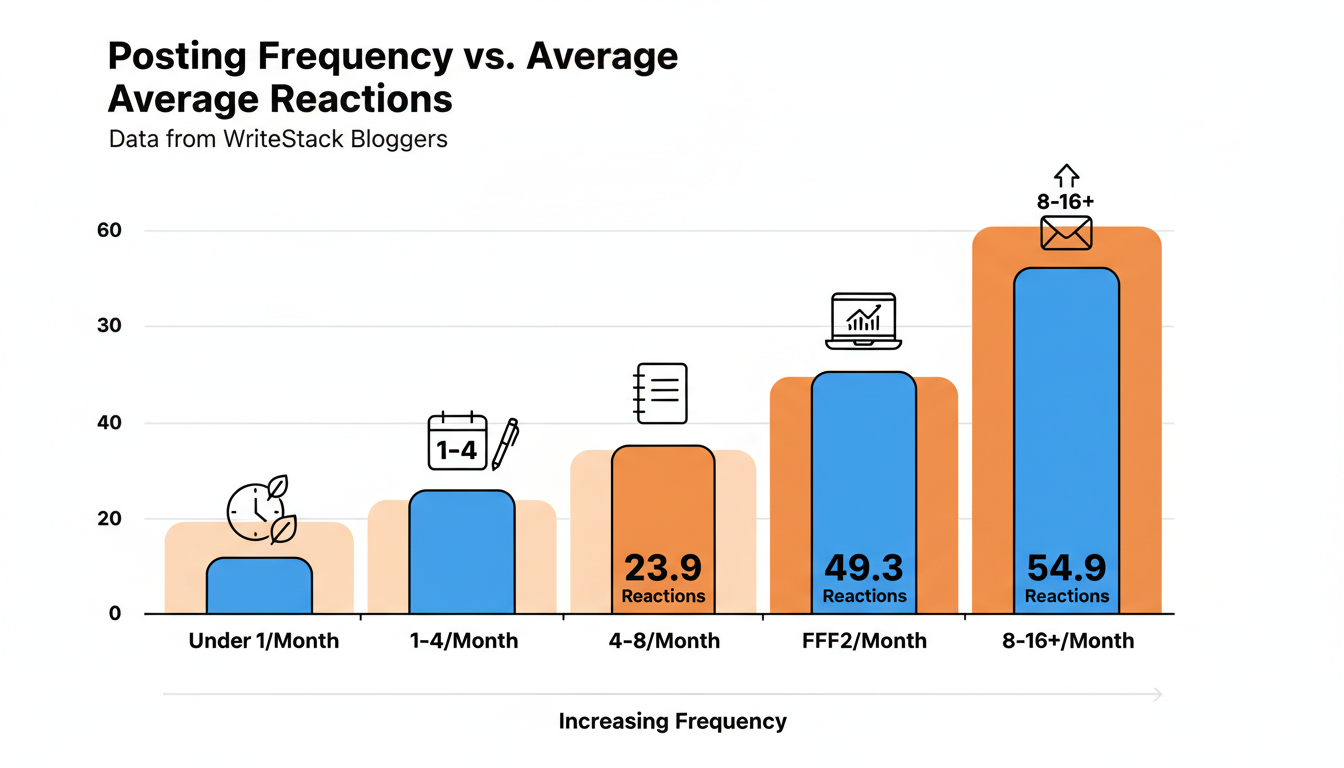
Sporadic posting is the pattern most likely to cap your growth. That lines up with what shows up separately in content marketing research: marketers who document a content strategy are 313% more likely to report success than those who wing it, according to Content Marketing Institute data compiled by DigitalApplied. A calendar is the mechanism that turns "I should post more" into a documented, repeatable habit.
Read the table as a workload question rather than a growth promise. Four to eight posts a month is where the numbers jump hardest, and it is also where publishing by hand, one draft the night before each one goes out, stops being sustainable for anyone with a job. The frequency that pays is the frequency that needs a queue behind it.
Practical rule: if you are posting less than once a week, moving to two to four times a month before you try anything else will likely move your numbers more than any single growth tactic.
Build Your Content Pillars First
A content pillar is a recurring theme your newsletter is known for. Pillars give you a filter for every idea that crosses your mind: does this fit one of my lanes, or is it a detour.
Writers without pillars chase whatever topic feels urgent that week, which produces individually good posts that add up to an incoherent archive. A reader who finds you through one great post and then checks your last five entries should be able to guess what the next one is about. That predictability is what turns a casual reader into a subscriber who opens every issue.
How Many Pillars You Actually Need
Two pillars is usually too narrow and leaves you stretching for topics by week three. Six is usually too broad and reads as unfocused to a new subscriber trying to work out what your newsletter is about. Three to five pillars covers most niches without forcing every post into the same shape.
Write your pillars down as short labels, not full sentences. A career newsletter might settle on "job search tactics" and "workplace stories from readers" as two of its lanes. A local news Substack might land on "council meeting recaps" paired with "small business spotlights." Each pillar should be broad enough to generate ten or more post ideas without repeating yourself, and narrow enough that a reader could describe it in five words.
If you are struggling to name your pillars, look back at your last ten posts and tag each one with a one or two word theme. Whatever themes repeat without you planning it that way are probably your real pillars already. WriteStack's tagging does that job on the live archive rather than in a side document, so the pillar labels stay attached to the queue you are scheduling from.
Turning Pillars Into Topics
Once your pillars exist, brainstorming gets mechanical instead of creative-on-demand. Sit down with each pillar and list every question a reader in that lane might ask, then do the same pass for every mistake you have personally made in that area. You will generate more topics in twenty minutes per pillar than you would in an hour of staring at a blank calendar.
You can shortcut that first pass. Point WriteStack's generator at a pillar and it drafts from your published archive in that lane, which produces angles you have earned rather than angles a generic prompt guessed at. If a batch lands flat, switch the model and run it again. Most tools ship one voice and ask you to live with it.
The 90-Day Substack Content Calendar Template
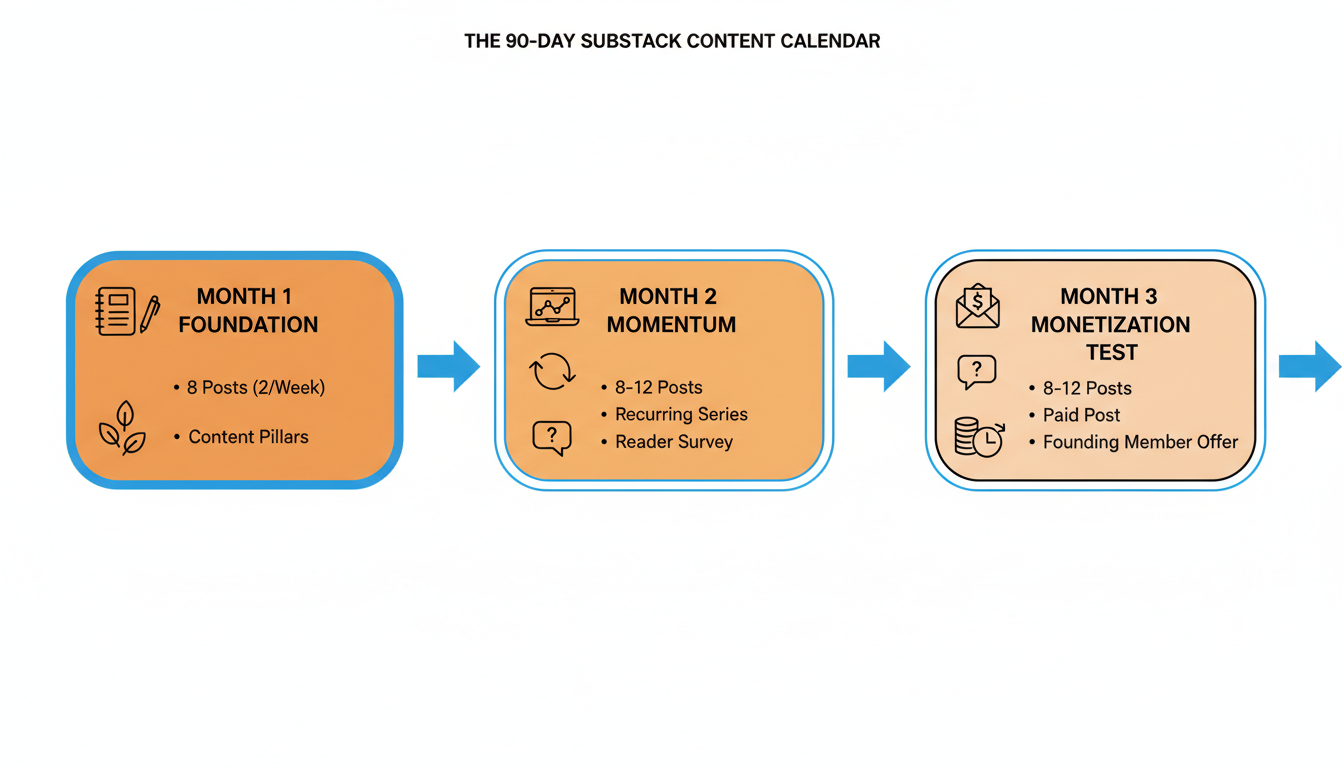
Planning a full year up front rarely survives contact with real life. Ninety days is long enough to build momentum and short enough to revise before you have wasted a quarter on the wrong plan. Here is the structure I recommend for a fresh calendar.
Month 1: Foundation
Publish eight posts, roughly two a week, and use every one of them to establish a pillar. This is not the month to chase trending topics outside your lane. New subscribers who land on your archive in month four will judge your newsletter by whether the early posts feel coherent, so make coherence the whole point of month one.
Month 2: Momentum
Increase to eight to twelve posts and introduce one recurring series or format readers can recognize by name, like a weekly roundup or a monthly long read. Run your first reader survey to find out which pillar is landing hardest, since that answer should shape month three.
Month 3: Monetization Test
Hold the eight-to-twelve post pace and add a single paid-only post to test whether your audience will pay for deeper coverage in your strongest pillar. Pair it with a founding member offer. You are testing demand with one data point before committing to a permanent paywall.
Ninety days is where the mechanics start to matter more than the plan. Twenty-four to thirty-two posts, plus Notes on the days between them, is a volume of publish actions no one performs reliably by hand for three months straight. Sit down once a month, draft into the queue, and drop each piece onto its date in the calendar view. The 90-day plan stops being a document and becomes a filled schedule.
Start your free trial and watch the month fill in one sitting.
What to Run the Calendar On
Spreadsheets, Notion boards, and paper planners all hold a plan. The question that separates them is what happens on the date itself, and what you know a month later about whether the slot earned its place.
| Calendar capability | Spreadsheet or Notion board | WriteStack |
|---|---|---|
| Publishes the slot on its date | No, you publish manually | Yes, queue and calendar view |
| Schedules Substack chat posts | No | Yes |
| Drafts each slot from your published archive | No | Yes, with model selection |
| Load a week or a month of slots in one pass | Manual, one at a time | Built for this |
| Link-click history across your full Notes archive | No | Yes, per link inside each Note |
| Benchmarks your numbers against publications your size | No | Yes |
| Trend analysis month over month | No | Yes |
| Whole month visible at a glance | Yes | Yes |
| Verified reviews from Substack writers | Not applicable | ~100 across multiple platforms |
| Cost | Free | 7-day free trial, from $19.99/month |
The part people don't expect
WriteStack schedules Chat threads as well as Notes, so a calendar built here holds every format you publish rather than the two that are easy. It tracks which of the two links inside a Note got clicked, going back to your very first one, so "that slot did well" becomes "that slot sent 40 people to the archive." And it benchmarks your restack rate against other publications your size, then shows the direction it is moving month over month. Open the dashboard on a Tuesday and see that the Wednesday slot you almost cut drove 40 link clicks, and that your restack rate is running well above typical for a publication your size. Not better than last week. Better than the field.
Before you lock in your weekly time slots, check WriteStack's heatmap of when you have actually posted and when your audience was actually reading. Most writers overestimate how consistent they have been until they see the gaps, and most weekly slots get chosen from habit rather than from evidence.
Struggling to stay consistent on Substack?
Batch and queue your Substack Notes in minutes, track which Notes convert subscribers, and grow without burning out.
Filling the Calendar in One Sitting
Writing one post at a time, the night before it publishes, is the single biggest reason calendars collapse. Batching breaks that cycle by separating idea generation from writing, so you are not doing both under deadline pressure every week.
Block two to three hours once a month. Spend the first thirty minutes only generating topics and one-line angles for every pillar, without writing a single full sentence. Spend the remaining time drafting as many posts as you can get through, even if some only reach a rough first draft. A rough draft sitting in your queue beats a blank page sitting in your calendar every time.
The ending of that session is the part that decides whether the calendar survives the month. If the session ends with drafts in a folder, you still owe the calendar thirty publish actions. If it ends with drafts scheduled, you owe it nothing. WriteStack's batch scheduling exists for exactly that last twenty minutes: select the drafts, drop them onto dates, and the month is loaded. Queue a week in one sitting, or a month if the session went well.
We wrote a full walkthrough of the session itself, including how to structure the drafting blocks, in our guide to batching Substack content. Read that one for the session mechanics, and keep this one for the calendar the session feeds.
Practical rule: never end a batching session with fewer than two weeks of scheduled material in the queue. That buffer is what protects your streak during a busy week.
Where Notes and Chat Posts Fit Into Your Calendar
A content calendar built only around full posts misses most of what keeps a Substack account visible. Notes fill the gaps between posts and keep your account active on days you are not publishing, and chat posts do the same job for the readers who already subscribed.
Notes as Calendar Filler
Schedule Notes on the days between your longer posts instead of leaving those days empty. A short observation counts, and so does a one-line version of an idea you are still developing for a future post. WriteStack's note generator turns a rough idea into a batch of Notes drafts in your voice, which fits into the same session you use for full posts, and the Notes land on the same calendar as the posts rather than in a separate tool.
Chat posts are the piece almost no calendar accounts for. Substack added scheduled Chats in 2026: start a new thread, select Schedule, and pick a date and time. WriteStack schedules Chat threads as well as Notes, which means the Thursday chat thread you keep meaning to start can occupy a calendar slot like everything else.
Repurposing One Post Into a Week of Notes
Every full post you write contains three to five smaller ideas that can each become their own Note across the following week. Pull out a surprising stat or a line you cut for length during editing, and schedule it on its own day. This single habit fills a third of your weekly Notes calendar without any new brainstorming.
The pass is mechanical enough to hand off. Point the generator at the post you just published and it drafts Notes from that specific piece, which is a different thing from generating from a topic prompt: the output carries the argument and the phrasing readers just received.
Closing the Loop: Which Slots Were Worth Keeping
The month ships, and the spreadsheet knows exactly what it knew in week one: that you intended to publish on those dates. It has nothing to say about which of those thirty slots was worth the two hours it cost you. That is the one thing a spreadsheet can never do.
That is the loop that turns a calendar from a plan into a system. After a month of scheduled slots, the link-click history tells you which posts and which Notes actually sent people somewhere, per link, going back across your whole archive rather than the last thirty days. Cross-publication benchmarks answer the question a per-account dashboard structurally cannot: not "was Wednesday better than last Wednesday," but "is Wednesday good for a publication this size." Trend analysis shows you the direction, so a slow month reads as a dip or a slide rather than an unexplained number.
Next month's calendar gets built from that. The Wednesday Note slot that pulled clicks every week stays. The Friday slot that collected polite reactions and sent nobody anywhere gets replaced by a chat post or dropped for a second Wednesday. You are moving slots based on what happened rather than on what felt productive, and the calendar gets better each quarter instead of being rebuilt from scratch each quarter.
Check WriteStack's fans view in the same sitting to see which posts brought in your most engaged readers, then weight the next ninety days toward that pillar. We built WriteStack. We also publish the data behind claims like these, so you can check the shape of it yourself.
What Breaks a Content Calendar
Calendars do not usually fail all at once. They erode. A missed week turns into two, and by week four the calendar feels like evidence of failure rather than a tool, so people stop opening it.
The most common breaking point is overcommitting on frequency in month one, before a queue exists to support it. The data above puts the fastest reaction gains in the four-to-sixteen posts a month band, but that only holds if you can hold the pace. Jumping to daily posting with nothing scheduled behind it is how most calendars die inside three weeks. A queue with two weeks of loaded slots survives a bad week. A calendar that depends on you remembering does not.
The second breaking point is losing track of which pillar your subscribers signed up for, which is the loop above going unclosed. Without link clicks and benchmarks, the correction is a guess, and guessing produces the scattered archive the pillars were meant to prevent.
Recovery is simpler than most writers expect. Do not try to make up missed weeks by cramming. Restart at your current week with a fresh two-week buffer scheduled from your next session, and treat the gap as information about what pace was unsustainable rather than a failure to fix by working twice as hard. Seasonal dips belong in the plan for the same reason: reader attention drops around major holidays regardless of niche, so build a lighter week into the calendar ahead of time and let the queue carry the slots that stay.
What Changes by Month Two
Track one month before you change anything. Write down every day you published, what time, and whether you meant to publish then or remembered late. Almost every writer who does this finds the same shape: two strong weeks, a gap, a catch-up burst, another gap.
A month into running the calendar as a queue, the change is not that you publish more. It is that you stopped deciding. Tuesday's post is written, scheduled, and gone before you sit down. Wednesday's Note is already in the slot the click history told you to keep. The mental overhead of remembering, which is the part that actually breaks streaks, is off your plate, and the writing energy that was going into logistics goes into the writing.
A spreadsheet holds the plan and hands the work back to you every single day. WriteStack holds the plan, publishes it through Substack's own scheduler from inside your browser, fills it with drafts written from your own archive, keeps your Chat threads in the same queue, and then tells you which slots earned their place so the next ninety days are informed rather than guessed. Close to 100 verified reviews from Substack writers back that up, and no other tool in this category has any we could find.
Start a free 7-day trial. Load a month of slots in one sitting. Watch them go out without you.