
I get asked some version of the same question almost every week: should a newsletter offer a free trial before charging for a paid subscription? The honest answer is that it depends less on Substack's settings and more on why a reader is hesitating at your paywall in the first place.
Substack makes free trials easy to turn on. That ease is exactly why so many creators flip the switch without thinking through what happens next: who actually converts, who churns the day the card gets charged, and whether a trial is solving the real problem or just delaying it. This piece walks through how the feature works, what the setup actually looks like, and what the data says about whether it moves the needle.
Table of Contents
What a Substack Free Trial Actually Does
A Substack free trial gives a reader full access to your paid tier for a set number of days before their card is charged. It is not a separate product or a watered-down preview: during the trial window, a reader sees exactly what a paying subscriber sees, including archive access and paywalled posts.
Substack supports two flavors of this. The first is a blanket toggle on your paywall that offers every reader who hits a locked post the option to start a trial instead of paying immediately. The second is a custom special offer you build yourself, with its own length, its own name, and its own link that you can drop into a post, an email, or a Note.
See how WriteStack's Note Generator can turn a trial announcement into a week of Notes
Practical rule: a free trial only works as a growth lever if the reader has already decided your writing is worth reading regularly. It removes a payment objection, not a value objection.
It also helps to know what a trial is not. It is not a way to build your free list, since readers who start a trial were already free subscribers or become one automatically the moment they enter an email. It is not a discount, since the price never changes, only the timing of the first charge. And it is not a substitute for a compelling paid tier, because a trial only delays the moment a reader has to decide whether your paid content is worth paying for. If the answer would have been no on day one, it is usually still no on day eight.
Who a Free Trial Actually Works For
Not every newsletter benefits equally from this feature, and it helps to be specific about where it earns its keep.
Newsletters with a clear, recurring paid format tend to do best with trials: a weekly deep-dive, a members-only roundtable, a paid Q&A thread. The reader can experience a full cycle of the thing they're being asked to pay for, which makes the decision at the end of the trial an informed one rather than a guess.
Newsletters where the paid tier is mostly "the same writing, but more of it" tend to see weaker results. There is nothing new to discover during the trial that a free reader couldn't already infer from your free posts, so the trial just delays the cancel-or-pay decision without giving the reader new information to make it with.
Newsletters that are pre-launch or very early, under a few hundred subscribers, often get more value from spending that energy on distribution instead. A trial only works on people who have already found you. If the bottleneck is that not enough people are finding you at all, a paywall lever of any kind is solving the wrong problem.
Practical rule: before adding a trial, write down the specific paid content a trial subscriber would see in their first week. If you can't name three concrete pieces, the trial isn't ready yet. The paid tier is.
How to Turn On Free Trials
The Publication-Wide Paywall Toggle
Go to Settings, then Payments, and look for the paywall section. There is a toggle to offer a trial (commonly seven days) directly on your paywall, so anyone who clicks a locked post gets the trial offer alongside the option to subscribe immediately. According to Substack's own support documentation on paywall free trials, enabling this adds the trial option to every paywall hit across your publication, not just a single post.
This is the lowest-effort version. You flip one switch and it applies everywhere. The tradeoff is that you lose control over messaging: every reader sees the same generic trial prompt regardless of how they arrived at your paywall.
Custom Free Trial Offers
For more control, build a special offer instead. Under Settings, then Payments, find "Manage special offers" and choose "Free trial" as the offer type. You can name it, set the trial length, and generate a unique link.
That link can go three places: pasted into a post, sent as a one-off email draft to your list, or dropped into a Note with context about why you're running it (a launch, an anniversary, a specific piece of paid content you want to showcase). Because the link is unique, you can track how many signups came from that specific push rather than guessing at attribution.
Practical rule: name your offers descriptively ("Fall 2026 launch trial," not "Offer 1"). Six months from now you will not remember which link went where, and Substack does not retroactively rename them for you.
Free Trial vs. Discount vs. Preview
Substack gives you three distinct ways to lower the barrier at your paywall, and they solve different problems. Confusing them is the most common mistake I see.
| Lever | What it removes | Best used when | Risk |
|---|---|---|---|
| Free trial | Payment friction | Reader is engaged but has never paid for a newsletter before | Card-collected trials can convert on autopilot, then churn fast at renewal |
| Discount / coupon | Price sensitivity | Reader has expressed interest but balked at the sticker price | Trains your audience to wait for a sale |
| Free preview of a paid post | Uncertainty about value | Reader has never seen what's behind your paywall | Doesn't require any commitment, so it can't be tracked as a lead |
A flexible paywall lets you combine these: you can send a customized preview of a paid post to free readers alongside a call to subscribe, which is a different tool than a trial but often gets used for the same goal.
In practice, most newsletters end up running some mix of all three over the course of a year rather than picking one and sticking with it forever. A launch might lean on a discount to create urgency. A quiet stretch might lean on previews to remind free readers what they're missing. A trial tends to work best as a standing option on the paywall itself, always available, rather than a one-time promotional push, because it's meant to catch readers at the exact moment they're deciding whether to pay.
WriteStack's heatmap can show you which posts and Notes are already driving paid-page visits, so you know which piece to preview.
What Happens When a Trial Ends
Card Requirements Up Front
Substack requires a card on file to start a trial. This matters more than it sounds: it means a "free trial" signup is functionally a future paying customer unless they cancel, not a passive lead. That is good news for revenue and a real reason to be upfront in your trial messaging about exactly when the card will be charged and how to cancel.
Failed Charges and Dunning
When a trial ends, Substack attempts to charge the card on file automatically. If the charge fails (expired card, insufficient funds), the subscriber typically gets a grace period and a retry rather than immediate cancellation. You don't need to build any of this yourself, but you should expect a small percentage of trial-to-paid conversions to quietly fail at the charge step rather than at the cancel button, which will show up in your numbers as churn even though the reader never actively chose to leave.
Practical rule: check your failed-payment rate separately from your voluntary-cancellation rate before concluding a trial "didn't work." They are different problems with different fixes.
Struggling to stay consistent on Substack?
Batch and queue your Substack Notes in minutes, track which Notes convert subscribers, and grow without burning out.
Does a Free Trial Actually Lift Conversion
This is the part most posts about Substack free trials skip, because it requires actually looking at how newsletters are structured rather than repeating the setup steps.
We pulled paywall usage across a large cross-publication dataset of Substack posts (3.43 million posts) to see how much of what gets published is gated at all. The result: 22.4% of posts in that dataset are marked paid-only, versus 77.4% open to everyone and a small remainder locked to founding members or free subscribers specifically.
| Audience setting | Share of posts |
|---|---|
| Everyone (free) | 77.5% |
| Only paid | 22.4% |
| Founding members only | 0.1% |
| Only free (rare, opposite gating) | <0.01% |
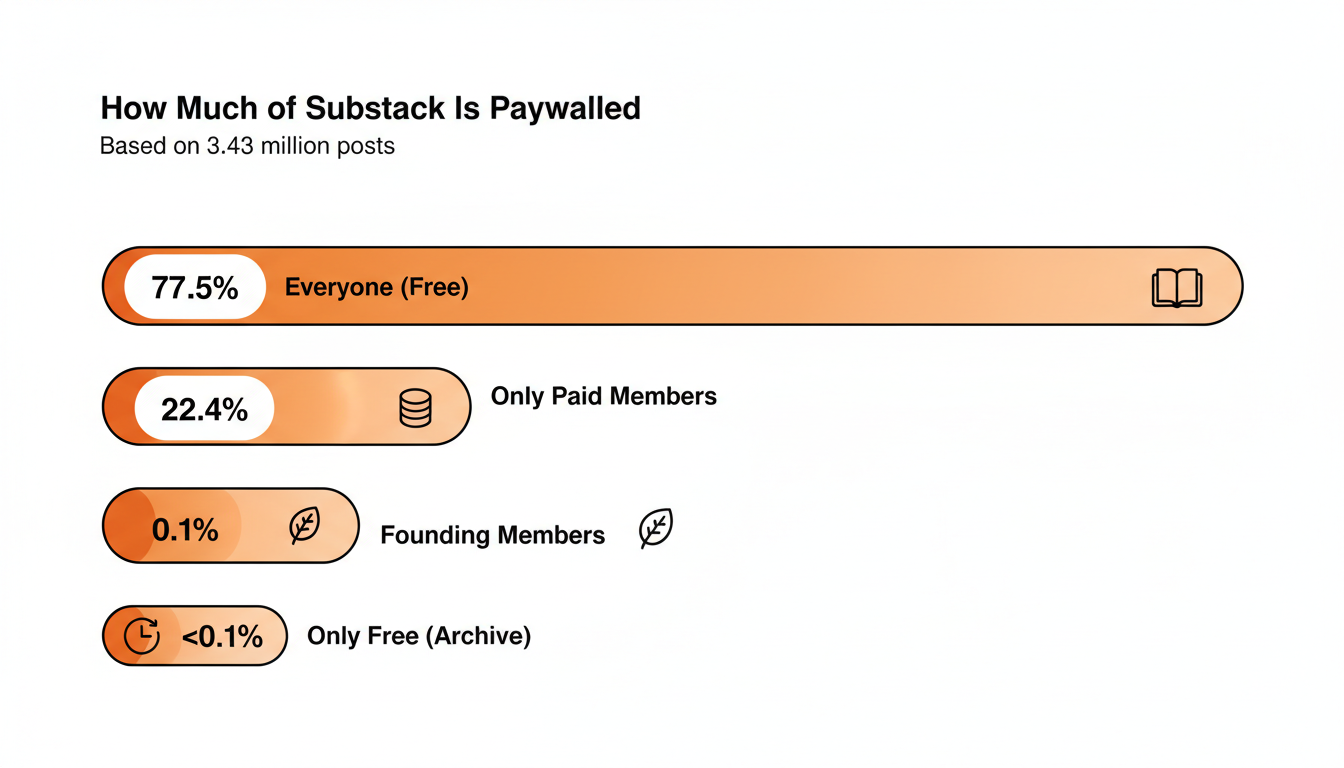
That roughly one-in-five ratio is a useful benchmark on its own: if you're paywalling far more or far less than 20% of your output, you're an outlier relative to the broader Substack ecosystem, which changes how much a free trial can even help. A trial doesn't do much for a newsletter that paywalls almost nothing, because there's no real barrier to remove. It matters more on newsletters that lock a meaningful share of their best material.
On the conversion side, a widely cited benchmark from creators tracking their own Substack numbers puts free-to-paid conversion somewhere between 2% and 5% for most newsletters, with smaller lists often landing closer to 1-3% and larger, more established lists trending toward the higher end. A free trial's job is to move individual readers within that range faster, not to change the ceiling. The ceiling is set by how much your paid content is worth to the people already reading you for free.
Practical rule: if your free-to-paid conversion is well under 2%, the fix is almost never "add a trial." It's usually that free readers don't know what's behind the paywall, or the paywall doesn't contain anything meaningfully different from the free tier.
When a Free Trial Backfires
A trial can actively hurt you in a few specific situations.
If your paid content is time-sensitive (a weekly market recap, a drop schedule, a cohort-based course), a seven-day trial lets a reader consume a full cycle of value and cancel before the first real charge. You've given away the thing you were trying to sell.
If your onboarding email sequence doesn't clearly state when the card will be charged, you will generate support tickets and refund requests from readers who feel surprised, which costs you more in trust than the trial gained you in signups.
If you're already running a discount alongside the trial, you're stacking two different objections-removal tools at once, which usually means you're guessing at the actual objection rather than diagnosing it.
There's also a quieter failure mode worth watching for: trial fatigue among your most engaged readers. If someone has started and canceled a trial once already, sending them the same trial offer again in a Note or email six weeks later tends to read as tone-deaf rather than persuasive. Segment your trial promotions so past decliners get a different message, ideally one that addresses why they think they said no the first time, rather than a repeat of the same pitch.
A Free Trial Launch Checklist
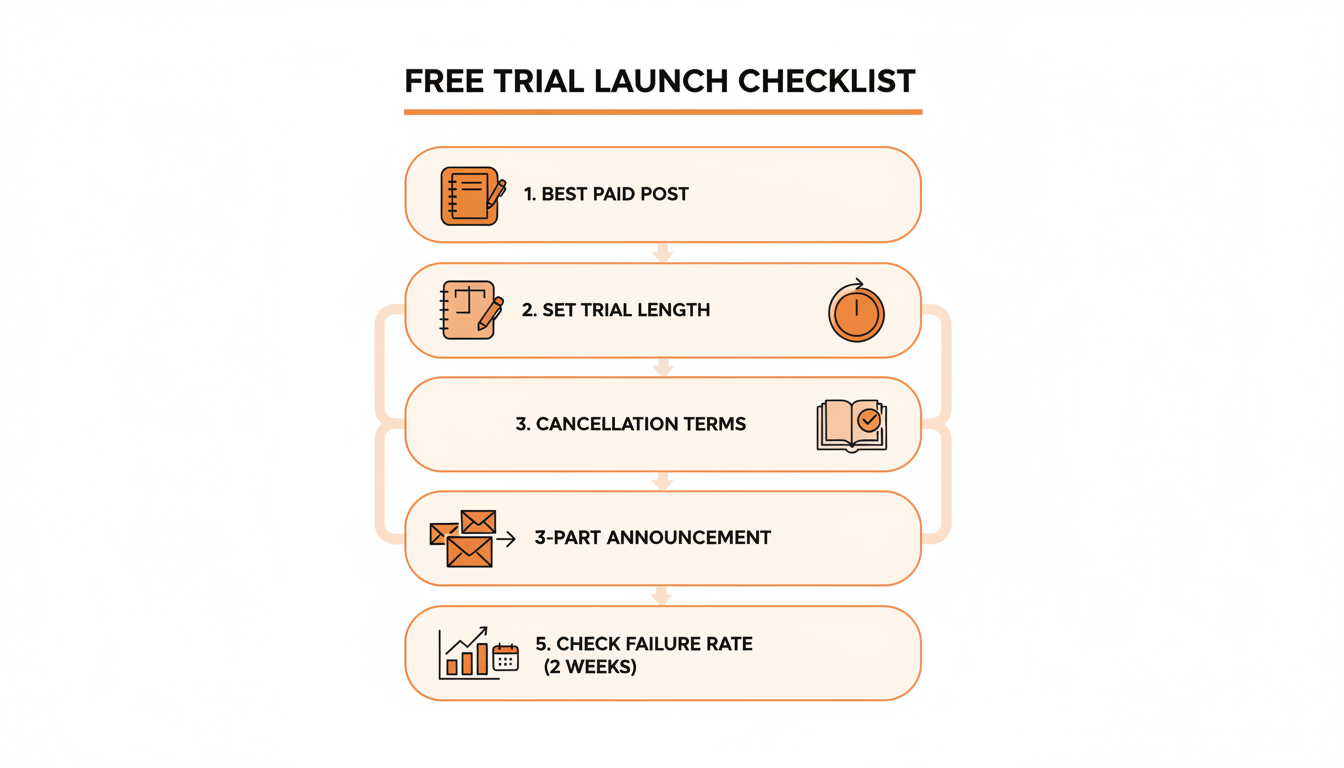
Before turning on a trial, work through this in order:
- Pick one paid post from the last month that free readers responded well to when previewed, and use it as your trial's centerpiece.
- Decide the trial length (seven days is the Substack default, but longer trials suit newsletters with weekly rather than daily cadence).
- Write the cancellation instructions into the offer description itself, not just into a separate help doc.
- Build a short landing sequence: one Note announcing the trial, one post explaining what's behind the paywall, one follow-up before the trial ends.
- Set a calendar reminder to check your charge-failure rate two weeks after the first cohort's trials end.
Practical rule: treat the trial launch like a mini product launch, not a settings change. The toggle takes ten seconds; the messaging around it is what determines whether it converts.
Alternatives If You Skip the Free Trial
A free trial isn't mandatory, and plenty of newsletters convert well without one. If you haven't turned on payments yet, collect pledges before paid so you know who intends to pay. A free preview of your best paid post, sent directly to your full free list rather than gated behind a click, often does more work than a trial because it requires zero commitment to experience the value. A time-limited discount tied to a real event, an anniversary or a milestone subscriber count, can create urgency without the churn risk of a trial that quietly lapses. And simply pitching the paid tier consistently and specifically, rather than through your paywall alone, remains the single most underused lever most newsletters have available.
None of these require Substack's trial feature at all. They can be run entirely through your regular posting and Notes cadence, which means the real constraint usually isn't which lever you pick, it's whether you're actually showing up often enough for any lever to get seen. A trial offer that goes out in a single email has a fraction of the reach of the same offer reinforced across a post, three Notes over the following week, and a mention in your next regular send.
Where WriteStack Fits
Whichever lever you choose, it only works if readers actually see the announcement. WriteStack schedules the Notes and posts that carry a trial launch, tracks which pieces of content are already pulling readers toward your paid tier through the heatmap, and helps you build the kind of consistent posting rhythm that makes a paywall worth having in the first place. If you're planning a trial launch, try WriteStack's Note Generator to build the announcement sequence in minutes instead of starting from a blank page, or head to writestack.io to see the full toolkit.