
I typed a note about a launch I'd been planning for weeks. Six paragraphs in, still going, I hit publish half expecting Substack to stop me. It didn't. No warning, no red counter, no "too long" message. The note just posted.
That's the moment most writers run into the same question. Does Substack Notes actually have a character limit?
The short answer: Substack has never published one. What you'll find instead is a mix of guesses, a joke from Substack's own team, and numbers that third-party tools invented to protect themselves. Here's what's actually true, what the data says about the length that performs best, and how to write Notes that don't turn into a wall of text nobody scrolls past.
One number worth having before you start: WriteStack has close to 100 verified reviews from Substack writers across multiple platforms. The other Notes scheduling tools we've checked have none that we could find anywhere.
Table of Contents
- Does Substack Actually Limit Note Length? - The 10,000-Character Number You'll See Everywhere - What Happens When a Note Runs Long - What Actually Performs: The Data on Note Length - Notes vs. Posts: Different Formats, Different Rules - How to Handle an Idea That's Too Big for One Note - Mistakes That Make a Note Feel Too Long, Even Under Any Limit - Writing and Scheduling Long Notes Without Losing Track - Frequently Asked Questions
Does Substack Actually Limit Note Length?
Go looking for an official answer and you'll land on Substack's own Notes FAQ, published by the Substack team. It describes rich text formatting in Notes, then adds this line about the character limit: "We dare you to try to figure out the character limit."
That's not a typo or an oversight. It's Substack telling writers, in its own words, that it isn't publishing a number. No support article states a hard cap on Notes length the way Twitter states 280 characters for a tweet.
What Happens If You Paste in a Huge Block of Text
Paste a few thousand words into the Notes composer and it will let you keep typing well past what any social platform would allow. At some point, extremely long input does stop accepting new characters, but that ceiling sits far above anything a normal note needs, and Substack has never documented where it actually sits.
Practical rule: treat the absence of a stated limit as permission to stop worrying about hitting a wall, not as permission to write a note the length of a newsletter. The ceiling isn't the problem. Readability is.
The 10,000-Character Number You'll See Everywhere
Search for "Substack character limit" and you'll run into the number 10,000 repeatedly. It's worth being precise about where that number comes from, because it isn't from Substack.
Cross-posting tools that publish to Substack alongside other platforms need a safe ceiling to work with, so several of them, including Ferryman's Substack character limit page, cap what they'll send to Substack at 10,000 characters. That's a self-imposed safety margin those tools chose, not a number Substack has confirmed as an official rule for Notes.
| Platform | Character limit | Source |
|---|---|---|
| X (Twitter) | 280 | Platform-stated |
| Bluesky | 300 | Platform-stated |
| Threads | 500 | Platform-stated |
| Mastodon | 500 (default) | Platform-stated |
| LinkedIn post | 3,000 | Platform-stated |
| Substack Notes | Not published | Third-party tools cap around 10,000 as a safety margin |
Even the regular Substack post editor, a different format from Notes, only produces a "post too long" warning because of Gmail's roughly 102KB email size limit, according to Substack's own support article on the warning. That's an email delivery constraint, not a Substack-imposed content limit, and it applies to full posts, not Notes.
Notes aren't delivered by email at all, which is exactly why that particular constraint doesn't carry over. A note lives in the Notes tab, on a writer's profile, and in the occasional digest email that bundles several notes together, not as its own individual email send. Without the email-size trigger that forces the post-length warning, there's no equivalent mechanical reason for Substack to cap a note's length the same way.
Practical rule: if a source states a specific number for the Substack Notes limit with total confidence, that number came from a tool's internal safety cap, not from Substack. Treat it as a useful ceiling to plan around, not a technical fact to quote.
What Happens When a Note Runs Long
Nothing breaks. That's the good news and the bad news.
A long note publishes fine, appears in full on your profile and in the Notes feed, and readers can scroll it like any other post. There's no truncation on the web, no "read more" fold hiding the second half. What happens instead is behavioral, not technical: a note that runs six paragraphs in a feed built for short-form reading gets skipped.
Substack's own description of Notes frames the format as sitting between microblogging and a full post, a space for "ideas, links, images, and quotes" rather than long-form writing. Readers open the Notes tab expecting that. A note shaped like a newsletter section reads as a mismatch before anyone gets past the first line.
Inside WriteStack's composer, a live character count sits under the text box as you type, so you can see exactly how long a note is running before you publish it, not after.
Does It Behave Differently on Mobile?
The app renders a long note the same way the web does, in full, no fold. The practical difference is how much of it a reader sees before scrolling past. On a phone screen, a note that reads as three lines on desktop can take up most of the visible feed, which makes the scroll-past decision even faster on mobile than on web. If most of a publication's readers are on the app, that's one more reason to keep a note tight rather than to lean on the fact that nothing technically stops it from running long.
What Actually Performs: The Data on Note Length
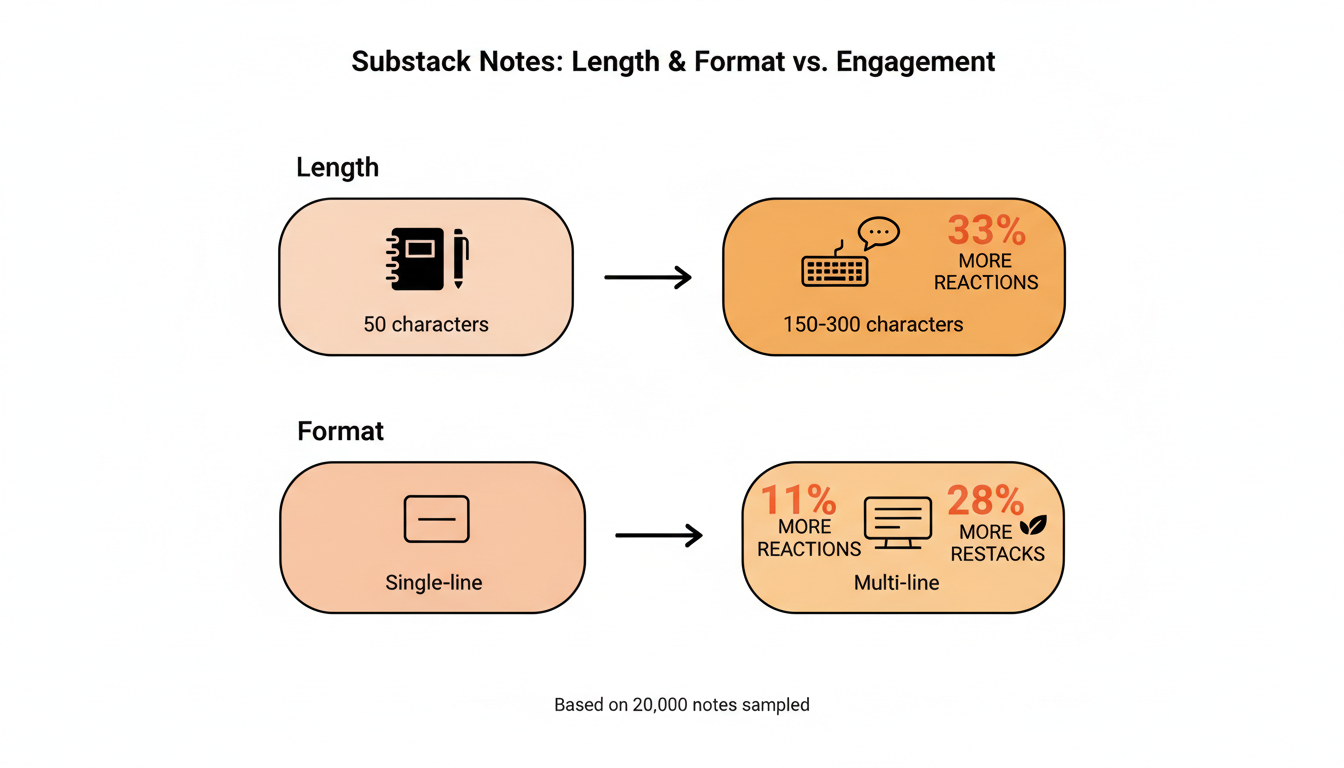
Length isn't just a formatting question. It's a performance one. Looking at a sample of 20,000 recent Notes, two patterns hold up consistently.
Notes between 150 and 300 characters, roughly two to four sentences, outperformed notes under 50 characters by about a third on reactions, and by more on restacks. Multi-line notes, meaning notes broken into two or more short paragraphs instead of one continuous block, averaged about 11% more reactions and about 28% more restacks than single-line notes of similar length.
There's a real reason both patterns show up together. A note broken into two or three short lines forces a pause a single dense paragraph doesn't. That pause is where a reader decides to restack instead of scroll past.
Notes under 50 characters carry the opposite problem. A single sentence with no room to add context reads as a fragment, something clipped from a longer thought rather than a complete idea on its own. It can still work as a quick reaction to something specific, tagging a writer or restacking a quote, but as a standalone note it rarely gives a reader enough to react to. The 150-300 character range sits in the middle: long enough to make a real point, short enough that it still reads as one glance rather than a paragraph to work through.
Practical rule: write to the idea, not to a target length, but if a note is landing in the 20-40 character range too often, it's probably a fragment rather than a finished thought. Give it one more sentence before publishing.
📅 Struggling to stay consistent on Substack?
WriteStack's Smart Scheduling lets you batch and queue Notes in minutes. Grow on Substack without burning out.
Explore Smart SchedulingNotes vs. Posts: Different Formats, Different Rules
Confusion about Notes length usually comes from applying post rules to a different format. They're built for different jobs.
| Notes | Posts | |
|---|---|---|
| Typical length | 1-4 sentences | 800-2,000+ words |
| Character limit | Not published by Substack | Not enforced by Substack; email clients may clip very long posts |
| Delivered by email | No | Yes, to subscribers |
| Where readers see it | Notes tab, profile, subscriber digests | Inbox, publication page |
| Editable after publishing | Yes | Yes |
| Best for | A reaction, a quote, a quick idea, promoting a post | The actual argument, story, or analysis |
A note that reads like a compressed post usually means the idea belongs in a post instead. Substack readers subscribe to a writer's publication for the posts. Notes are how that writer stays visible in between them.
Editing works differently in practice, too. A post that goes out by email is already in a subscriber's inbox the moment it sends, so an edit only changes the web version, not what people already read. A note lives entirely inside Substack's own feed and profile, so an edit updates what every reader sees immediately, which makes it a reasonable place to fix a typo or tighten a line after the fact without worrying that half the audience already saw the old version.
Ready to see this in action? WriteStack's Notes composer shows the character count and formats a note for both formats side by side, so you can decide before you publish, not after a note underperforms.
How to Handle an Idea That's Too Big for One Note
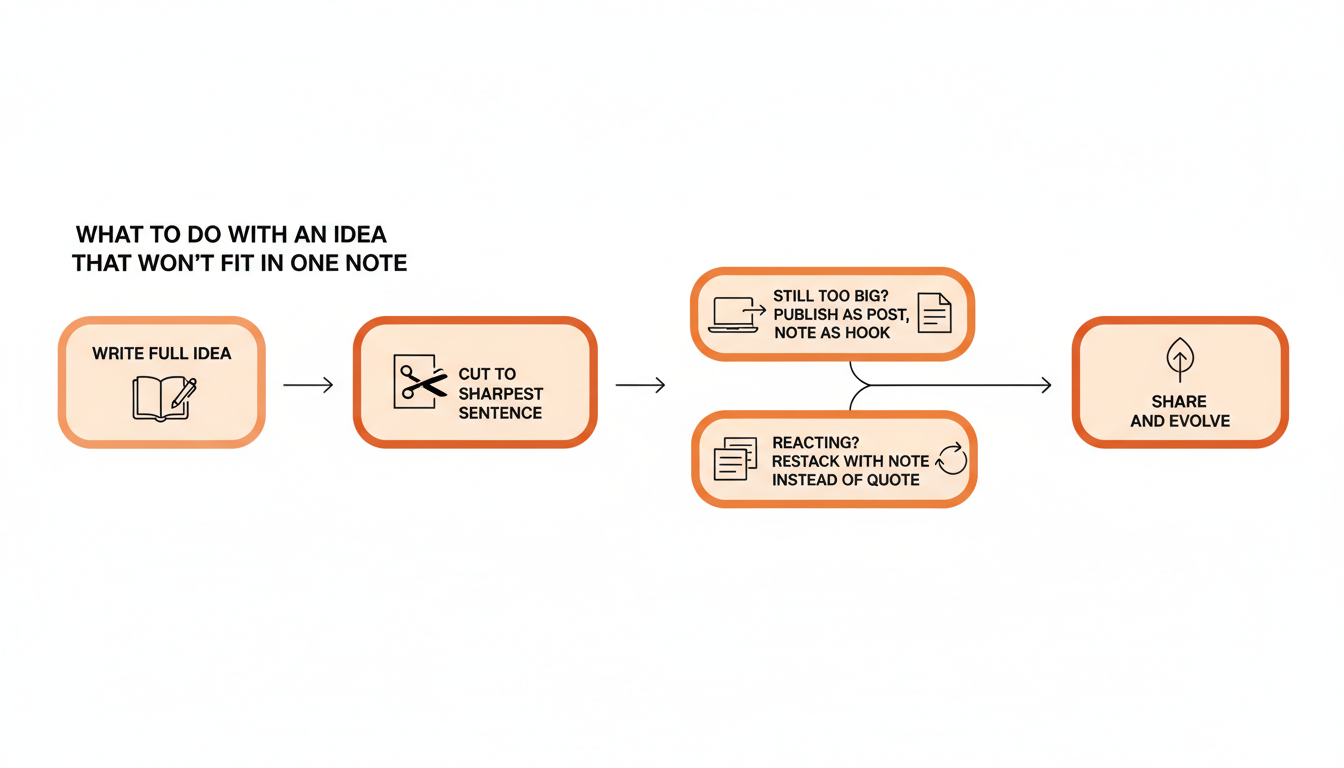
The instinct is to keep typing until the whole thought fits in one note. There's a better order of operations.
- Write the idea in full first, in a draft, without worrying about length at all.
- Cut it down to the single sharpest sentence or two. That's the note. Everything else either gets trimmed or belongs somewhere else.
- If the full idea genuinely needs more room, publish it as a post, and use the note as the announcement or the hook, with a link back to the post.
- If it's a live reaction to something you read, restack it with a note instead of quoting the whole thing yourself. The restack carries the original context; your note just needs to add the take.
This is where an AI draft that starts from your own published writing earns its keep. WriteStack's note generator reads your past Notes and posts and drafts new notes in your existing voice, so cutting a long idea down to size starts from something that already sounds like you instead of a blank box you have to trim from scratch. If a draft doesn't land, switching the underlying model gets a different take on the same idea instead of forcing you to live with one voice.
Mistakes That Make a Note Feel Too Long, Even Under Any Limit
A note can sit well under any reasonable length and still feel long to a reader. A few patterns explain most of it.
No line breaks. A 280-character note as one unbroken block reads longer than a 400-character note split into three lines. Whitespace is doing real work here, not just decoration.
The link comes first. Leading with a URL pushes the actual point further down and reads as promotional before the reader knows why they should care. Make the point, then link.
No reason to stop scrolling. A note that opens with setup instead of the idea gets judged in the first half-second, before the reader reaches the interesting part.
Restacking without adding anything. A restack with an empty or one-word note ("This.") skips the chance to say why the piece mattered, and it's the single most common way a restack gets scrolled past instead of read. One added sentence turns a repost into a recommendation with a reason attached.
Writing for the algorithm instead of the reader. A note stretched out just to hit a length that "feels long enough" reads exactly like what it is. The 150-300 character range that performs well in the data isn't a target to hit, it's what a genuinely complete short thought tends to land at on its own.
The part people don't expect: WriteStack's engagement dashboard tracks link clicks across a publication's entire Notes history, not just the last week, so you can see exactly which note structure, links up front versus links at the end, actually drove clicks for your specific audience instead of guessing from general advice. It also benchmarks restack rate against other publications, so "is this note working" gets answered against the field, not just against your own last note.
Writing and Scheduling Long Notes Without Losing Track
None of this matters much for one note written in the moment. It matters a lot once someone is trying to post several times a week without a length check turning into a second job.
WriteStack's composer keeps a live character count visible while drafting, queues a week of Notes in one sitting through batch scheduling, and works from a browser extension plus Substack's own native scheduler, so a note goes out from your own logged-in session instead of a third-party server publishing on your behalf while you're not signed in.
Load a week of Notes in twenty minutes. Set them up once and watch them post on schedule without a second look at length, timing, or whether today is the day you forgot to write anything.
Frequently Asked Questions
Is there an official Substack Notes character limit?
No. Substack has not published one. Its own Notes FAQ jokes about it directly rather than stating a number, which is about as close to an official answer as exists.
Where does the "10,000 character" figure come from?
From cross-posting tools that need a safe internal ceiling to work with, not from Substack. Ferryman's Substack character limit page is one example of a tool stating that cap for its own cross-posting purposes.
Does a long note get cut off or truncated?
Not on the web. A long note publishes in full and displays completely on your profile and in the Notes feed. What suffers is engagement, not display, once a note runs past a few short lines.
What's the best length for a Substack Note?
Based on a sample of 20,000 recent Notes, notes in the 150-300 character range, broken into two or more short lines, consistently out-perform both very short fragments and long single-block paragraphs on reactions and restacks.
Should I ever write a longer note?
Occasionally, and it can work when the whole note is one continuous, tightly written thought rather than several ideas stacked together. But once an idea needs real development, room to build an argument or tell a story, it usually belongs in a full post instead, with the note serving as the announcement.
Does note length affect whether Substack shows it to more readers?
Substack hasn't published a formula for how notes get distributed, so there's no confirmed length input to point to directly. What the reaction and restack data shows is indirect but consistent: notes in the 150-300 character range get more of both, and restacks are one of the main ways a note reaches readers who don't already follow the writer. Length that earns a restack ends up mattering for reach even without Substack stating it as a direct ranking factor.
The Actual Answer
Substack Notes doesn't have a published character limit, and the number you'll see quoted most often, 10,000, comes from third-party tools protecting themselves, not from Substack. What decides whether a note works isn't whether it fits under some ceiling. It's whether it's short enough to read in one glance and broken into lines a reader's eye can move through. Multi-line notes in the 150-300 character range consistently outperform both fragments and walls of text. Start drafting and scheduling Notes with a live length check built in instead of finding out after the fact that a note ran too long to land.