

You publish a post, it goes out to your list, it gets a good day of opens, and then it stops existing. A week later nobody can find it. Six months later even you can't find it without scrolling your own archive.
Substack SEO is the practice of making that same post findable on Google for years instead of one morning, using the handful of controls Substack actually gives you. We pulled the numbers on how many writers bother: out of 3,097,383 Substack posts in our database, 98.7% never set a custom SEO title and 96.9% leave the search description empty. Nearly everyone is ignoring search entirely, which means the writers who take it seriously are competing against almost nobody.
One number worth having before you start: WriteStack has close to 100 verified reviews from Substack writers across multiple platforms. The other tools in this category have none that we could find anywhere. That matters here because search is a slow channel, and the tool you pick to carry your distribution while search compounds is a decision you live with for months.
Table of Contents
Why Substack SEO Is Worth Your Time
A Note has a shelf life of about a day. A post that ranks on Google keeps sending readers for months, sometimes years, without you touching it again. That difference in lifespan is the whole argument for spending any effort on search.
Position matters more than most writers assume. Backlinko's analysis of 4 million Google search results found the top organic result takes roughly 27% of all clicks, and click-through rates fall off a cliff after the first few positions. Ranking eighth for a big keyword is worth less than ranking first for a small one.
There is also a compounding effect that network growth doesn't have. Every post that ranks becomes a permanent doorway into your publication. Ten ranking posts means ten doorways, each one working while you sleep, while every Note you publish starts from zero attention again.
The cost is time. Doorways take months to open. Almost nobody quits SEO because it stopped working, they quit at month three when Search Console still shows a flat line, and by then they have also stopped publishing the Notes that were bringing readers in meanwhile. The writers who win search are the ones who kept a second channel running the whole time they were waiting.
Search readers convert differently
Someone scrolling Notes is passing time. Someone who typed "how to price a paid newsletter" into Google has a problem right now, and if your post solves it, subscribing is the natural next step. Search traffic is smaller than viral Notes traffic for most writers, and it arrives pre-qualified. A post that brings 200 search visitors a month and converts 5% of them adds 120 subscribers a year on autopilot.
Practical rule: Treat every post as two assets. The email goes out once. The web page can bring in readers for years, but only if you set it up for search before you hit publish.
Two assets is also twice the work, because a post you want to rank is a post you should be talking about for a week. WriteStack's Notes generator reads what you have already published and drafts Notes from it, so one afternoon of SEO research turns into a queue of Notes in your own voice rather than five prompts and three rounds of editing. Start a free 7-day trial and turn your next post into a week of distribution.
What 3.1 Million Posts Show About Substack SEO
We looked at 3,097,383 posts across 56,565 Substack publications to see how writers actually handle the SEO settings Substack gives them. The short version: they don't.
| What we measured | Result |
|---|---|
| Posts analyzed | 3,097,383 (56,565 publications) |
| Posts with a custom SEO title | 1.3% |
| Posts with a custom search description | 3.1% |
| Titles longer than 60 characters (truncated on Google) | 16.2% |
| Average title length | 39.5 characters |
The SEO title field, the most direct signal you can send Google about what a post covers, goes unused on 98.7% of posts. Roughly one post in six also ships with a title so long Google cuts it off mid-sentence. In most channels you compete against people trying hard. On Substack search, you mostly compete against people who never opened the settings panel.
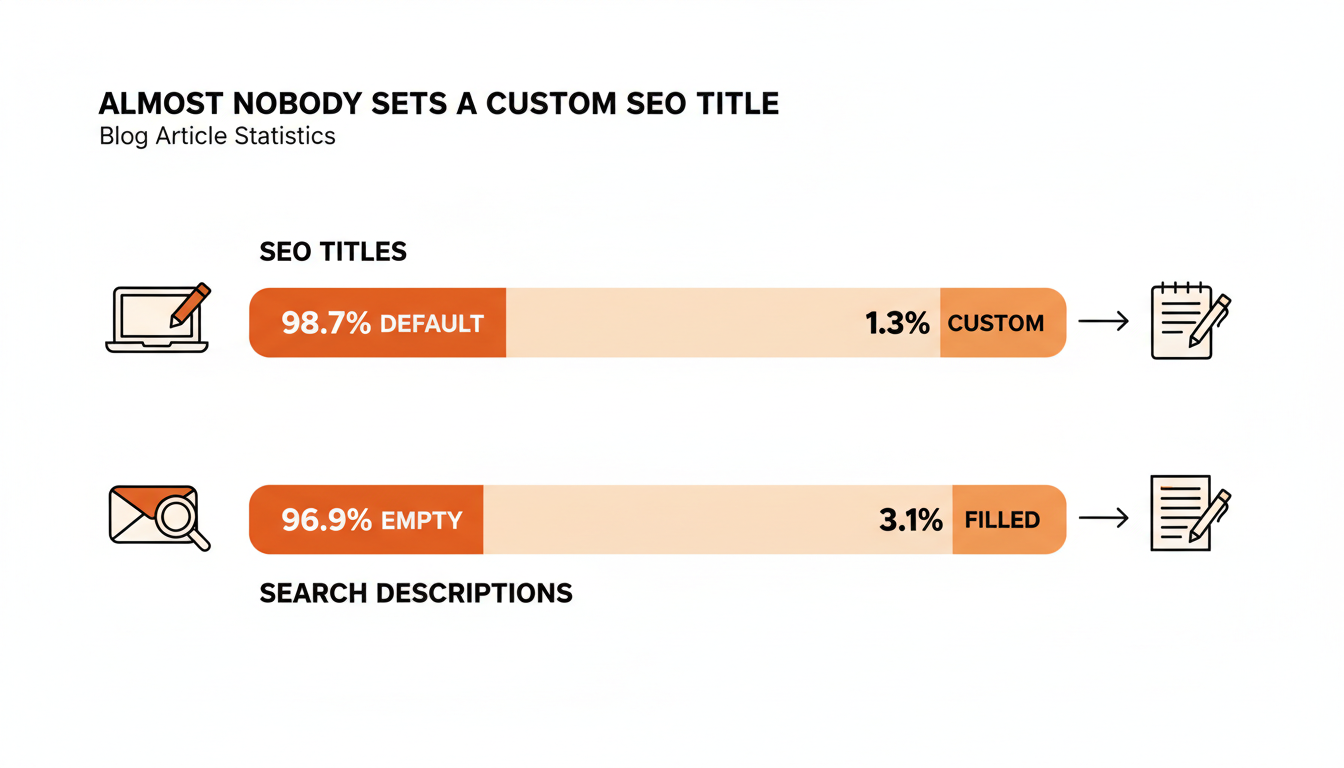
Being ahead of a field that isn't trying is a real edge and a small one. Two filled fields do not outrank an established site on a competitive term. They win long-tail queries where the current results are thin, which is still a fight measured in months.
Practical rule: Before chasing backlinks or domain tweaks, fill in the SEO title and search description on your ten most-visited posts. It is the highest-return 20 minutes in Substack SEO, and it is the floor, not the ceiling.
How Google Sees Your Substack
Substack handles the technical plumbing better than its reputation suggests. Every publication gets clean HTML, fast pages, a sitemap at yourname.substack.com/sitemap.xml, and proper meta tags. You cannot install plugins or edit code, and Substack's own SEO guidance confirms the platform generates the standard signals search engines expect.
What you control is real but narrow: the post title, the SEO title, the search description, the URL slug, the header structure inside the post, and the links between your posts. Six levers, every one a content decision rather than a technical one. None of them moves a page by itself. They stack, slowly, on top of posts that were already worth ranking. There is no technical fix available to you here, which means every remaining lever runs on a timeline of quarters.
Do you need a custom domain?
A Substack custom domain (yoursite.com instead of yoursite.substack.com) gives you two real benefits: you own the address if you ever leave the platform, and links people build accrue to a domain you control. It is worth the $50 setup fee for anyone serious about long-term search traffic, and it is not the bottleneck. A great post on a substack.com subdomain outranks a thin post on a custom domain every time.
Connect Google Search Console
Search Console is free, takes ten minutes to verify, and answers the question every writer eventually asks: which of my posts does Google actually show people? The most useful report is the query list, because you will find posts ranking on page two for keywords you never targeted. A small title edit or an added section often moves one of those onto page one, since the hard part is done.
What Search Console will not tell you is anything about the other half of your traffic. It has no idea which Note sent readers to that post, which link inside the Note they clicked, or how any of it compares to publications your size. Substack's own dashboard does not answer those either. WriteStack's link-click tracking runs across your full Notes history, so "this post got a spike on Thursday" becomes "this Note sent 40 people to that post, and it was the second link that did it."
Practical rule: Check Search Console for queries where you rank between positions 8 and 20. Those posts need edits, not replacements.
Keyword Research for Newsletter Writers
Keyword research sounds like a marketing department activity. For a newsletter writer it reduces to one question: what does my ideal reader type into Google, in their exact words? You are not looking for volume records. You are looking for questions you can answer better than the current results.
Small keywords are your friend. A term with 200 searches a month and weak results beats a term with 20,000 searches dominated by major publishers. Newsletters win on specificity and lived experience, so pick fights where those matter.
Free ways to find keywords
You do not need a paid tool to start. Four sources cover most of it:
- Your inbox and comments. Questions readers send you are keywords, phrased by the exact audience you want more of.
- Google autocomplete. Type your topic and a space, then each letter of the alphabet. The suggestions are real queries with real volume.
- People Also Ask boxes. Each expandable question is a proven search Google is actively looking to source an answer for.
- The current results. If page one is thin listicles and forum threads, you can win. If it is all major publications, pick a narrower angle.
A fifth source sits inside your own Notes. A Note that got unusual engagement means a phrasing landed, and phrasings that land in Notes are often phrasings people search. WriteStack surfaces which of your Notes actually drove clicks rather than just likes, which turns your Notes history into a keyword list nobody else can see.
Match the intent before you write
Google ranks pages that match what searchers want, and the current results tell you what that is. If everything ranking for your keyword is a how-to guide, a personal essay will not rank there no matter how good it is. Check the format before writing: how-to, comparison, list, or definition. Then write in that format with your own material.
Intent mismatch is the most common reason a well-written post never ranks, and it fails silently, because the post is good at answering a question nobody asked in that phrasing.
Struggling to stay consistent on Substack?
Batch and queue your Substack Notes in minutes, track which Notes convert subscribers, and grow without burning out.
On-Page SEO Inside the Substack Editor
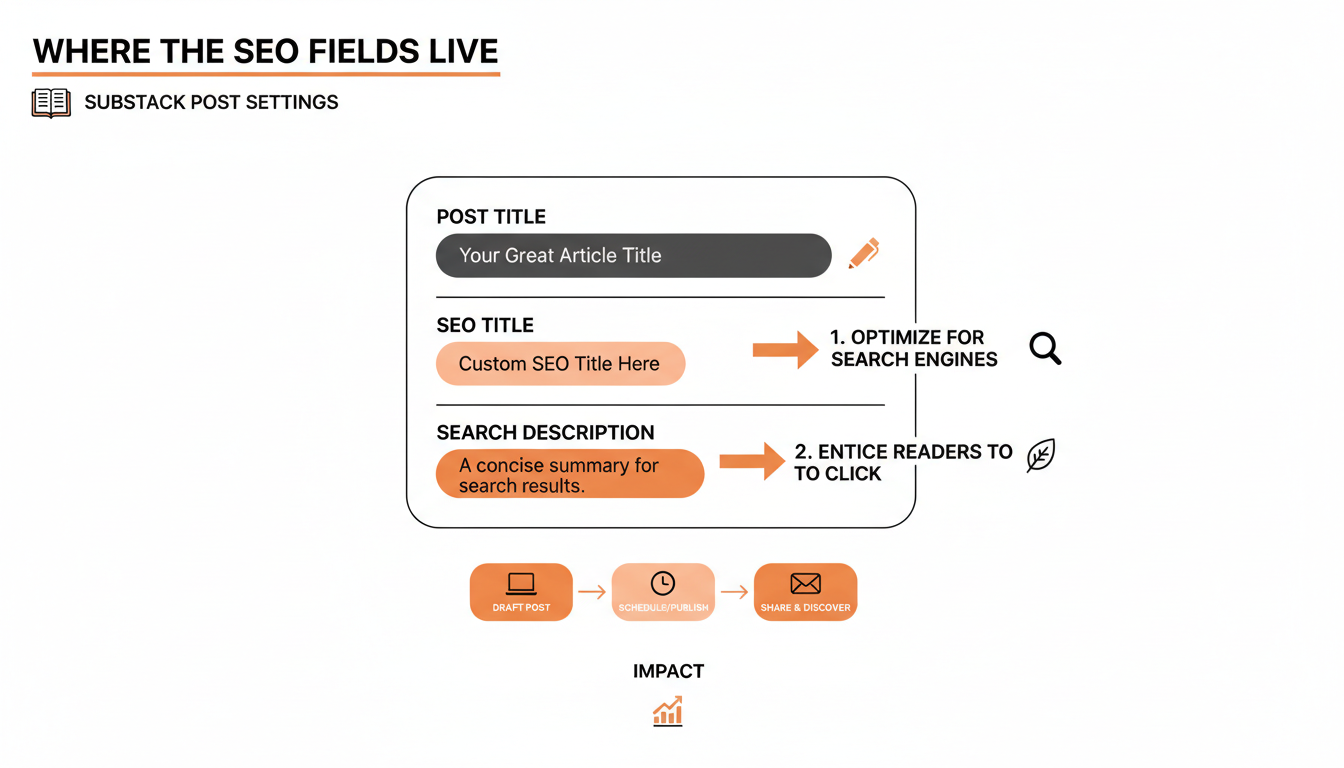
Everything in this section lives in the post editor's settings panel, under "SEO" (open a draft, click the settings gear). None of it takes more than a few minutes per post, and per our data above, almost nobody does it.
The SEO title and description fields
Substack lets your post carry two titles: the one subscribers see in email, and a separate SEO title shown to Google. Use both. Your email title can be curiosity-driven for people who already trust you ("The mistake that cost me 400 subscribers"). Your SEO title should carry the keyword plainly for strangers ("Substack Growth Mistakes: What Losing 400 Subscribers Taught Me").
Keep the SEO title under 60 characters so it displays in full. Our data shows the average Substack title is 39.5 characters, so most writers have room, yet 16.2% of posts still overflow the limit. The search description is the two-line pitch under your title in results. Write it like ad copy: what the reader gets, in one or two plain sentences, with the keyword included, since Google bolds matching words. Aim for 150 to 160 characters.
Fill in both fields on every post. Neither is a growth plan. They control how your page looks once Google has already decided to show it, and getting shown is the part that takes months.
What the headline data says about length
The same headline has to work in a Note, and the two formats have opposite constraints. Search rewards brevity because Google truncates past 60 characters. Notes reward the opposite.
We looked at a sample of 20,000 recent Substack Notes. Notes running 150 to 300 characters outperformed Notes under 50 characters by roughly a third on reactions, and by more on restacks. Multi-line Notes averaged about 11% more reactions and about 28% more restacks than single-line Notes. A one-line Note that repeats your 55-character SEO title is the worst of both formats: too short to earn engagement, too flat to earn a click.
So the promotional Note for a ranking post should not be the headline. It should be the argument, in 150 to 300 characters, broken across lines, with the link. WriteStack drafts those from the post itself rather than from a prompt, which is the difference between a Note that sounds like your post and a Note that sounds like a bot summarizing your post.
| Job you actually need done | Substack's own tools | WriteStack |
|---|---|---|
| Draft Notes from a post you already published | No | Yes, in your voice, from your own published work |
| See which link inside a Note earned the click | No | Yes, across your full Notes history |
| Compare your numbers against publications your size | No | Yes |
| Trend analysis on restack rate month over month | No | Yes |
| Schedule Substack chat posts | Yes, in the Chat tab | Yes |
| Queue a week of promotional Notes in one sitting | One at a time | Built for this |
| Switch AI models when a draft misses your voice | No | Yes |
| See when your audience actually engages | No | Heatmap of real engagement times |
| Set an SEO title and search description | Yes, use it | Lives in Substack, as it should |
| Verified reviews from Substack writers | Not applicable | ~100 across multiple platforms |
Start your free trial and stop guessing which Notes moved readers to your posts.
Slugs, headers, and images
Edit the URL slug before you publish. Substack generates it from your title, filler words included. Trim it to the keyword: /p/substack-welcome-email beats /p/heres-everything-i-know-about-welcome-emails-after-two-years. Changing a slug after publishing breaks existing links, so get it right the first time.
Use real headers inside the post. Google reads H2s and H3s as a map of what the page covers, and a post with clear sections answers more query variations than one unbroken wall of text. Give images descriptive alt text as well, which is a small ranking signal, makes posts accessible, and picks up image search traffic.
Practical rule: Fill in slug, SEO title, search description, and headers in one pass before publishing. As a pre-publish habit it costs three minutes. As a retrofit across your archive it becomes a project you will never start.
Links Still Decide Most Rankings
Content quality gets you into the game. Links decide close calls. Google still treats a link from another site as a vote of confidence, and Substack's support documentation names inbound links as the main way to improve how your publication ranks.
Internal links are the ones you fully control. When a new post touches a topic you covered before, link the old post in the body text, with descriptive anchor text rather than "click here." That shows Google which of your posts relate to each other, and it moves readers deeper into your archive instead of letting them bounce. Go the other direction too: when a new post starts ranking, open your older related posts and add links pointing to it, since pages that already have authority pass some of it forward.
Inbound links you cannot manufacture, and you can make them likely:
- Put your URL everywhere you already exist. X bio, LinkedIn, Instagram, personal site, podcast show notes.
- Guest write. A post on another writer's publication with a link back is the classic move, and Substack's culture of collaboration makes the ask normal.
- Publish citable numbers. "I tested 5 posting schedules for 90 days, here are the numbers" earns links that opinion pieces never will.
- Do recommendation swaps with a written blurb. Blurbs on high-traffic publication pages put your name and link in front of new audiences.
Every one of those depends on people finding your work before they can link to it, the circular problem at the center of newsletter SEO. Links come from visibility, visibility comes from links. Notes are how most Substack writers break the loop, because a Note that gets restacked into a bigger writer's feed puts your post in front of the exact people who might cite it. That is the practical reason to run a Notes queue while you wait on search: it is the input to the link building, not a distraction from it.
Where Substack SEO Stops, and What Carries You Meanwhile
Some honesty before the workflow section. Substack SEO has a ceiling, and knowing where it sits saves you from wasting effort.
You cannot add schema markup, install plugins, edit robots directives, or restructure the archive page. Writers who need that control eventually pair Substack with a separate site. For most, the trade is fine: less control, zero maintenance.
Results are slow, and no setting changes that. New publications routinely wait months for meaningful search traffic. SEO rewards writers who were already going to publish for years, and it does very little for anyone hoping to reach their first hundred subscribers this quarter.
Which leaves an obvious question about those months. Something has to bring readers in while the posts age into rankings, and on Substack that something is Notes. The two channels feed each other: the research behind a ranking post is the raw material for a week of Notes, and the Notes are what get the post seen, linked, and eventually ranked. Running only one of them is the slow version of both.
The part people don't expect
WriteStack drafts Notes from your own published posts rather than from a prompt, so an article you wrote for search becomes a week of distribution that already sounds like you. It tracks which of the two links inside a Note got clicked, going back to your very first Note, which is the attribution Substack's own dashboard does not give you at all. And it benchmarks your numbers against other publications your size, so "is 200 search visitors a month good" has an actual answer instead of a shrug. Open the dashboard on a Tuesday and see that the Note you almost didn't post sent 40 people to a post you published in March, and that your restack rate is running well above typical for a publication your size. Not better than last week. Better than the field.
Search traffic also does not replace the email list. A Google visitor you fail to convert is gone. The post's job is to rank, the subscribe prompt's job is to make the visit permanent. Make sure ranking posts have a clear reason to subscribe near the top, not just Substack's default footer.
Practical rule: Judge SEO on a six-month window and Notes on a one-week window. Using either channel's clock to judge the other leads to quitting the wrong one.
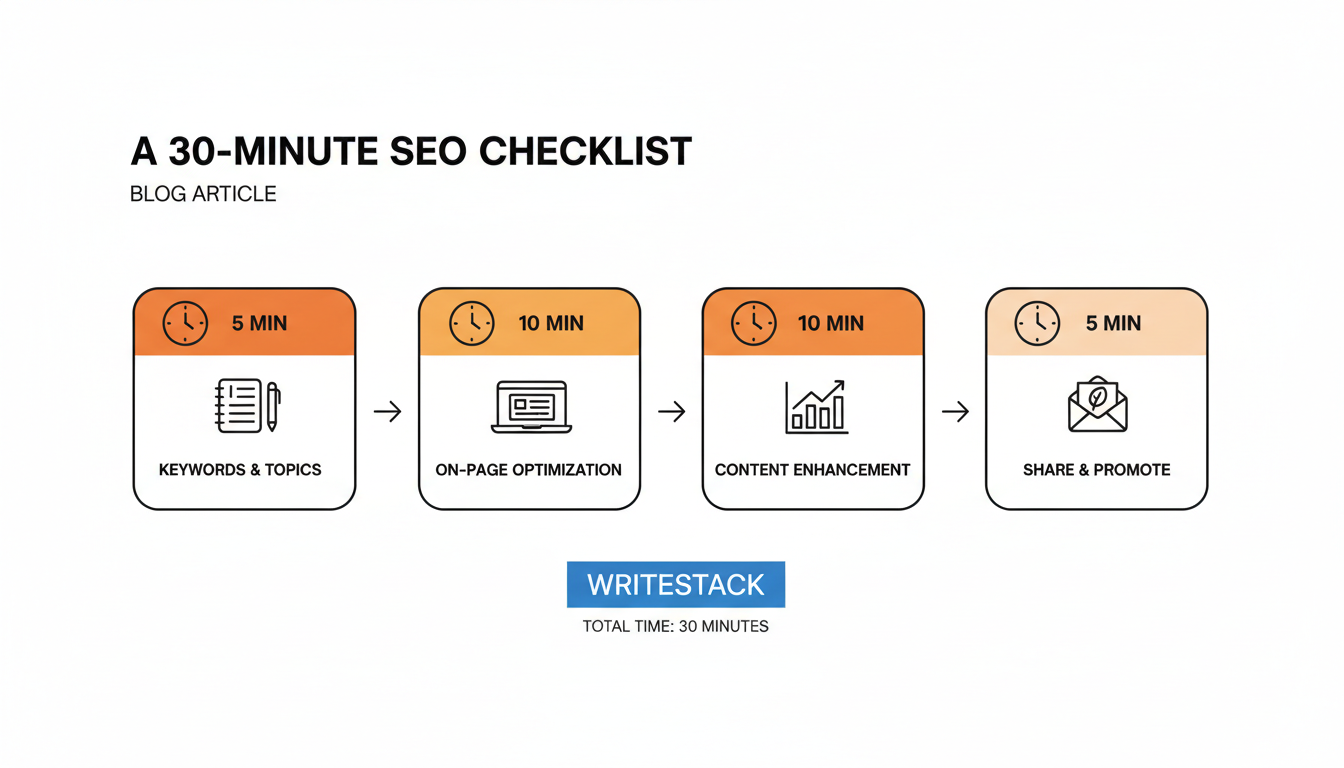
A 30-Minute Weekly SEO Routine
None of this requires becoming an SEO person. A weekly half hour, attached to a publishing schedule you already keep, covers everything that matters:
- Five minutes: scan Search Console. Note any query where you rank between positions 8 and 20.
- Ten minutes: upgrade one old post. Take the best opportunity from step 1 and tighten its SEO title, rewrite its search description, and add a section if the query deserves one.
- Ten minutes: set up this week's new post. Slug, SEO title, search description, headers, one internal link to a related older post.
- Five minutes: queue the Notes. Generate 5 Notes from the post you just published and drop them into next week's schedule so the post has distribution while it waits on Google.
Step 4 decides whether the other three ever pay off, and it is the one writers skip when the week gets full. Hand it to software. WriteStack generates the Notes from the post and fills the queue through Substack's own native scheduler inside your browser, so nothing publishes on your behalf from someone else's server. WriteStack's heatmap shows when your audience actually engages, so those Notes land at the hours your readers are awake rather than the hours you happen to be at your desk.
WriteStack's pricing runs three tiers: Hobbyist at $19.99/month, Standard at $24.99/month with cross-posting via Buffer to 11 platforms, and Enterprise at $79.99/month with unlimited AI credits and advanced search across millions of Notes. All three carry a 7-day free trial. There is no free-forever tier, because the analytics layer is the product and it cannot be sampled at 30 Notes a month.
What Six Months of Running Both Channels Changes
The writers winning Substack search in 2026 are not SEO experts. They are regular writers who filled in two fields the other 98.7% ignored, picked keywords their readers actually type, and kept publishing while the rankings caught up.
Six months in, the change is not that you rank for more terms. It is that the two channels stopped competing for the same thirty minutes. Monday's post gets its slug and its SEO title in three minutes, and the Notes that carry it are already written and already scheduled, drafted from the post itself instead of from a blank composer at 11pm. Search Console shows a query climbing from position 14 to position 6, and the link-click data shows which Note put the post in front of the person who linked to it.
That is the loop, and WriteStack is what closes it: Notes drafted from your published posts in your own voice, link-click history across every Note you have ever sent, and benchmarks that tell you how your numbers compare to publications your size instead of just to your own last week. Close to 100 verified reviews from Substack writers back that up, and no other tool in this category has any we could find.
Start a free 7-day trial. Turn one post into a week of Notes. Let Google take its time.