
A lot of writers get to the point where their newsletter has outgrown Mailchimp, or ConvertKit's pricing has crept past what the list is actually worth, or Beehiiv just isn't where their readers are anymore. The writing already works. The list took years to build. The only thing standing between here and Substack is the fear of breaking all of it in one afternoon.
That fear is reasonable, and it's solvable. How do you migrate to Substack without losing subscribers, tanking your open rates, or breaking the archive you've spent years building? The short version: migrate in the right order, treat the first 30 days after the move as its own project instead of an afterthought, and know ahead of time what simply won't come with you no matter how carefully you plan.
This covers what actually transfers platform to platform, the import steps for the platforms writers move from most, and the part most guides skip: what to do with your list in the weeks right after the move so a change of address doesn't quietly turn into a slow bleed of engagement.
One number worth having before you start: WriteStack has close to 100 verified reviews from Substack writers across multiple platforms. The other tools built for Substack growth have none that we could find anywhere. You are about to hand a new tool your publishing schedule during the most fragile month your list will ever have, so that gap is worth knowing about now rather than in week three.
Table of Contents
What Actually Transfers When You Migrate to Substack
Substack has a built-in importer for the platforms most writers leave, and it handles your email list and your post archive as two separate processes. Planning for both before you touch either one saves a lot of stress later. If your old site ran on your own domain, you can keep your domain when you move by connecting it to Substack.
Substack's own support documentation lists direct import support for Mailchimp, Kit (formerly ConvertKit), Beehiiv, Ghost, Medium, WordPress, Tumblr, Blogspot, Patreon, Flodesk, Tinyletter, and Mailerlite, covering subscriber lists and, for most of these, post content too (Substack support, "How do I import my mailing list from another platform"). Here's the practical breakdown of what moves and what doesn't.
| What you're moving | Transfers to Substack? | Notes |
|---|---|---|
| Free subscriber emails | Yes | CSV upload, columns mapped manually |
| Paid subscriber emails | Yes, with setup | Offer a trial so nobody gets billed twice during the switch |
| Published posts | Yes | Direct importer covers most major platforms |
| Post comments | No | Comment history doesn't carry over |
| Post likes and reactions | No | Engagement history resets to zero |
| Sender reputation | No | You're sending from a new domain with no history yet |
| Your standing in Substack's discovery feed | No | You start at zero Notes, zero restacks, zero recommendations |
Practical rule: treat the list import and the post import as two separate checklists. Handling migration as one single step is where most of the mistakes further down this guide happen.
That last row is the one that decides how the next six months go, and it is the only row on the table that no importer will ever fill in for you.
The Reason You're Moving Is the Thing Most Migrations Skip
Nobody moves to Substack for the editor. The editor is fine. Mailchimp's editor is also fine, and Ghost's is nicer in places. The reason writers move is that Substack is the only major newsletter platform with a discovery layer attached to the mailing list: Notes, restacks, and the recommendation network, all of which can put your publication in front of readers who have never heard of you and were not on any list you imported.
Mailchimp has no equivalent. Kit has no equivalent. Ghost has no equivalent. Beehiiv's boosts are a paid placement network, not a feed where your writing circulates on its own merit. Substack's growth mechanism is the product difference you are paying for by moving, and it is the entire reason the migration is worth the weekend.
Which makes the standard migration a strange thing to watch. A writer spends three weeks planning the CSV export, cleaning bounces, staging the post import, and emailing paid subscribers about the cutover, then lands on Substack, publishes a "we've moved" post, and goes quiet in Notes for a month. The list arrived. The reason for moving it did not get used. Every subscriber who came over is one you already had, and the upside of the platform sits behind a feed nobody opened.
The fix is a separate project from the import, and it has to start in week one while the network is still giving a newly arrived publication a small burst of curiosity. That means Notes going out consistently from day one, in the same weeks you are learning a new dashboard and reassuring paid subscribers about billing.
Start a free 7-day trial of WriteStack and queue your first month of Notes before the import finishes running.
Before You Touch the Import Button
The single biggest mistake in a Substack migration happens before the first CSV ever gets uploaded: bringing over a list that was never properly consented, or dragging years of dead addresses along with the addresses that actually still read you.
Getting Consent Right
Substack requires confirmation that everyone in an imported file actually opted in to hear from you, in line with GDPR and CAN-SPAM rules (Substack support). That checkbox isn't a formality to click past without thinking. If your old platform let people onto your list through a co-registration form, a purchased list, or a lead magnet from four years ago that nobody remembers signing up for, bringing all of it over invites spam complaints on a domain that hasn't built any sending reputation yet.
Practical rule: if you can't remember how or when someone joined your list, leave them out of the first import. Adding people back later is easy. Undoing a spam complaint on a brand-new sending domain is not.
Cleaning Your List Before You Import
Export your list from the old platform, then filter it before uploading anywhere. Pull out hard bounces, remove anyone who unsubscribed on the old platform (Substack has no way of knowing they opted out unless you exclude them yourself), and think hard about leaving out subscribers who haven't opened an email from you in the last six to twelve months.
A smaller list of real readers beats a padded list of long-dead addresses on every metric that matters after the move, starting with open rate, which is also part of what Substack shows prospective new readers about your publication.
How to Import Your Email List
The export step differs by platform, but the Substack side is identical no matter where you're coming from: Settings, then Subscribers, then Import, then upload a CSV with email addresses and, optionally, names (Substack support, "How do I move from my current platform to Substack"). Substack maps the columns, flags anything malformed, and reports how many rows imported successfully versus how many were skipped.
Mailchimp to Substack
In Mailchimp, go to Audience, then All Contacts, then Export Audience. Mailchimp emails you a download link for the CSV. Clean that file using the steps above, then upload it through Substack's importer and map the email and name columns when prompted. Review the skipped-rows report before assuming the import is done. Mailchimp's addresses often include old test entries and long-bounced accounts that are worth cutting here rather than carrying forward.
ConvertKit, Beehiiv, Ghost, and WordPress
Kit (the renamed ConvertKit) and Beehiiv both offer a subscriber export to CSV from their audience or subscriber settings, formatted close enough to Substack's expected layout that mapping is usually a one-minute step. Ghost exports members the same way, from Settings, then Members, then a CSV export option. WordPress depends on what's running the list: a newsletter plugin usually has its own export, while Jetpack-connected sites can pull subscriber data from Jetpack's own settings panel.
Posts follow a separate importer that supports Medium, Ghost, WordPress, Mailchimp, and Beehiiv directly, plus RSS-based imports from platforms like Squarespace (Substack support, "How do I import my posts from another platform").
Practical rule: import your post archive before your subscriber list. Formatting problems in old posts are far less stressful to fix when there's no live audience watching your dashboard yet.
There's a second reason to import the archive first. Once those old posts are live, they stop being a museum and become raw material: WriteStack's Notes generator drafts from what you have already published, so an archive that lands on Tuesday can be filling a queue by Wednesday.
Importing Paid Subscribers Without Losing Revenue
Paid subscribers need their payment details re-entered on Substack's own Stripe integration, since billing information doesn't transfer between platforms automatically. When you import a paid subscriber, Substack lets you offer a trial period covering however long they'd already paid for on the old platform, so someone who paid ConvertKit for a year in March doesn't get charged again by Substack the same month.
Communicate the cutover date to paid subscribers before it happens, and do it on the old platform while they can still see it in their normal inbox flow. A gap in service, or a surprise charge that looks like a duplicate, is one of the fastest ways to generate refund requests right when you need paying subscribers to feel like the move was worth it.
Practical rule: email paid subscribers separately from your free list, a few days before the cutover, explaining exactly what changes and when. Subscribers who feel blindsided by a billing change are the ones most likely to churn over a migration, not the free ones.
Struggling to stay consistent on Substack?
Batch and queue your Substack Notes in minutes, track which Notes convert subscribers, and grow without burning out.
Why Your Open Rates Drop After Migration
A sudden, across-the-board drop in open rate right after a migration is a structural issue, not a sign your writing got worse overnight. Changing sending infrastructure disrupts sender reputation, which directly affects deliverability and open rates during the transition. A gradual decline that shows up over weeks instead points to list fatigue or subject-line drift, which is a different problem with a different fix.
You're sending from a new domain with zero sending history, and inbox providers are cautious by default about anything with no track record yet, on any platform. Expect a temporary dip and don't read too much into the first week or two of numbers.
Telling a settling dip apart from a worsening one is the hard part, and one month of numbers on a brand-new account cannot do it. Direction is the signal. WriteStack's trend analysis reports engagement month over month rather than as a snapshot, so a restack rate climbing off a low base reads as recovery, and a sliding one gets caught in week three instead of month three. Your posting heatmap sits beside it, which matters during a migration because most writers badly overestimate how consistently they published while distracted by the move.
Practical rule: expect a temporary open-rate dip for two to four weeks after migration and resist the urge to overhaul your subject lines or content based on that early data. Reputation rebuilds through consistent sending, not through panic changes.
Start your free trial and watch the direction of your first ninety days instead of guessing at it.
Re-Engaging a Migrated List in the First 30 Days
A standard re-engagement structure for anyone who's gone quiet runs two to three emails spaced over about two weeks, and it wins back a meaningful slice of an otherwise dormant segment rather than losing them for good (Mailflow Authority, "Re-Engagement Email Campaign"). Applied to a fresh Substack migration, that sequence looks like this in the first month after the move.
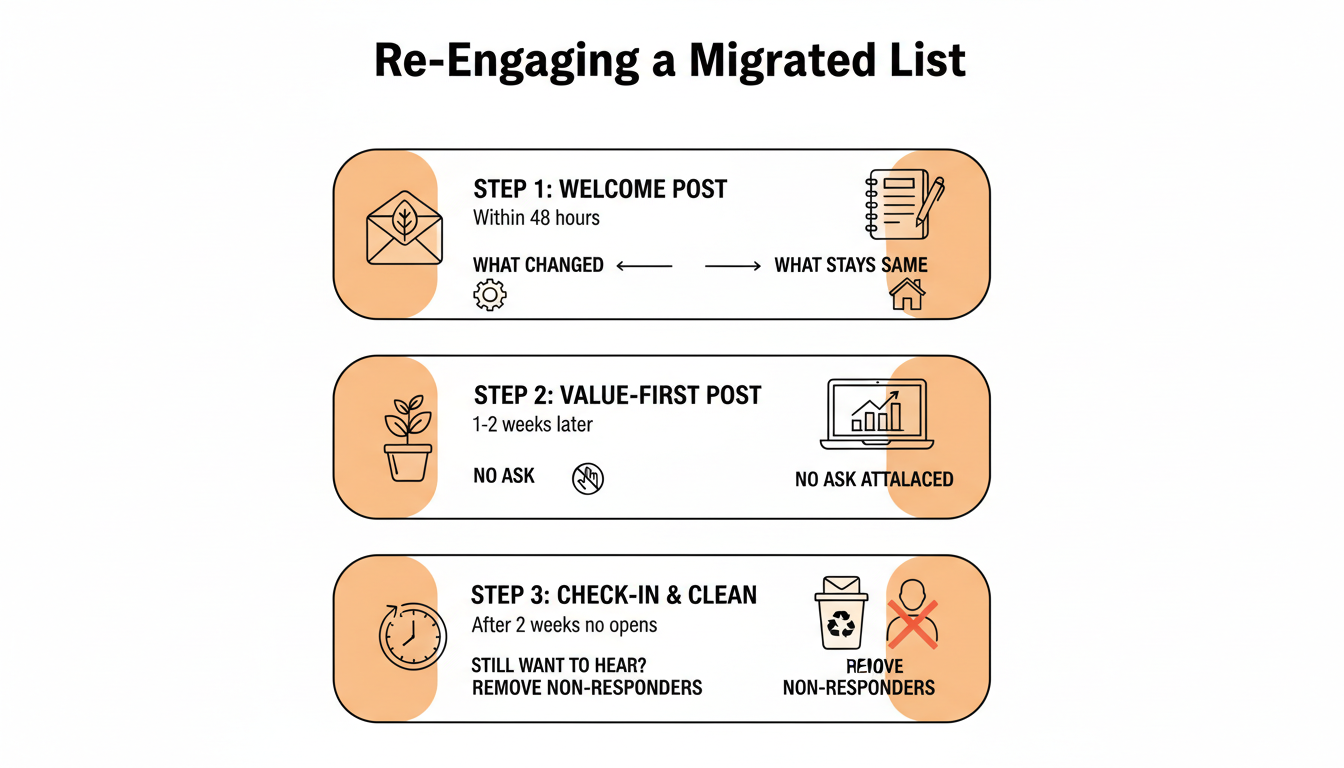
Removing subscribers who never respond feels counterintuitive right after a migration, when every number on the list feels precious, but non-responders drag down deliverability for the subscribers who do want to be there. A migrated list of 3,000 engaged readers outperforms a migrated list of 5,000 that includes 2,000 people who stopped opening two years ago.
Run this sequence and your Notes in parallel, not in sequence. They pull different people: the emails wake up readers you already had, and Notes reach the ones you don't.
Practical rule: don't wait for a full quarter of data to start the re-engagement sequence. Run it in the first 30 days, while the migration itself gives you a natural, honest reason to reach out.
What Doesn't Transfer
Beyond comments and reactions, a few other things quietly get left behind in most migrations. Subscriber tags and segments from your old platform rarely map one-to-one onto Substack's simpler subscriber model, so plan to rebuild any meaningful segmentation from scratch using Substack's own tools once your list is in. Automated welcome sequences and drip campaigns don't transfer either. If your old platform sent new subscribers through a five-email onboarding series, that logic needs to be rebuilt as a Substack welcome email and, where relevant, a Substack sequence of your own.
Past broadcast-level analytics (historical open and click rates from your old platform) also stay behind. You'll have a clean slate for reporting on Substack, which is worth knowing ahead of time so a dip in your "reported" numbers right after the move doesn't get mistaken for an actual engagement drop when it's really just a change in what's being measured.
The part people don't expect
The migration hands you a strange asymmetry: a big list and no history. WriteStack is built around that gap. Its AI drafts Notes from your published archive rather than a blank prompt, so five years of old-platform writing becomes months of Notes that already sound like you. Its benchmarks compare your restack rate against other publications your size, answering the question every migrating writer has (is this number normal, or am I failing?) that a per-account dashboard structurally cannot, because it only knows about you. And it tracks which of the two links inside a Note got clicked, going back to your first one, so "the announcement did well" becomes "the announcement sent 62 people into the imported archive." It schedules Chat threads as well as Notes.
Practical rule: write down what your old platform automated for you before you migrate. If you don't list it out in advance, you won't notice it's missing until a new subscriber falls through a gap.
Turning a Back Catalogue Into Your First Month of Notes
Right after a migration, your Substack account has no history in the Notes feed, no matter how established your publication was somewhere else. That's a real disadvantage for discovery, and it means the first few weeks on the platform matter more than they might seem to from the outside.
We looked at posts across our own Substack dataset that specifically announce a move to the platform and found they run short, a median of around 500 words, more of a quick note than a full essay, with modest engagement on the announcement post itself. The announcement is not the growth driver. What you publish consistently in the weeks right after it is.
Working in your favour is the one asset a brand-new Substacker doesn't have: a back catalogue. Every essay you imported holds three or four ideas that stand alone as Notes, and you already know which ones landed. Most tools in this category generate from a prompt, so the output arrives in a generic voice and you edit it into yours. WriteStack's Notes generator reads what you have published and drafts from that instead, and if a draft misses you switch models rather than living with one fixed voice. A five-year archive becomes a queue in an afternoon.
Batching is the other half. Queue a week in one sitting, then a month, and the feed keeps moving while your attention stays on the migration. Pair it with WriteStack's fan tracking to see which migrated subscribers engage first, so you know who to reply to while the list finds its footing.
| Rebuilding on Substack after a migration | Substack alone | WriteStack |
|---|---|---|
| AI drafting from your imported archive, in your voice | No | Yes, with model selection |
| Benchmarks against other publications your size | No | Yes |
| Trend analysis month over month | No | Yes |
| Link-click history across your full Notes archive | No | Yes, per link inside each Note |
| Schedule Substack chat posts | Yes, one thread at a time | Yes |
| Queue a week of Notes in one sitting | Manual, one at a time | Built for this |
| See your whole posting week at a glance | Drafts list only | Queue and calendar view |
| Cross-post the same Note beyond Substack | No | Via Buffer to 11 platforms |
| Verified reviews from Substack writers | Not applicable | ~100 across multiple platforms |
Practical rule: treat your first 30 days of Notes on Substack as a second launch, not a continuation. Nobody in the feed knows you yet, regardless of how big your list was somewhere else.
Knowing Whether Your New Numbers Are Any Good
Six weeks after the move you will be looking at a Note that got 14 reactions and four restacks with no idea what to make of it. On the old platform you had years of context. Here you have six weeks. What you need to know is whether that number is normal for a publication your size, and your own dashboard cannot answer that no matter how long you stare at it, because it only knows about you.
Your list size came over. Your Substack-native engagement history did not, which is why cross-publication benchmarks matter more during a migration than at any other point. They hand you a reference class on day one instead of making you build one over a year, and trend analysis then supplies the direction, so a slow start is distinguishable from a stall. Open the dashboard on a Tuesday and see that the Note you almost didn't post drove 40 link clicks into your imported archive, and that your restack rate is already running above typical for your size. Not better than last week. Better than the field.
WriteStack's pricing runs three tiers, all with a 7-day free trial and no free-forever plan, because the analytics layer is the product and a 30-Note sample says nothing about direction. The trial gives you all of it instead of a fraction. We built WriteStack. We also linked every claim here to a primary source, including Substack's own support pages, so you can check the migration mechanics yourself.
Common Migration Mistakes to Avoid
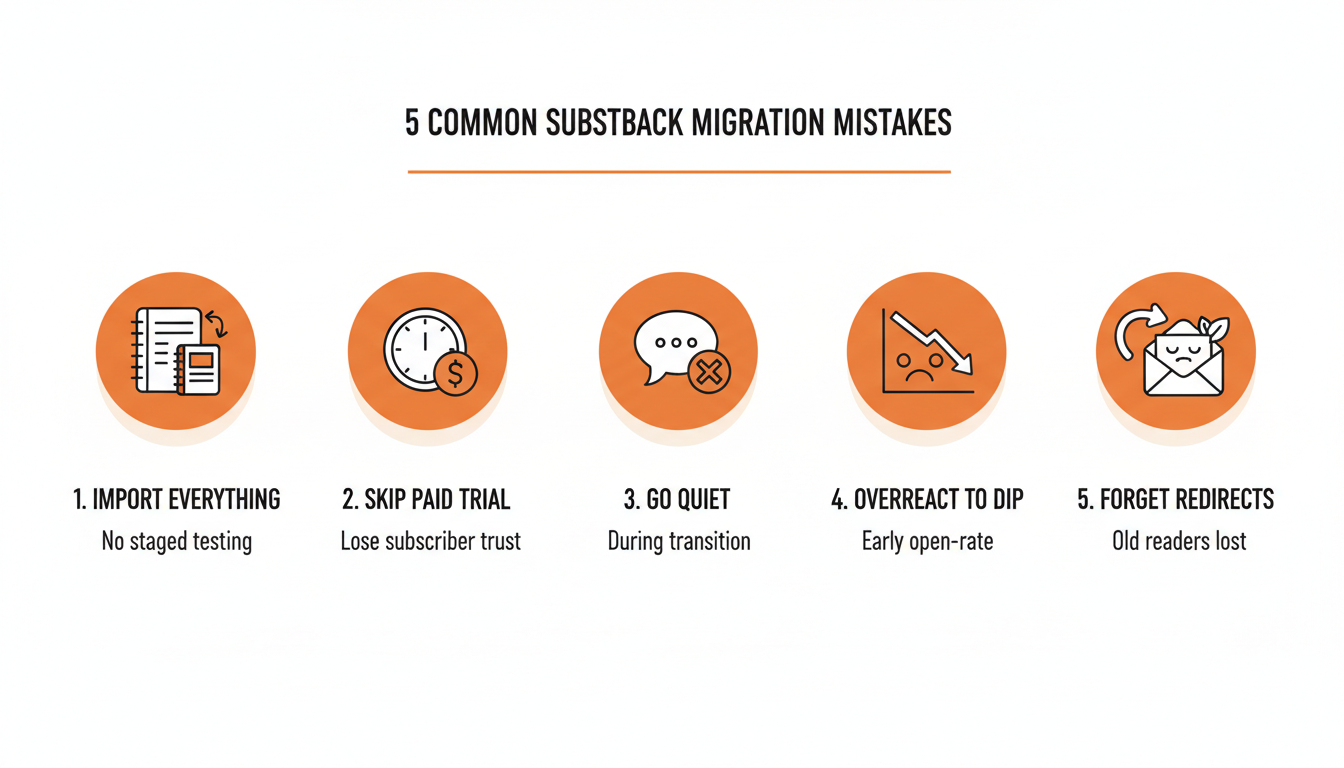
The migrations that quietly go badly almost always fall into one of these patterns.
Importing everything at once, list and posts and payment setup, in a single afternoon with no testing in between. A staged migration, checked at each step, catches formatting problems and consent issues before they reach a live subscriber's inbox.
Skipping the trial period for paid subscribers to save a few minutes of setup. This is the single fastest way to generate angry replies and refund requests from the subscribers who matter most to your revenue.
Going quiet during the transition instead of over-communicating it. Subscribers who don't hear anything about a move and then suddenly get emails from an unfamiliar domain are the ones most likely to mark it as spam.
Ignoring the open-rate dip described earlier and reacting to it by rewriting your whole content strategy in week one, when the actual cause is a new domain building reputation, not the writing.
Forgetting to point your old platform's readers somewhere permanent. A simple note, an old-platform sign-off post, and a bio-link update pointing to the new Substack matter more than most writers expect, since not every reader migrates through the CSV import.
Treating the move as finished when the import report says 4,812 subscribers added. The import is the smallest part. The discovery layer you moved for opens in the feed, and it opens for people who post there.
Practical rule: budget a full week for a migration, not an afternoon. The technical import takes minutes. Getting the communication and the first 30 days right is what actually protects the list.
Three months in, the writers who migrate well stop calling it a migration. They describe it as the point where the list stopped being a fixed number they protected and became one that grows on its own, because Notes went out daily from an archive they'd already written while they were busy, and the dashboard showed their restack rate running ahead of publications their size. The old platform never offered that, which is why you're leaving it.
Start a free 7-day trial of WriteStack. Turn your archive into a month of Notes in one sitting, and give the platform you just moved to a reason to show you to people who have never heard of you.