
Someone taps your name after reading a Note you wrote. They skim your feed, click through to your publication, and land on the page that decides whether they hand over their email address. Most writers spend weeks polishing posts and about ten minutes on this page.
Your Substack About page is the highest-intent page you own. Nobody arrives there by accident. Every visitor already showed interest, and now they want a reason to subscribe or a reason to close the tab.
One number worth having before you start: WriteStack has close to 100 verified reviews from Substack writers across multiple platforms. The other tools writers use to grow a Substack publication have none that we could find anywhere. That matters here because most of the advice about About pages is untested opinion, and the numbers below come from a dataset instead.
At WriteStack we pulled 61,970 Substack publications to see how writers actually handle this page and the one-line description attached to it. The gap between hobby publications and paid ones turned out to be wide enough to build a playbook around. This guide covers what to include, what to cut, a template you can adapt in under an hour, how to tell whether the page is working, and the data behind each recommendation.
Table of Contents
What Your About Page Actually Does
Every post you publish has to earn attention from scratch. The About page starts with attention already earned. Someone found you through a Note, a recommendation, a restack, or a search result, and they clicked deeper on purpose. That makes it the one page where the reader is doing half the work for you.
Substack itself treats this page and your one-line description as a single unit; the company's official guide to polishing your About page walks through both together, because they show up together everywhere a stranger evaluates you: the publication homepage, embeds, recommendation cards, and the subscribe flow.
The page has one job, which is converting an interested stranger into a subscriber. Everything on it either helps that job or gets in the way. That framing makes most editing decisions easy. A charming anecdote that doesn't tell the reader what they'll get in their inbox is in the way. A plain sentence that says "every Tuesday, a 5-minute teardown of one landing page" is doing the job.
The Four Questions Every Visitor Asks
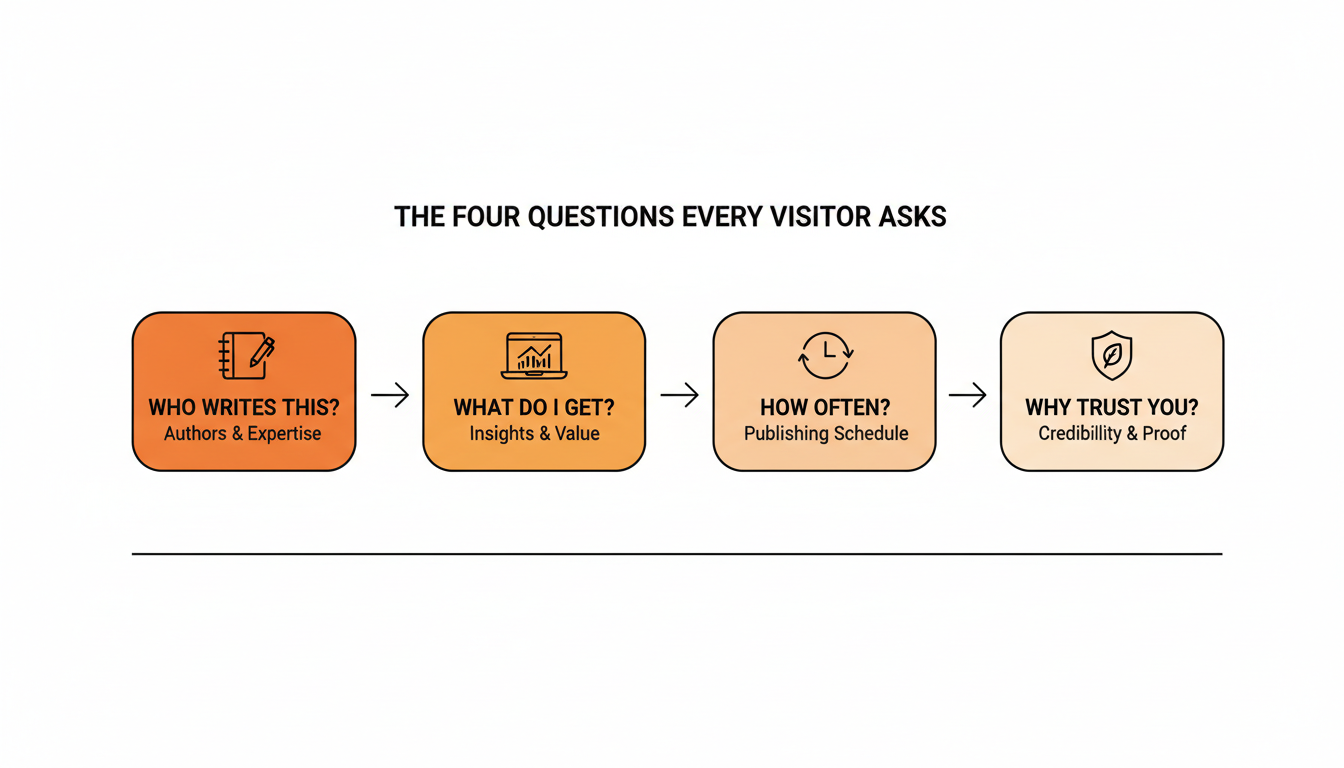
A visitor scanning your About page wants four things answered fast: who writes this, what will land in my inbox, how often will it arrive, and why should I trust you on this topic. Answer all four in the first two paragraphs and the rest of the page becomes supporting evidence. Bury any of them and the visitor has to work for it, and most won't.
Practical rule: if a stranger can't answer "what do I get and how often" from the first two paragraphs of your About page, rewrite the opening before touching anything else.
The page is a conversion asset, which means it has a conversion rate, which means it can be measured. Most writers never measure it, because Substack's own stats tell you how many people liked a Note and not how many people that Note walked to your About page. WriteStack closes that specific gap by tracking link clicks on every link inside every Note you have published, going back to your first one. Start a free 7-day trial and find out which Notes are actually delivering readers to the page you are about to rewrite.
The One-Line Description: Data From 61,970 Publications
The short description under your publication name is the About page's opening act. It follows your publication around Substack: search results, recommendation widgets, category pages, and link previews. It is also the single most skipped field on the platform.
We checked 61,970 publications in WriteStack's Substack dataset. 53,485 of them, 86.3%, have a description filled in. Roughly one publication in seven shows a blank where its pitch should be, which means the first impression for those publications is whatever a random recent post happens to be.
| Publication type | Has a description | Average description length |
|---|---|---|
| Free publications | 86.2% | 108 characters |
| Paid-enabled publications | 98.8% | 143 characters |
What Paid Publications Do Differently
Publications with paid subscriptions enabled almost never skip the description: 98.8% have one, against 86.2% of free publications. They also write longer ones, 143 characters on average versus 108. That's about a third more space spent explaining the value before anyone clicks anything.
You can read the correlation either direction and it doesn't change the advice. Writers serious enough to turn on payments treat every surface a stranger sees as sales copy, the first line of the pitch rather than decoration. Copy the behavior before you copy the pricing.
The Generic Opener Problem
In the same sample, 2,455 publications open their description with a generic frame like "a newsletter about..." or "my personal Substack." Those words spend your most visible characters saying something the reader already knows from the fact that they're on Substack.
Compare "A newsletter about productivity" with "Systems for finishing your novel while working a day job." The second names a reader, names an outcome, and implies a point of view, all in eleven words. The first could belong to ten thousand publications.
Practical rule: write your one-line description as a promise to a named reader, then delete every word that doesn't add information. "A newsletter about" is the first thing to cut.
What to Include on Your Substack About Page
The Five Core Sections
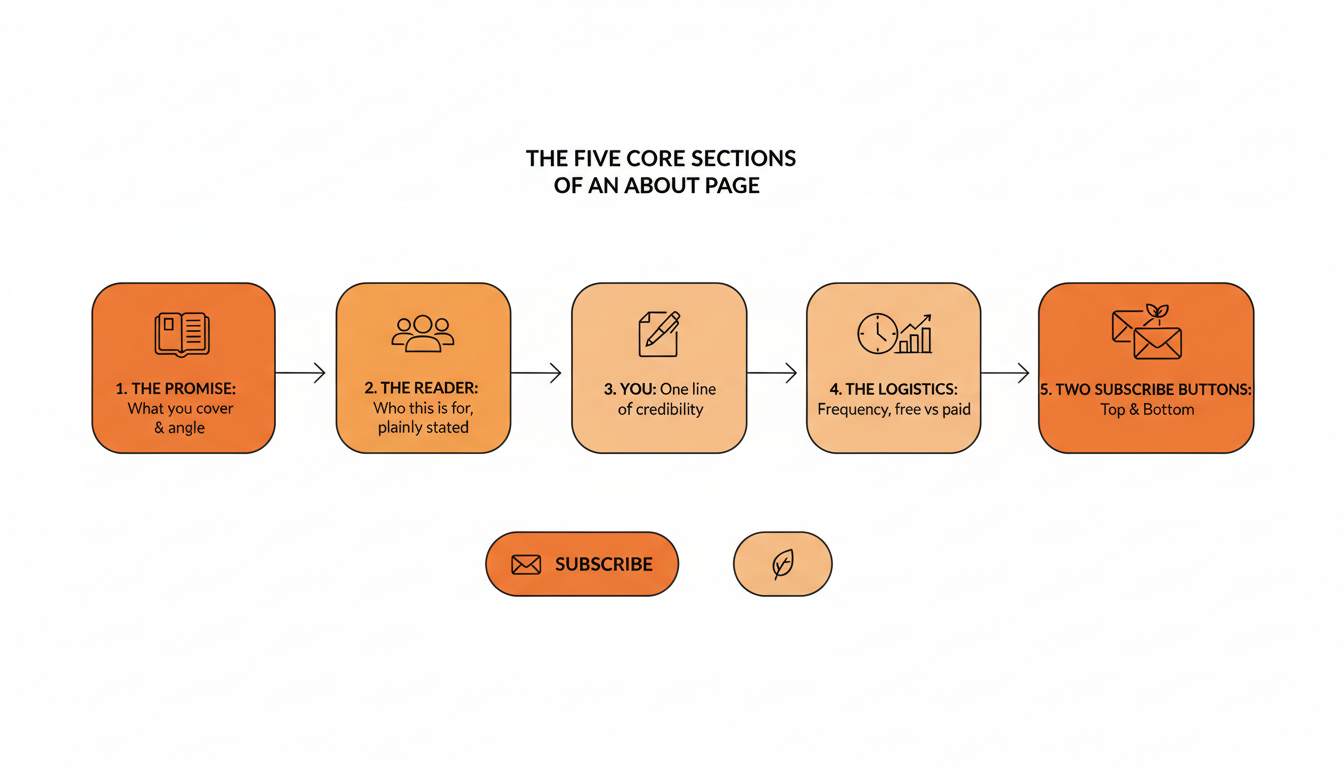
Strong About pages across Substack keep showing the same shape. You can move the order around, but these five elements should all be present:
- The promise. What the publication covers and the angle you take on it. One or two sentences, specific enough that the wrong reader self-selects out.
- The reader. Who this is for, named plainly. "For freelance designers tired of feast-or-famine income" beats a paragraph of throat-clearing.
- You. What makes you worth reading on this topic. Credentials help, and lived specifics work too: years doing the thing, results, failures you learned from.
- The logistics. How often you publish, what day if you have one, what's free, and what paid subscribers get. A reader who doesn't know what they signed up for unsubscribes at the first email.
- Subscribe buttons. Two of them, one near the top and one at the bottom, so nobody has to scroll hunting for the action you want them to take.
A photo of your face belongs near the top as well. Substack runs on the relationship between a writer and a reader, and a face converts better than a logo for a solo publication. Check the Substack image sizes before you upload it so it doesn't crop badly.
What to Leave Out
The cuts matter as much as the content. Skip external links to your other platforms; every one is an exit door on the exact page where you want people to stay and subscribe. Skip the full autobiography, because the reader wants only the parts of your story that make the publication credible. Skip hedges like "I'm still figuring this out" or "I'll try to post weekly." Confidence about the offer reads as respect for the reader's inbox.
Substack About Page Examples: Four Patterns That Work
Rather than screenshot specific writers, here are four recurring shapes we see on high-converting pages, with the details anonymized. Writer-run guides like Karen Cherry's PubStack Success piece on About pages collect live examples if you want real screenshots to study.
The specialist. Opens with a narrow promise ("weekly injury-prevention programming for masters runners"), establishes credentials in one line, then gets out of the way. The right reader recognizes themselves instantly.
The insider. Leads with access: "I spent nine years inside [industry] and this is what I couldn't say publicly." The credibility is the story itself, so logistics come second.
The proof-first page. Opens with numbers: readers, years publishing, results, publications that cited the work. Cold, and effective for analytical topics where the reader is buying rigor rather than personality.
The manifesto. States a belief the target reader shares and mainstream coverage doesn't ("most personal finance advice is written for people who are already rich"). Polarizing on purpose. The wrong readers leave, the right ones feel found.
All four shapes answer the same four visitor questions from earlier. The pattern is the packaging; the questions are the content.
A Copy-Paste About Page Template
Here's a structure you can adapt in under an hour. Replace the brackets, cut what doesn't apply, and keep the total under 400 words:
[One-sentence promise: what the reader gets and the angle you take.]

I'm [name], [one line of credibility: what you do or have done that
makes this publication worth reading].

Every [day/frequency], I send [format: essay, teardown, roundup,
case study] about [topic], written for [the specific reader].

Recent posts you can sample before subscribing:
- [Post title that shows your range]
- [Post title that shows your depth]

[SUBSCRIBE BUTTON]

Free subscribers get [what the free tier includes]. Paid subscribers
get [what paid adds: extra posts, archive access, community, Q&As],
for [price] a month.

[One short paragraph of personality: why you write this, what you
believe about the topic that most people in the space don't.]

[SUBSCRIBE BUTTON]
The two sample-post links are the most underused part of this template. A stranger deciding whether to subscribe wants evidence, and your two best posts are better evidence than any adjective you could write about yourself.
One line in that template quietly commits you to something. "Every Tuesday" is a promise, and the fastest way to lose a subscriber you just converted is three weeks of silence after they read it. Writers who keep that promise almost never keep it from memory. They write in batches and publish from a queue, which is what WriteStack's Notes scheduler exists for: a week of Notes drafted in one sitting, going out on the schedule your About page advertises. Start your free trial and load the first week before you publish the page.
Struggling to stay consistent on Substack?
Batch and queue your Substack Notes in minutes, track which Notes convert subscribers, and grow without burning out.
Getting Strangers to the Page, and Knowing Which Ones Arrived
An About page nobody reaches converts nobody. The page has no traffic of its own; it inherits traffic from wherever strangers first meet you, and on Substack that engine is Notes. A Note travels beyond your subscriber list, gets restacked by people who have never heard of you, and sends a slice of those readers to your publication, where the page you just rewrote does its job.
That creates a measurement problem most writers never solve. Substack shows you likes, restacks, and replies on a Note, and none of those tell you whether anyone clicked through. A Note with 80 likes and no clicks and a Note with 12 likes and 30 clicks look almost identical in the app, and only one of them is feeding your About page. WriteStack keeps link-click history on each individual link inside each Note across your full posting record, so "this one performed well" turns into "this one sent 30 people to the page where they subscribe."
The second thing that leaks is voice. A stranger reads your Notes, likes the person writing them, clicks through, and lands on an About page written in a different register six months earlier. That mismatch costs subscriptions quietly, and it is why WriteStack's AI drafts from Notes and posts you have already published rather than from a blank prompt. The Notes come out sounding like the page because they came out of the same body of writing. If a draft misses, you switch models instead of accepting one fixed voice.
The part people don't expect
WriteStack tracks which specific link inside a Note got clicked, going back to your very first Note, so you can see exactly which Notes are feeding your About page and which ones only collected likes. It benchmarks your numbers against other publications your size, which answers "is my conversion rate normal" instead of "is it better than last week," a question a per-account dashboard structurally cannot answer. And it schedules Chat threads as well as Notes. Open the dashboard on a Tuesday and see that the Note you almost didn't post drove 40 clicks to your About page, and that your restack rate is running well above typical for a publication your size. Not better than last week. Better than the field.
| The question you actually have | Substack's own stats | WriteStack |
|---|---|---|
| Which Note sent readers to my About page | No, likes and restacks only | Yes, per link, across your full Notes history |
| Is my conversion rate normal for a publication my size | No | Yes, benchmarked against other publications |
| Is my restack rate climbing or sliding | Snapshot only | Trend analysis month over month |
| Do my Notes sound like the page they point at | Not applicable | AI drafts from your published Notes, with model selection |
| Can I queue a week of Notes pointing at the page | One at a time | Batch queue with calendar and heatmap |
| Can I schedule a Substack chat post | Yes, in the Chat tab | Yes |
| Verified reviews from Substack writers | Not applicable | ~100 across multiple platforms, competitors none we could find |
Timing is the last piece of the traffic half. WriteStack's posting heatmap shows the hours your audience is actually online, so the Notes carrying people to your About page land when someone is there to read them rather than at 2am in your readers' time zone.
Common About Page Mistakes and How to Fix Them
| Mistake | What it costs you | The fix |
|---|---|---|
| Blank or default About page | Every high-intent visitor bounces with no pitch | Ship the template above today, refine later |
| Generic one-liner ("a newsletter about...") | Invisible among thousands of identical descriptions | Rewrite as a promise to a named reader |
| No posting frequency stated | Readers won't commit to an unknown volume of email | State it plainly, even if it's "twice a month" |
| Links to social profiles | Visitors leak out to platforms you don't own | Remove every external link |
| One subscribe button, bottom only | Readers convert at the moment of interest, not after a scroll | Add a second button near the top |
| No traffic reaching the page | A perfect page converting nobody | Post Notes on a queue and track which ones send clicks |
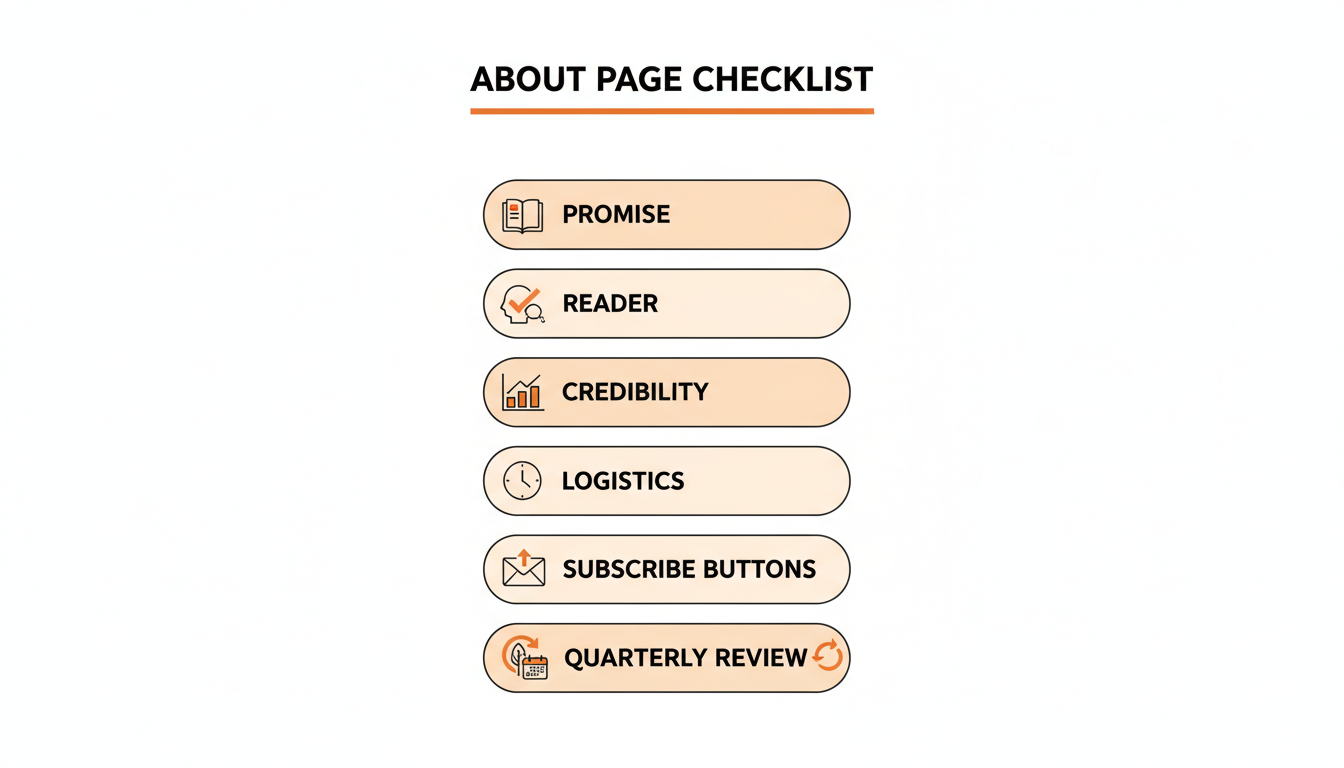
| Written once, never updated | Page drifts out of sync with what you publish | Recheck it quarterly, same as your welcome email |
None of these fixes takes more than an afternoon, and the first two are worth doing before your next post goes out. Fix them in table order: a blank page costs more than a generic one, a generic one costs more than a missing frequency line, and so on down. The About page compounds, converting a little better every day for as long as it stays sharp.
How to Edit Your About Page on Substack
The mechanics are quick. Open your publication dashboard, go to Settings, and edit the About page from your publication details, where the one-line description lives as well. Substack moves settings around occasionally, so if the layout looks different, the official support article on editing your About page stays current with the exact click path.
Two details worth knowing while you're in there. The About page accepts the same editor as a normal post, so you can add buttons, images, and embeds rather than settling for plain text. And changes publish immediately with no confirmation step, so draft the copy somewhere else and paste it in when it's ready.
Update the one-line description in the same session. The data from earlier is blunt about priorities: it's the field the successful publications never leave blank.
Substack About Page FAQ
How long should a Substack About page be? Long enough to answer the four visitor questions and short enough to read in under a minute. For most solo publications that lands between 200 and 400 words. Writers with paid tiers, testimonials, and archives worth touring can justify more, but length added without new information lowers conversion. When in doubt, cut.
Should I put my paid subscription pricing on the About page? Yes. Hiding the price doesn't make anyone likelier to pay, and stating it plainly filters in the readers who might. Spell out what free subscribers get and what paid adds in concrete terms: extra posts, archive access, community, whatever the actual offer is. Vague paid pitches ("support my work") convert worse than specific ones ("two extra deep reports a month").
Do I need an About page before I start publishing? A short one, yes. It takes twenty minutes with the template above, and your earliest visitors are the likeliest to check it, since you have no archive yet to vouch for you. Ship a plain 150-word version on day one and improve it later.
How do I know if my About page is converting? Watch the two numbers together: how many people arrive, and how many of them subscribe. Substack reports subscriber growth, and WriteStack reports the traffic half by tracking clicks on the links inside your Notes, so you can attribute arrivals to specific Notes instead of guessing. Cross-publication benchmarks tell you whether the resulting rate is normal for a publication your size, which is the only version of that question worth answering.
How often should I update it? Quarterly is a sensible default, plus any time something structural changes: a new posting schedule, a new paid tier, a rename, a shift in topic. The page reads as a promise, and an About page describing a weekly schedule you abandoned in March quietly tells new visitors the rest of the page might be stale too.
Does the About page matter for Substack SEO? It's one of the pages Google indexes for your publication, and often the one that ranks for your name or brand. Clear topic language helps it show up for the searches your future readers make. The description field matters here too, since it becomes preview text in many contexts off Substack.
What Changes Six Weeks After You Fix It
Six weeks in, the difference isn't that your About page is better written. It's that you know what it's doing. You know that Tuesday's Note sent 30 people to it and Thursday's sent four, so you write more Tuesdays. You know your subscribe rate sits above the typical range for a publication your size, so you stop rewriting the page and start pointing more traffic at it. The guessing is gone, and what replaces it is a loop you can turn.
Fix the page once with the template above, keep the one-line description sharp, then put your recurring effort into the half the page can't do for itself: showing up in Notes where strangers find you, on the schedule your page promised, and knowing which of those Notes actually delivered readers. WriteStack runs that half, with close to 100 verified reviews from Substack writers behind it and no competitor we could find carrying any.
Start a free 7-day trial. Queue a week of Notes in twenty minutes, and watch the page you just rewrote start converting the readers they bring.