
You hit publish on a post you spent six hours writing. The next morning your open rate reads 19%, half of what it was three months ago. Nothing about your writing changed. Your list didn't shrink. Something else moved.
That something is usually substack email deliverability, quietly worse than it used to be, quietly wrecking the number writers use to judge whether a newsletter is working. Most writers notice the symptom (opens dropping) long before they find the cause (their email is landing in a spam folder or a Promotions tab instead of an inbox).
This piece covers why Substack emails end up there, what actually controls it, and what to do about the part you can't fix directly by tomorrow morning.
One number worth having before you start: WriteStack has close to 100 verified reviews from Substack writers across multiple platforms. The other Substack scheduling tools we've checked have none we could find anywhere.
Table of Contents
- The Two Problems: Spam Folder vs. Promotions Tab
- What Actually Controls Inbox Placement
- Content and Formatting Triggers Still Worth Avoiding
- Getting Readers to Whitelist You
- List Hygiene: Why an Inflated List Hurts You
- Email vs. Notes: Comparing Two Distribution Channels You Actually Control
- The Part About Notes Nobody Explains
- A Pre-Publish Deliverability Checklist
- What to Do This Week If Your Opens Are Falling
The Two Problems: Spam Folder vs. Promotions Tab
Writers usually describe both problems the same way ("my emails aren't getting through") but they're different failures with different fixes.
Spam folder placement means a mail provider's filters decided your email looks risky: bad sender reputation, a spammy phrase, an authentication mismatch. Substack's own support documentation treats this as a deliverability problem and walks through how to get emails out of the spam folder, starting with asking readers to move one email manually so the provider learns the sender is wanted.
Promotions tab placement is a different, much less severe problem: Gmail decided your email is legitimate but commercial in tone, and sorted it into a tab most readers never open. Substack addresses this separately in its guide on getting email out of the Promotions tab, which is really a behavior-training problem, not a trust problem.
Practical rule: if your open rate cratered suddenly and your comments/replies also disappeared, treat it as spam. If your opens dropped gradually and readers still occasionally mention seeing the email, treat it as Promotions. The fixes barely overlap.
None of the fixes below happen instantly, and a spam folder problem can take weeks to fully clear even after every fix is in place. Load a week of Notes into WriteStack in twenty minutes and that channel keeps reaching readers the entire time email is being repaired.
What Actually Controls Inbox Placement
Shared Sending Infrastructure
Substack sends on behalf of every writer on the platform through shared infrastructure. That's convenient (no writer configures their own mail server) and it's also the reason one writer's bad sending habits can shift how mail providers treat email coming from Substack generally. A sudden spike of spam complaints against other Substack senders can make providers more cautious about Substack mail as a category, at least for a window of time, independent of anything an individual writer did.
This is outside any single writer's control, which is exactly why the levers covered later in this piece (engagement, list hygiene, whitelisting) matter more for a Substack writer than they would for someone running their own dedicated mail server.
The Engagement Signals Gmail and Outlook Track
Mail providers watch what recipients do with an email far more than what the email contains. Opens, replies, "move to inbox" actions, and time spent reading all count as positive signals. Deletes without opening, "mark as spam," and long stretches of silent non-opens count against a sender.
Recent industry-wide deliverability numbers give a sense of how much this matters even for well-run mail programs: average inbox placement across senders sits around 75.6%, with more than 14% of legitimate email landing in spam, according to MailReach's 2025 email deliverability statistics. Substack writers aren't exempt from that baseline. If anything, a newsletter with a large chunk of subscribers who signed up once and never opened again looks, mathematically, a lot like the low-engagement senders those numbers describe.
Authentication: What Substack Already Handles
Two technical checks sit under all of this: SPF and DKIM, which let a receiving mail server confirm that an email claiming to come from Substack actually came from Substack's sending servers and wasn't spoofed. Substack manages both on the writer's behalf as part of the shared sending setup described above, so there's no DNS record for an individual writer to configure or break.
That's good news and a limit at the same time. It means a writer can't accidentally misconfigure authentication the way someone running their own mail server might. It also means authentication was never the lever an individual writer could pull to fix a deliverability problem, which is exactly why the writer-controlled levers below (the whitelist ask, list hygiene, subject lines) carry more weight on Substack than the generic "check your SPF record" advice written for people using their own mail infrastructure.
Content and Formatting Triggers Still Worth Avoiding
Content filtering matters less than it used to relative to engagement and reputation, but it hasn't disappeared. A few things still raise risk on the margin.
Subject lines that read as sales copy (all caps, multiple exclamation points, "free," "act now") get flagged more often than plain, descriptive subject lines. Walls of images with almost no text can look like a template built for a promotional blast. Shortened or unfamiliar link domains inside the body can trip filters that don't recognize the destination. None of these guarantee a spam folder placement on their own, but combined with a weak sender reputation they tip the balance.
Two subject lines make the difference concrete. "LAST CHANCE: Read This Before It's Gone!!!" reads like the exact template a spam filter was trained to catch. "Why I stopped posting on Tuesdays" reads like a person wrote it, because a person did. The second one also happens to perform better with actual readers, which is the more common reason to fix it, but the deliverability benefit is real too.
Practical rule: write the subject line you'd actually text a friend, not the one that reads like a marketing test. It costs nothing and it's the single easiest filter trigger to remove.
Getting Readers to Whitelist You
The Ask That Works
The most reliable deliverability fix isn't technical. It's getting enough readers to manually move one email to their primary inbox or add your sending address to their contacts. Both actions teach Gmail and Outlook, at the account level, that this sender is wanted, and that signal outweighs almost everything else on a per-recipient basis.
📅 Struggling to stay consistent on Substack?
WriteStack's Smart Scheduling lets you batch and queue Notes in minutes. Grow on Substack without burning out.
Explore Smart SchedulingThe ask that works is specific and low-friction: tell readers exactly what to do ("drag this email into your Primary tab" or "reply with one word so this shows up in your inbox next time"), and ask it once, near the top of an email that's otherwise valuable on its own. The ask that gets ignored is vague and buried ("please whitelist us for the best experience"), usually near the footer where nobody reads.
A version that tends to work: "If this landed in Promotions or Spam, drag it into your Primary inbox once. Gmail remembers, and you'll never have to do it again." It states the problem, the exact action, and the payoff in one sentence, which is the whole reason it gets followed instead of skipped.
Practical rule: ask for the whitelist action in the first two sentences of an email, not the last two. Readers who already opened the email are the ones most willing to do a small favor for you, and they're gone by the time they scroll to a footer.
List Hygiene: Why an Inflated List Hurts You
A larger list looks better on a dashboard and behaves worse in a mail provider's eyes. Every subscriber who never opens an email is a small, recurring signal that this sender isn't wanted, and mail providers weight recent behavior more heavily than historical behavior.
Two things worth doing on a regular schedule: remove or re-engage subscribers who haven't opened anything in 90-plus days, and treat "founding member" or paid-only sends differently from broad free-tier blasts, since paid subscribers open at meaningfully higher rates and skew a sender's reputation upward when segmented rather than mixed with everyone else.
Practical rule: a newsletter that mails 10,000 addresses and gets 2,000 opens looks worse to a mail provider than one that mails 4,000 addresses and gets 2,000 opens, even though the second number is identical. Providers read the ratio, not the raw count.
Free-to-paid conversion data backs up the segmentation point in a different way: real-world conversion from free to paid on Substack tends to land closer to 1-3% for most writers, with the highest-performing niches reaching into the high single digits, according to a breakdown of average paid subscriber conversion rates. That means the large majority of a typical free list will never become paid subscribers, which is fine for reach but means that list should be pruned on engagement, not size, since a free subscriber who never opens anything contributes to reputation risk without contributing to revenue either.
Email vs. Notes: Comparing Two Distribution Channels You Actually Control
Email deliverability problems are frustrating in part because a writer can do everything right and still lose a chunk of an email send to a spam folder they'll never see. Notes work differently: there's no inbox, no spam filter, and no Promotions tab standing between a published Note and the people who follow the writer.
| Email Post | Substack Note | |
|---|---|---|
| Delivery gatekeeper | Recipient's mail provider (Gmail, Outlook, etc.) | Substack's own app feed |
| Affected by spam/Promotions filtering | Yes | No |
| Depends on sender reputation | Yes, heavily | No |
| Reaches non-subscribers who follow/restack | Rarely | Often, through restacks |
| Best for | Long-form writing, the core product | Distribution, discovery, staying visible between posts |
| Schedulable in advance with writestack.io | Yes | Yes |
Neither channel replaces the other. A post is still the thing a writer is actually selling. But treating email as the only distribution channel means every deliverability problem directly caps how many people see new writing, with no backup path.
The restack mechanic makes this bigger than it looks at first. A Note that a follower restacks shows up in the feeds of that follower's own audience, some of whom have never subscribed to the original writer at all. That's discovery an email send structurally cannot produce, since an email only ever reaches people already on the list. A writer relying only on email is capped at the size of that list. A writer publishing Notes alongside it has a path to people who aren't on it yet, regardless of what any spam filter decides that week.
The Part About Notes Nobody Explains
The part people don't expect: Notes aren't just a discovery feature bolted onto Substack. They're the one distribution channel in a writer's control that a spam filter cannot touch, that can reach followers who never opened a single email, and that can be scheduled a week ahead through WriteStack's Note generator so a bad deliverability month doesn't also mean a quiet month.
Most writers treat Notes as a nice-to-have next to the "real" newsletter. That gets the priority backwards during a deliverability slump specifically, since Notes are the one channel where a spam folder problem literally cannot happen. A writer who batches a week of Notes in one sitting and schedules them through WriteStack keeps showing up in front of readers even while the email side of the business gets fixed. WriteStack's heatmap shows exactly when that audience is actually active, which matters more once email opens can no longer be trusted as the only signal of who's paying attention.
A Pre-Publish Deliverability Checklist
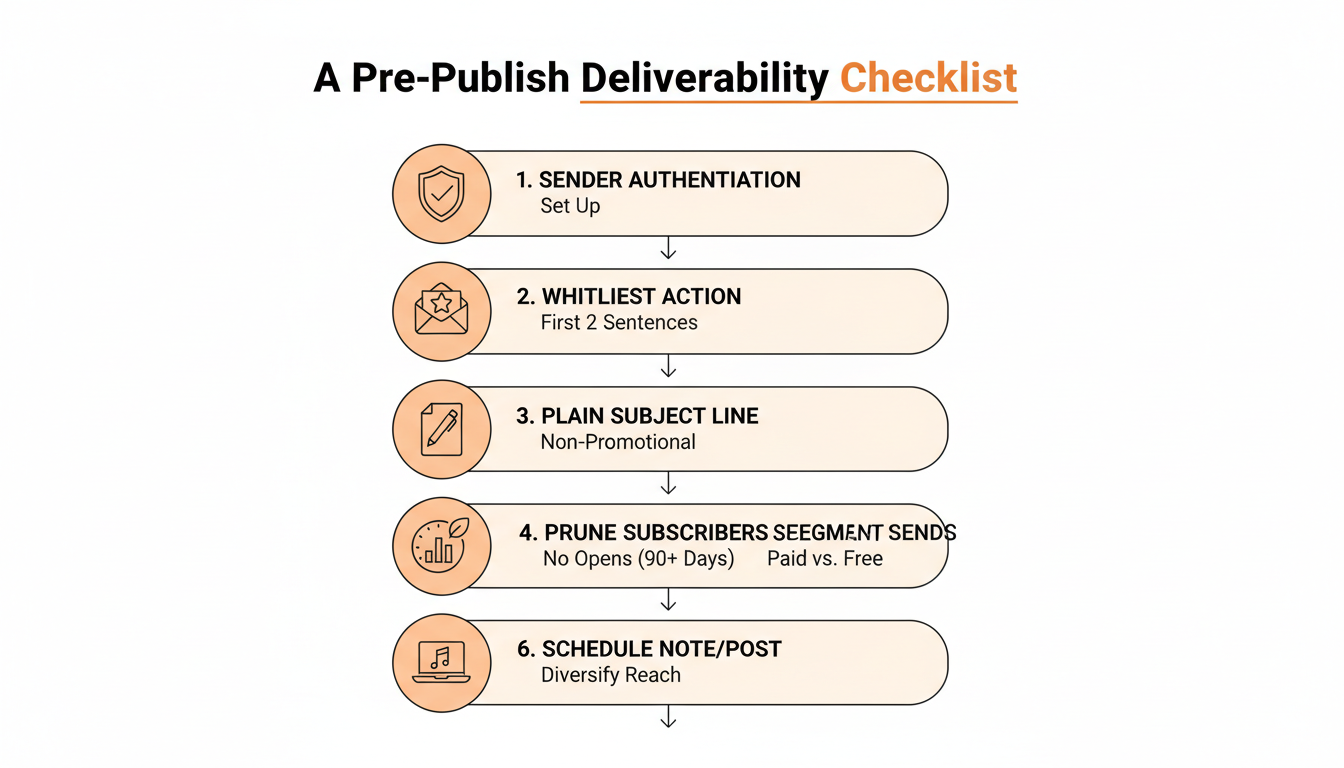
Run through this before hitting publish on a post that matters:
- Confirm the sending domain and authentication settings haven't changed since the last post.
- Ask for one whitelist action, near the top of the email, phrased as a specific instruction.
- Read the subject line out loud. If it sounds like an ad, rewrite it.
- Check whether the list needs a prune. Ninety days of silence is a reasonable cutoff.
- Segment sends where it makes sense, particularly paid versus free.
- Schedule at least one Note to go out around the same time as the post, so the post's reach doesn't depend on email deliverability alone.
Practical rule: treat step six as non-negotiable, not optional. It's the only step on this list that removes the deliverability risk instead of just reducing it.
What to Do This Week If Your Opens Are Falling
Diagnose before treating. Pull the last 10 posts and look at open rate over time, not the last single email. A sudden cliff points to spam; a slow decline points to Promotions or list fatigue. Fix the item that moves the needle most first: usually that's the whitelist ask, since it directly improves the engagement signal mail providers weight most heavily, and it costs a writer nothing to add.
Give each fix time before judging it. A single whitelist ask changes one recipient's account-level signal, not the sender's overall reputation, so the visible effect builds over several sends rather than showing up on the very next one. Writers who abandon a fix after one email usually conclude it didn't work when the real issue is that a week isn't enough time for a mail provider to update its model of a sender.
Then build the habit that makes the next deliverability dip survivable instead of catastrophic. That means treating Notes as a standing part of the publishing routine, not a reaction to a bad month. A writer who's already scheduling Notes through WriteStack every week has a working distribution channel in place before they ever need one, and doesn't have to scramble to build one the week deliverability actually breaks.
Deliverability problems on Substack aren't usually permanent, and they're rarely caused by one big mistake. They're caused by small, recurring signals: an unclear whitelist ask, a bloated list, an over-reliance on one delivery channel that a spam filter can quietly throttle without warning.
Fix the signals this week. Then open WriteStack, queue next week's Notes in one sitting, and stop letting a single spam filter decide how many readers see new writing.