
You open Substack, click the orange "Start writing" button, and then sit there. A blank field asks for a publication name. Another asks for a subtitle. There's a toggle for paid subscriptions you don't know whether to touch yet. Forty minutes later you've renamed your publication three times and still haven't written a word.
That gap between opening the account and actually publishing something is where most people quit. How to start a Substack isn't really a technical question. The signup form takes five minutes. The real work is the handful of decisions before and after it: what you're writing about, what you charge, and what happens in the first week after you hit publish.
This guide walks through that whole sequence in order: picking your angle, setting up the publication itself, writing a first post that earns a second visit, deciding what to charge, and building the habits that keep a new Substack alive past week three.
One number worth having before you start: WriteStack has close to 100 verified reviews from Substack writers across multiple platforms. The other tools built for Substack writers have none that we could find anywhere. That matters early, because the two places a new publication actually dies are both tooling problems, and you will hit the first one the week you publish.
Table of Contents
What You Need Before You Start a Substack
Substack launched in 2017 as a way for writers to publish directly to subscribers and get paid for it, without an ad-supported publisher standing between them and their readers, as detailed on Substack's Wikipedia page. That direct relationship is still the whole pitch. It also means the platform gives you almost no editorial rules to follow. Nobody tells you what to write about or how often. That freedom is the reason most new publications stall before they get their footing.
Two decisions matter more than anything in the signup flow: what you're going to write about, and what you're going to call it.
Choosing Your Niche and Angle
"Niche" gets treated like a marketing exercise, but it's really a promise. A reader who subscribes needs a one-sentence answer to "what will I get in my inbox and how often." Vague answers like "thoughts on life and culture" don't give a reader a reason to open the next one.
The angle works better when it's specific enough to repeat without effort. Not "a newsletter about food" but "weeknight dinners for people who hate meal planning." Not "career advice" but "what it's actually like managing a team of ten as a first-time manager." The second version in each pair tells a reader exactly what they're signing up for and gives you an easy answer every time you sit down to write.
Practical rule: if you can't describe your Substack in one sentence a stranger would understand, the niche isn't locked in yet. Write the sentence first, then build the publication around it.
A useful test before committing: write five post titles you could publish in your first month under this angle. If that's hard, the topic is too broad or too dependent on a single idea that only carries one post. If titles come easily, the angle has enough range to support a publication rather than a single essay stretched into a newsletter. Our longer guide on how to choose a Substack niche goes deeper on pressure-testing an angle before you commit a year to it.
Picking a Publication Name
The name and the niche should reinforce each other. A name that's too clever can obscure what the newsletter is actually about, which matters more on Substack than on a personal blog because so much discovery happens through the Notes feed and search, where readers scan a name and subtitle in under a second before deciding whether to tap in.
Two things to check before locking in a name: whether the subdomain (yourname.substack.com) is available, and whether the name still makes sense if the newsletter grows into topics slightly outside its original lane. If it outgrows the lane entirely, you can run more than one Substack from the same account. A name tied too tightly to one narrow format (like "The Weekly List") can box you in later.
Start a free 7-day trial and have a week of Notes queued before your first post goes live.
Setting Up Your Substack Account and Publication
Once the niche and name are settled, the mechanical part of this is genuinely fast. Most writers can have an account, a named publication, and a live first post within an hour of starting.
Account Creation and Profile Setup
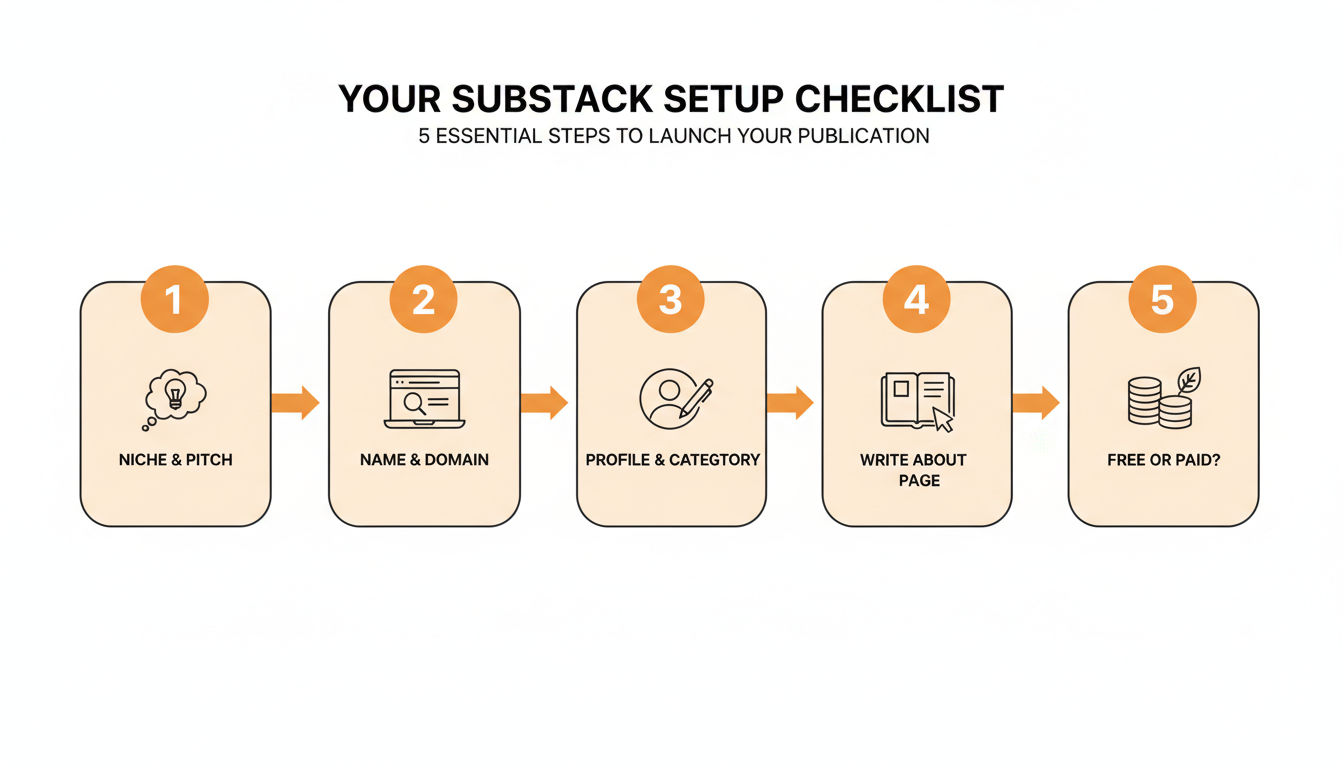
Signing up requires an email address and the publication name from the previous step. Substack will ask for a subtitle, which shows up under your name in search results and at the top of your homepage, so treat it as a second, shorter version of your one-sentence pitch rather than a throwaway field.
From there, the setup flow walks through:
- Publication name and subdomain confirmation (you can connect your own domain later)
- A subtitle (roughly one sentence, visible in search and social previews)
- A profile photo and publication logo (here are the cover, logo and banner sizes)
- Choosing your primary category, which affects how you show up in Substack's topic-based discovery
- Deciding whether paid subscriptions are on or off to start (more on this below)
Customizing Your Publication Page
The default Substack theme is clean and most writers don't need to touch it beyond colors and a header image. Where it's worth spending real time is the About page, since that's the page a reader lands on when they're deciding whether to subscribe rather than just read one post and leave. A strong About page answers what the newsletter covers, how often it lands in an inbox, and why the writer is credible on the topic, in that order.
The category chosen during signup affects how a publication surfaces in Substack's topic pages and leaderboards, so pick the closest match rather than the broadest one. A memoir-style newsletter filed under "Culture" competes against a much wider field than the same newsletter filed more specifically, and category changes can be made later if the first choice turns out wrong.
Writing and Publishing Your First Post
The first post carries more weight than any post after it, because it's the one piece of writing a brand-new subscriber judges the entire newsletter against. It doesn't need to be a manifesto. It needs to do a few specific jobs: say what the newsletter is about, set expectations for frequency, name who it's for, and give the reader a reason to open the next one.
We pulled a sample of debut posts from our own Substack dataset and looked at what separated the ones with strong reader engagement from the rest. The ten highest-engagement first posts in that sample averaged around 1,180 words, well short of the 2,500-plus word investigative pieces a lot of new writers feel pressured to open with. Several of the best-performing ones ran under 900 words. A first post's job is to earn trust quickly, not to prove expertise in one sitting.
What Makes a Strong Welcome Post
The posts that work tend to open with something concrete rather than a definition of the topic. A specific moment, a real number, a mistake the writer made, anything that isn't "welcome to my newsletter about X." They close with a clear expectation ("new posts land every Tuesday") instead of leaving frequency vague.
Practical rule: write the welcome post like it's issue two, not issue one. Skip the throat-clearing about why newsletters matter and go straight to the kind of content a subscriber will actually get.
Then comes the part nobody warns you about. You publish it, and roughly nobody reads it. That is not a verdict on the writing. A new publication has no subscribers, no archive, and no signal for Substack's feed to work with, so a first post lands in a room with nobody in it. The writers who get through that week are the ones who already have a second distribution channel running, which on Substack means Notes.
Should You Charge From Day One? Free vs. Paid Setup
Substack lets you turn on paid subscriptions the moment you create a publication, but most writers with an established following recommend waiting until there's a real audience to convert. The logic is straightforward: a paywall in front of zero social proof and zero back catalog gives a new visitor almost nothing to evaluate before being asked to pay.
| Setup | When it fits | Tradeoff |
|---|---|---|
| Free only | New publication, still finding an audience | No revenue yet, but zero friction to subscribe and easier to build initial reach |
| Founding member tier, paid tier off | Established personal audience being migrated over | Lets early supporters pay more upfront without gating regular content |
| Paid tier live from post one | Existing brand, waitlist, or pre-sold audience | Higher revenue ceiling immediately, but converts far fewer cold visitors |
How Substack's Fees Actually Work
Publishing itself is free on Substack regardless of subscriber count. Fees only apply once paid subscriptions are switched on: Substack takes 10% of subscription revenue, and Stripe (the payment processor) adds its own processing fee on top, according to Substack's own help documentation. On a $10/month subscription, that works out to Substack keeping roughly $1 and Stripe taking somewhere around $0.59, leaving the writer with about $8.40 of every $10 charged.
Practical rule: don't turn on paid subscriptions until there's an answer to "what does a paying subscriber get that a free one doesn't." A vague answer here is the most common reason early paid tiers convert poorly.
A middle option worth considering is a founding member tier: a higher, optional price for readers who want to support the newsletter directly, without gating any regular content behind a paywall. It lets early, invested readers pay something meaningful while the rest of the audience keeps building on a free, low-friction basis.
Struggling to stay consistent on Substack?
Batch and queue your Substack Notes in minutes, track which Notes convert subscribers, and grow without burning out.
Growing Your First 100 Readers
The first 100 subscribers rarely come from Substack's discovery features. They come from people who already know the writer: an email list from somewhere else, a social following, past colleagues, a group chat willing to forward the first post. Substack's own network effects (recommendations and the explore page) start compounding after there's an existing base to build from, not before.
Treat the first hundred as a different job than growth after that point. It's less about tuning for discovery and more about making it effortless for people who already like your writing to subscribe and share the first post. A personal message asking someone to subscribe converts far better than a public post asking the same thing, simply because it's specific and hard to scroll past. We broke the full sequence down in our guide to getting your first 100 Substack subscribers.
Once that early base exists, understanding which of those readers actually engage, rather than just who subscribed, becomes the more useful signal, which is part of why WriteStack's fan tracking exists separately from Substack's own basic subscriber list. Knowing which ten readers open every single post and reply in the comments matters more at this stage than the total subscriber count, since those are the readers most likely to share the newsletter with someone else.
The part people don't expect
The number that keeps a new writer going is not their own. WriteStack benchmarks your restack rate against other publications your size, which answers "is this normal" instead of "is this better than last week." A per-account dashboard structurally cannot answer the first question, and at forty subscribers the first question is the only one you are actually asking. It also tracks which of the two links inside a Note got clicked, going back to your very first Note, so "that one did well" becomes "that one sent 40 people to the archive." And it schedules Chat threads as well as Notes.
Start your free trial and turn your first three posts into a week of Notes today.
Using Substack Notes to Get Found
Notes is Substack's short-form feed, built for quick posts, quotes, and links rather than full articles, and it's the main way new publications get discovered by people who've never heard of them. Unlike the newsletter itself, which mostly reaches people who already subscribed, Notes can surface a single post to a stranger through Substack's discovery and For You feeds. At zero subscribers, Notes is not a supplement to the newsletter. It is the only distribution you have.
Which is where the first real problem shows up. You have no performance data of your own to learn from, because you have not published enough to have any. Guessing at what works on Substack this week, from a blank composer, on the same morning you also have to write, is the exact task that makes new writers quit Notes inside a fortnight.
WriteStack's live inspiration feed is built for that specific hole. It updates continuously from live Notes data, so what you see on a Tuesday is what is actually working on Substack that week, not a fixed set of examples from whenever someone last updated a page. Narrareach's equivalent is a static list, which was accurate on their live page as of July 2026. When you have no data of your own, the difference between live and static is the whole value of the feature.
The second half of the problem is supply. A single Note is usually a few sentences, a quote pulled from a post, or a short observation, not a condensed version of a full article. New writers sometimes treat Notes like a second newsletter and over-write them, which strips out the casual, quick-read quality that makes people stop scrolling. Short and specific beats polished and long here, which is the opposite of what tends to work in the newsletter itself.
WriteStack's Notes generator drafts from posts you have already published rather than from a prompt you have to write. Three published posts is enough raw material for a week of Notes, and because the drafts start from your own sentences, they land in your voice instead of arriving at it after three rounds of editing. If a draft misses, you switch models rather than living with one fixed voice. Every other tool in this category generates from a prompt and asks you to edit your way toward sounding like yourself.
| What a brand-new publication needs | Substack on its own | WriteStack |
|---|---|---|
| Ideas when you have no performance data of your own | Nothing | Live inspiration feed, updating continuously from live Notes data |
| A week of Notes from three published posts | Blank composer | AI drafts from your published posts, with model selection |
| An answer to "is this normal for a publication my size" | Per-account stats only | Benchmarks against other publications |
| Which link inside a Note sent someone to your archive | Not tracked | Link-click history back to your first Note |
| A full week queued in one sitting | One Note, one time, manually | Batch scheduling into a queue and calendar |
| Direction over time rather than a snapshot | No | Trend analysis month over month |
| Scheduling a Substack chat post | Yes, one thread at a time | Yes |
| Verified reviews from Substack writers | Not applicable | ~100 across multiple platforms |
Building a Consistent Posting Habit
A newsletter that posts on a predictable schedule outperforms one that posts brilliantly but irregularly, mostly because readers build a habit around when they expect something to land. Missing three weeks in a row does more damage to a new Substack than a handful of average posts on a consistent schedule.
Week three is when this breaks. Weeks one and two run on launch adrenaline. By week three the novelty is gone, the subscriber count has barely moved, and the daily decision of what to post meets a genuinely busy Tuesday. The habit does not end with a decision to stop. It ends with two skipped days that turn into a fortnight.
The publications that survive their first few months usually pick a posting schedule they can hold even during a busy week, rather than the most ambitious schedule that sounds good on day one. Weekly is a workable starting point for almost anyone with a full-time job elsewhere. Looking back at actual posting patterns, rather than guessing at them, is where a posting heatmap is useful, since it shows the gaps in a schedule that are easy to miss from the inside.
Practical rule: pick the schedule you can hold during your worst week, not your best one. A newsletter that reliably posts every other week beats one that posts weekly for a month and then goes quiet.
Batching is what removes the daily decision entirely, and it is the reason week three stops being a cliff. Queue a week of Notes in one sitting on a Sunday, and Tuesday's busy evening no longer has a publishing task attached to it. WriteStack's batch scheduling exists for exactly that sitting: you write several Notes at once, drop them into the queue, see the whole week laid out in a calendar view, and reorder anything that reads wrong in sequence. The queue publishes through a browser extension into Substack's own native scheduler, so your session never leaves your browser and no server anywhere is holding a credential that posts as you.
The same logic applies to the newsletter itself. Writing two posts in one longer weekend session and scheduling the second for release midweek removes the pressure to produce something on a specific evening, which is usually where a posting schedule breaks down first.
Common Mistakes New Substack Writers Make
Most early missteps aren't about writing quality. They're structural choices made in the first week that are easy to avoid once they're named.
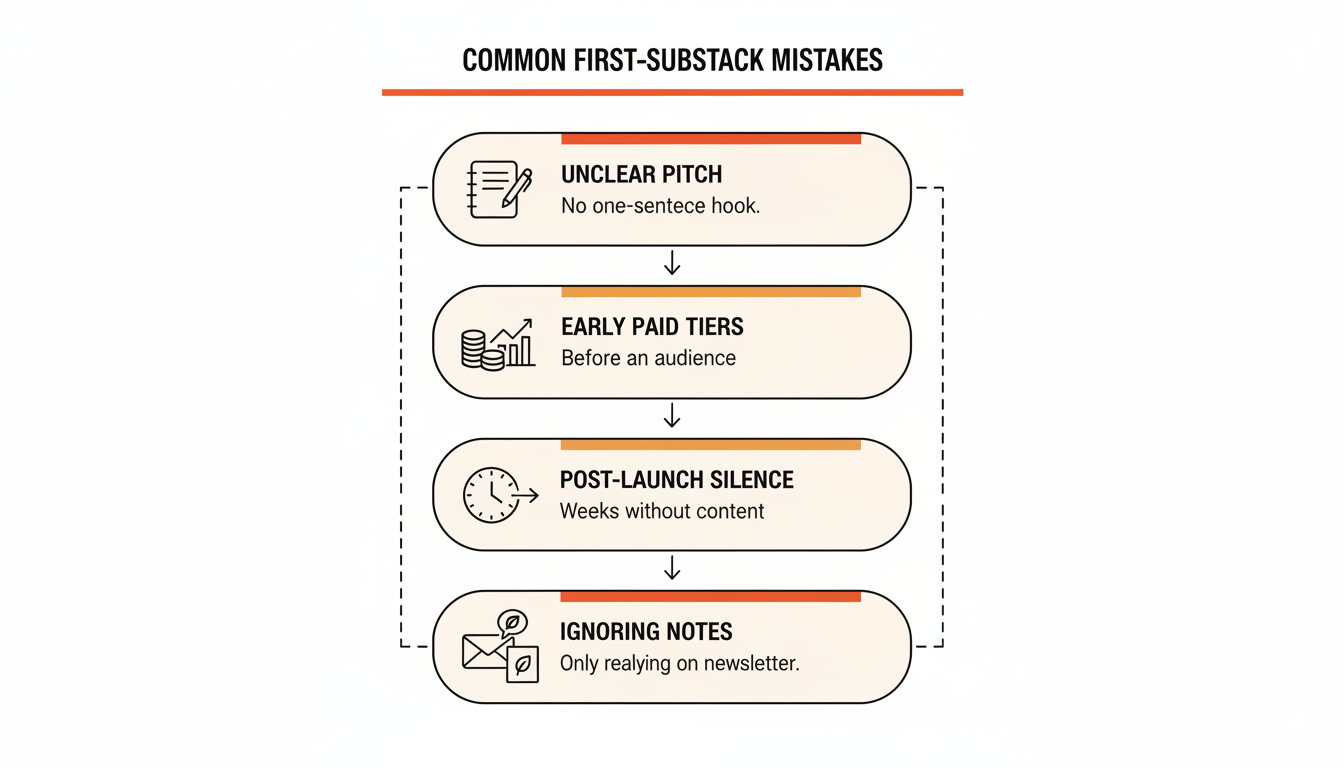
The pattern across all five is the same: they're decisions made once, early, that keep costing the writer for months afterward. A rushed name, a paywall turned on too soon, a launch week that isn't followed up. None of them are hard to fix in isolation. The fix is mostly deciding on them deliberately instead of defaulting into them while rushing to hit publish.
There's a sixth mistake that doesn't fit on a list, because it looks like discipline while it's happening: doing every part of this by hand for the first few months and treating the queue, the drafting help, and the benchmarks as something to add once the publication is established. Week three is where new publications go quiet, and week three arrives long before anything is established. The tooling matters most at zero subscribers, when you have no data of your own to learn from and no momentum to coast on.
Starting a Substack is genuinely simple mechanically. The account, the subdomain, the first post, all of that takes an afternoon. What separates the newsletters still publishing a year later from the ones that quietly stopped in month two is what happens next.
Once your first post is live, the next step is learning how to grow a Substack, from a clear promise to a weekly numbers review.
Six weeks in, the change isn't that you post more. It's that you stopped deciding. Sunday's sitting filled the queue, Tuesday's Note is already written and already gone by the time you sit down, and the dashboard tells you your restack rate is running above typical for a publication your size, so you know to keep going instead of guessing. WriteStack ships the live inspiration feed, AI drafting from your published posts, batch scheduling, link-click history, and cross-publication benchmarks together, and close to 100 verified reviews from Substack writers back that up. No other tool built for Substack writers has any we could find.
Start a free 7-day trial. Fill your first week of Notes in twenty minutes, and get past week three.